32
5 Buses and Routing
5.2 Aux Mixes
StudioLive™ Series III
Owner’s Manual
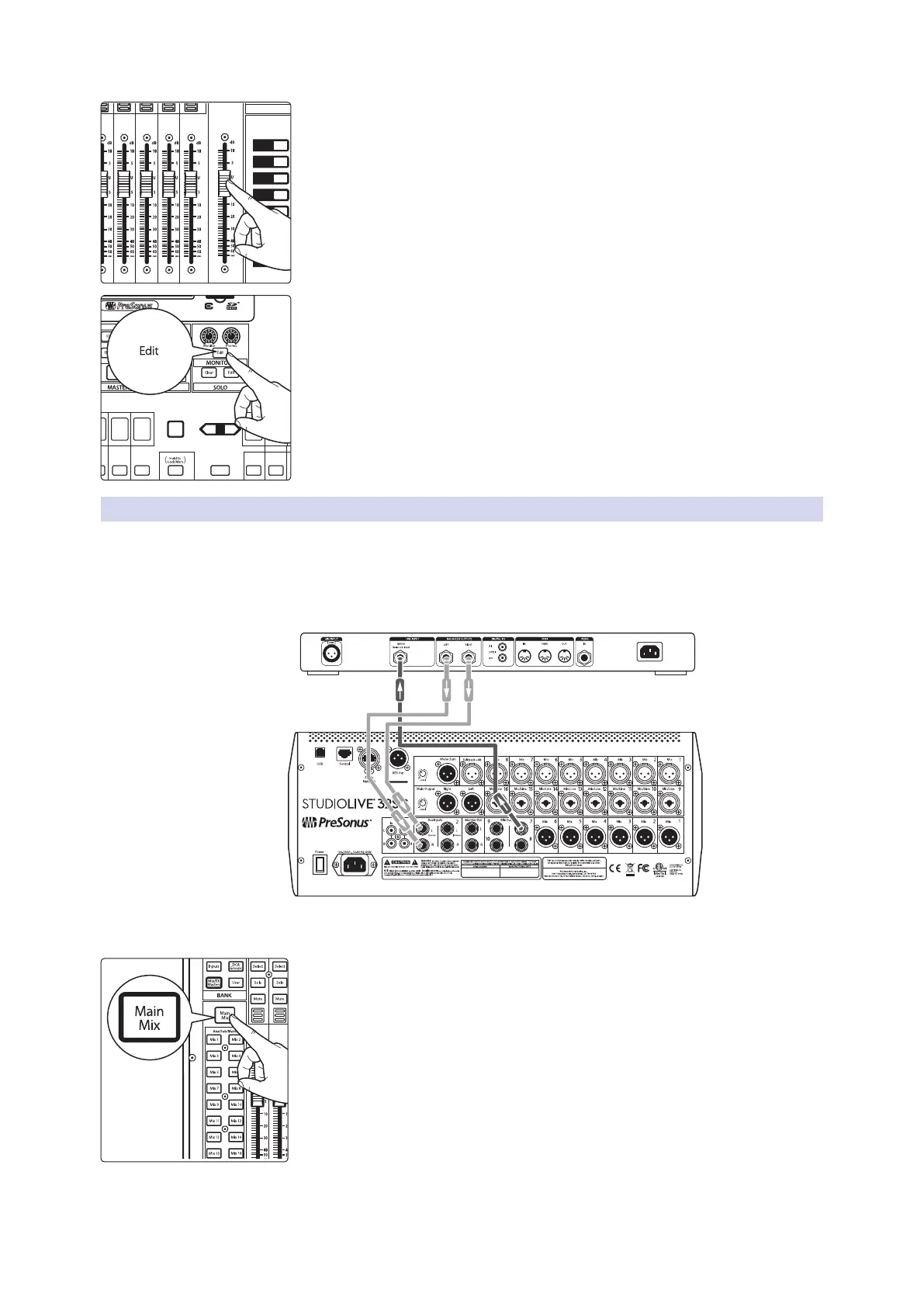
4. Move the Master fader to adjust the overall level of the monitor mix.
5. You can listen to the monitor mix you’re creating in your headphones or
control room monitors by pressing the Edit button in the Monitors control
section.
6. Select Monitor or Phones on the Touch Display, then touch the Aux mix
you’re working on at the moment (Mix 1, in this example).
5.2.3 Working with External Effects Processors
Creating a mix to send to an external effects processor is similar to creating an
internal FX mix, only in this case, we route the mix signal to a mix output (Mix Output
7, in this example), and route the effected signal from the processor back to a stereo
Aux input (Aux Input 1, in this example) on a StudioLive 32SC, for our example. If your
effects processor is mono, connect its output to the L (left) jack of the Aux Input.
1. Connect Mix Output 7 to the input of your external effects processor, and
connect the outputs of the processor to the Aux Input 1 jacks.
2. Press the Main Mix button.
Select
GEQ
AUX
Inputs
DCA
Groups
Mix/FX
Master
Talk
NextPrev
Solo
Select
Solo
Select
Solo
Select
Solo
Select
Solo
Select













 To Next Page