90
9 Master Control
9.6 Scenes and Projects
StudioLive™ Series III
Owner’s Manual
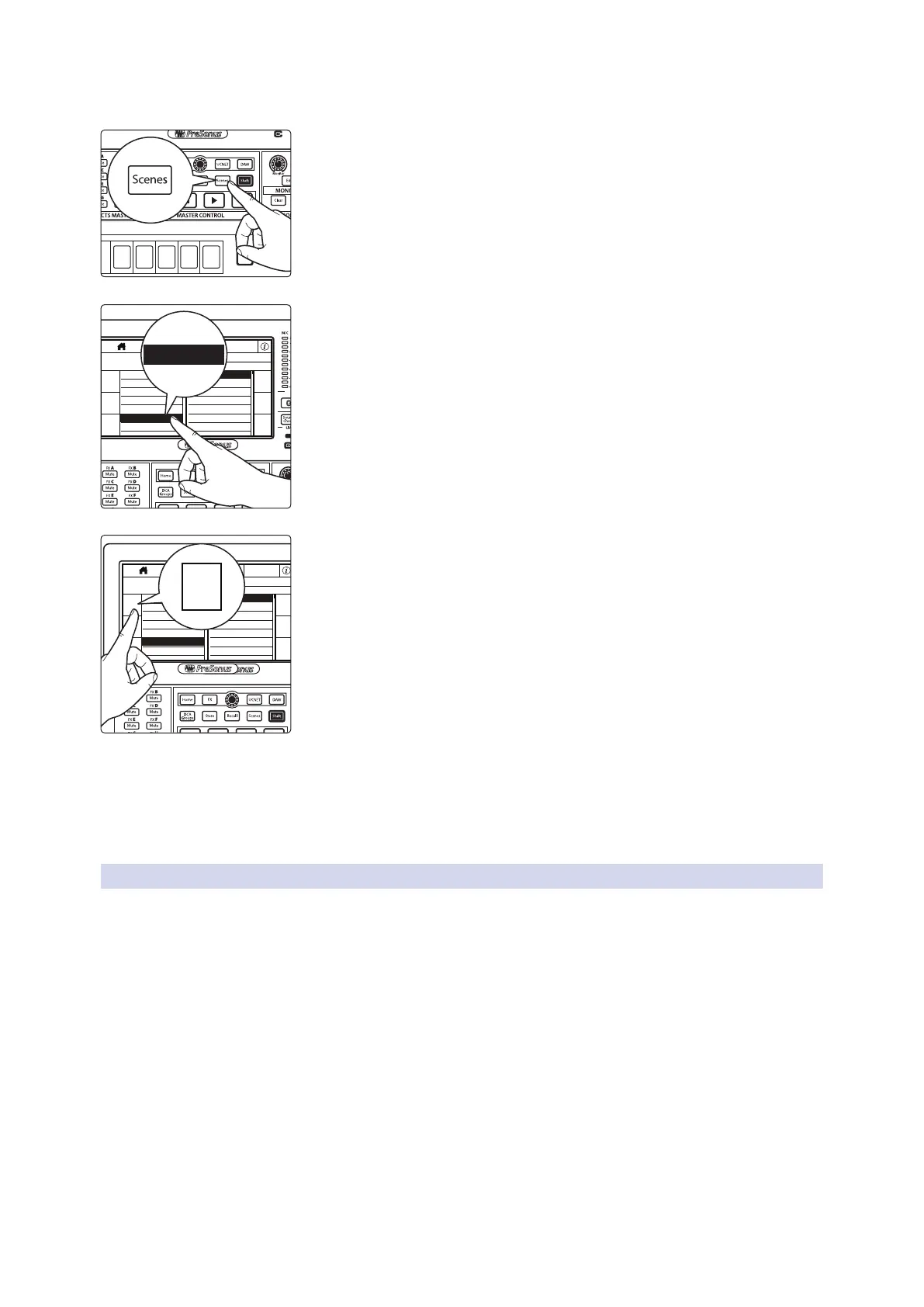
Saving a Project
1. To save a project, press the Scenes button.
2. Tap the desired location for your new Project. You can select an Empty
Location or a previously used location. Selecting a previously stored Project
will overwrite the stored settings with the current settings.
3. Press the left Store button on the Touch Display to bring up the onscreen
keyboard. Enter your Project name with the keyboard.
4. Press the Enter button to save your Project, or press the Cancel button on
the screen to cancel and return to the Projects Library screen.
5. Once saved, the Current Project field will alert you that your Project has
been successfully saved and then display your new Project name.
6. The Store and Recall buttons will begin to flash. Use these buttons to create
a new Scene with your current mix parameters, or to recall a stored Scene
(if applicable). For more information on saving and recalling Scenes, see
Section 9.6.2.
Loading a Project:
1. Tap name of the desired Project.
2. Press the left Recall button on the Touch Display.
3. Once loaded, the Current Project field will display the Project name.
9.6.2 Creating and Recalling Scenes
Creating a scene requires simply dialing in a mix that you would like to use at a later
date and saving it. This has obvious benefits for both studio and live sound. For
example, in the studio, saving and recalling a scene allows you to move to another
song and come back to the current mix later. For live shows with multiple bands, you
can set up custom mixes for each band at soundcheck and recall the mix when that
band goes onstage.
Scenes with the same Global routing and settings should be stored within the same
Project. This greatly decreases load time when switching between Scenes.
Select
GEQ
Mute
AUX
Inputs
DCA
Groups
Mix/FX
Master
Talk
Prev
Solo
Mute
Select
Solo
Mute
Select
Solo
Mute
Select
Solo
Mute
Select
Solo
Mute
Select
Guitars
Rhythm Section
Backing Vocals
Drums
Traditional DCAAuto Groups Edit
DCA 6
DCA 8
DCA 10
DCA 12
DCA 5
DCA 7
DCA 9
DCA 11
Groups
Main
Volume -84.00 dB
M1
Scene Safe
SCENES
List EditorFilters
PROJECTS
QT and the Beasts
Dark Harm
Derek Sharp (solo)
Stanley Gerard Tribute
Clementine Toledano
Voodoo Boogaloo
Bourdello
Q and Fi
Laffitte’s Cove
Ida’s Place
Current Project: Laffitte’s Cove Current Scene: Clementine Toledano
The Orpheum (Rehearsal)
Saenger
Archangel Tour
*Empty Location*
*Empty Location*
Store
Recall
Reset
Store
Recall
Reset
*Empty Location*
*Empty Location*
Scene Safe
SCENES
List EditorFilters
PROJECTS
QT and the Beasts
Dark Harm
Derek Sharp (solo)
Stanley Gerard Tribute
Clementine Toledano
Voodoo Boogaloo
Bourdello
Q and Fi
Laffitte’s Cove
Ida’s Place
Current Project: Laffitte’s Cove Current Scene: Clementine Toledano
The Orpheum (Rehearsal)
Saenger
Archangel Tour
*Empty Location*
*Empty Location*
Store
Recall
Reset
Store
Recall
Reset
*Empty Location*
Store













 To Next Page