36
5 Buses and Routing
5.3 Subgroups
StudioLive™ Series III
Owner’s Manual
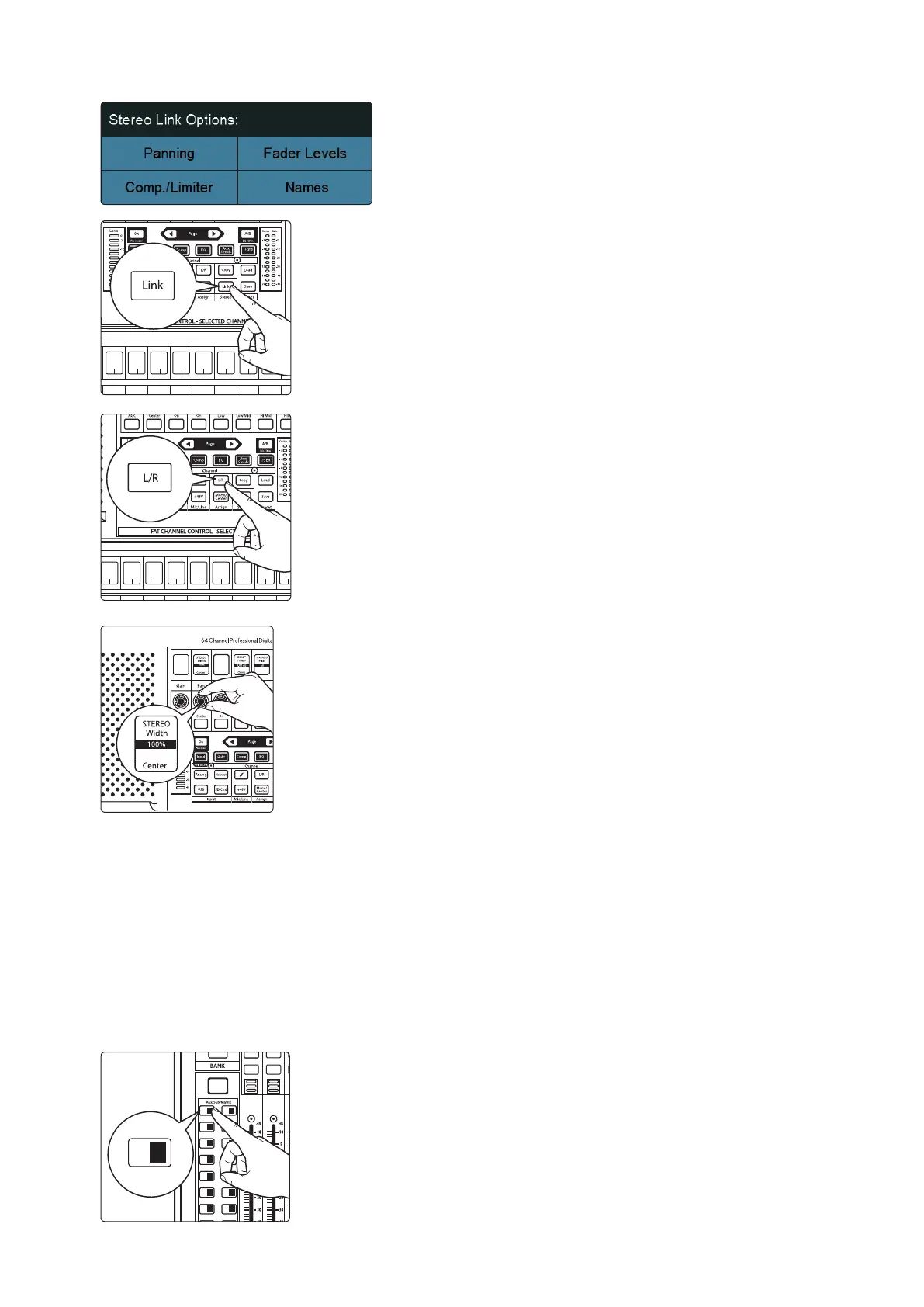
4. Enable all four Stereo Link Options.
5. In the Fat Channel, press the Stereo Link button.
6. Assign the Subgroup to the Main bus by pressing the L/R (StudioLive 64S)
or Main assign button in the Fat Channel.
7. Turn the Pan knob all the way clockwise to set the stereo pan to hard left
and right. Now Subgroups 1 and 2 are linked, with Sub 1 panned hard left
and Sub 2 panned hard right. The channel panning is preserved.
Now that we’ve created a stereo subgroup, let’s make an instrument group:
1. Press and hold the FlexMix button and then press the Select button for each
of the drum channels to assign them to the subgroup.
2. The first step is to get a good mix of the instruments you are grouping—in
this case, the drums. Beginning with Channel 1 (Kick), raise the fader and,
with the drummer’s assistance, set the input trim, EQ, and dynamics for each
drum separately.
3. As you select each channel and dial in its Fat Channel settings, unassign it
from the Main bus so that it is only assigned to the Subgroup. When you are
done with each channel, lower the fader before moving on.
4. After you have gone through the entire kit and are satisfied with each
channel’s EQ and dynamics, have the drummer play the entire kit, and select
the Mix 1 in the Mix Select area and set the relative volume and panning for
each mic in the mix.
Solo
Select
Solo
Select
Solo
Select
Solo
Select
Solo
Select
Solo
Select
Solo
Select
Solo
Select
Solo
Select
10
Ch. 10
11
Ch. 11
12
Ch. 12
13
Ch. 13
14
Ch. 14
15
Ch. 15
13
Ch. 13
Select Select Select Select Select Select Select Select Select
9
Ch. 9
10
Ch. 10
11
Ch. 11
12
Ch. 12
13
Ch. 13
14
Ch. 14
15
Ch. 15
16
Ch. 13
17
Ch. 13
User
Main
Mix
Solo
Mute
Solo
Mute
11 27
13 29
15 31
12 28
14 30
16 32
A E
C G
B F
D H
1 17 18
19 20
21 22
3
5
2
4
6
23 247 8
25 269 10
1 17













 To Next Page