The heating modesPage EN-20
Overview and indicators
Heating mode Application
Microwave Defrost, warm, cook (see page EN-21).
Convection Baking
Grill with fan Grilling
Grill Grill in 3 levels for meat, sausages, fish and bread.
+
Microwave plus
convection
Quick cooking of dishes (see page EN-24).
+
Microwave plus grill
with fan
For crispy poultry, rolled roasts, etc. (see page EN-24).
+
Microwave plus grill Quick cooking of dishes with a brown crust (see
page EN-24).
Defrosting Defrosting of frozen food at two levels (see
page EN-26).
Automatic
programmes
Ten automatic programmes that calculate cooking
time and heat by weight (see page EN-27).
Select the heating mode
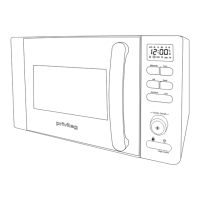
(12) (14) (16)
• Set the desired heating mode using the fun-
ction selector (12).
For microwave-only mode: Press the
“Microwave” sensor button (14).
The selected heating mode will be shown
in the display (16) as an indicator (see table
above).
For heating modes where the temperature
or grill level can be set, the indicator also
lights up in the display (16).
Further settings are possible with each hea-
ting mode, which are explained in the follo-
wing sections.
WARNING
Risk of burns!
The appliance and its accessible parts
become hot during use.
■ Make sure that, when opening the
cooking chamber door, you do not
come into contact with the hot steam
rising out of the cooking chamber.
■ Always hold the door handle to open
the cooking chamber door.
The heating modes


 To Next Page
 Loading...