17
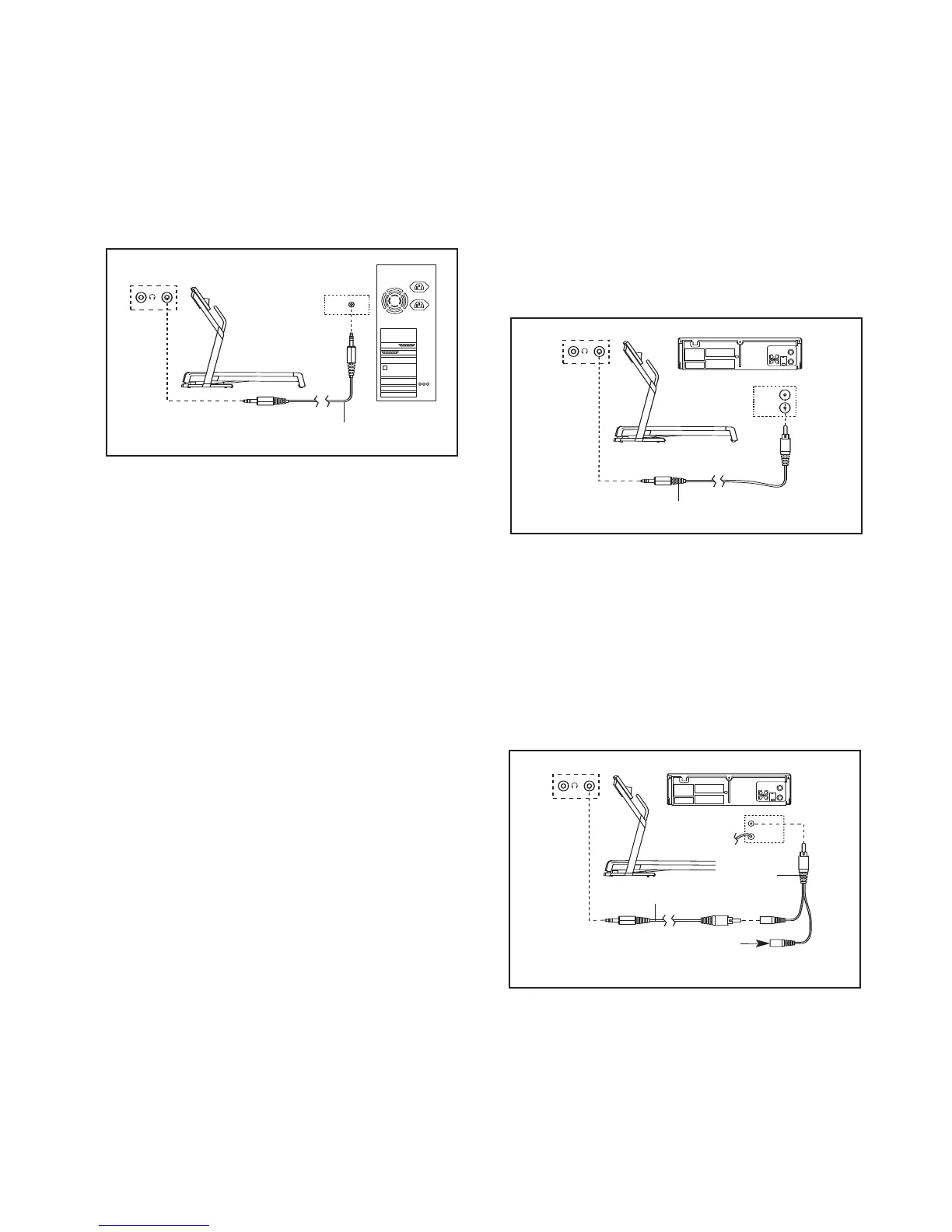
HOW TO CONNECT YOUR COMPUTER
A
. Plug one end of a long 3.5mm to 3.5mm stereo
audio cable (available at electronics stores) into the
i
nput jack on the console. Plug the other end of the
cable into the LINE OUT jack on your computer.
Note: While the cable is plugged into the LINE OUT
jack, do not plug your headphones into the head-
phone jack on the console.
HOW TO CONNECT YOUR VCR
N
ote: If your VCR has an unused AUDIO OUT jack,
see instruction A below. If the AUDIO OUT jack is
b
eing used, see instruction B. If you have a TV
with a built-in VCR, see instruction B. If your VCR
is connected to your home stereo, see HOW TO
CONNECT YOUR HOME STEREO on page 16.
A. Plug one end of a long 3.5mm to RCA stereo audio
cable (available at electronics stores) into the input
jack on the console. Plug the other end of the cable
into the AUDIO OUT jack on your VCR.
B. Plug one end of a long 3.5mm to RCA stereo audio
cable (available at electronics stores) into the input
jack on the console. Plug the other end of the cable
into an RCA Y-Adaptor (available at electronics
stores). Next, remove the wire that is currently
plugged into the AUDIO OUT jack on your VCR and
plug the wire into the unused side of the Y-Adaptor.
Plug the Y-Adaptor into the AUDIO OUT jack on
your VCR.
Audio Cable
A
B
VIDEO AUDIO
A
NT. IN
RF OUT
IN
OUT
CH
34
A
AUDIO OUT
RIGHT
LEFT
VIDEO AUDIO
ANT. IN
R
F OUT
IN
OUT
CH
34
Audio Cable
A
B
VIDEO AUDIO
ANT. IN
RF OUT
IN
OUT
CH
34
A
AUDIO OUT
RIGHT
LEFT
VIDEO AUDIO
ANT. IN
RF OUT
IN
OUT
CH
34
B
Wire removed from
AUDIO OUT jack
RCA
Y-Adaptor
Audio Cable








 To Next Page