15
Note: If you stop pedaling for a few seconds, the
program will end. To use the program again, rese-
lect it and start it at the beginning.
Follow your progress with the large display
.
See step 4 on page 11.
Turn on the fan if desired.
See step 6 on page 12.
When you are finished exercising, the console
will automatically turn off.
See step 7 on page 12.
T
o use iFIT.com CDs
, the elliptical exerciser must be
connected to your portable CD player, portable stereo,
home stereo, or computer with CD player
. See pages
16 to 18 for connecting instructions.
To use iFIT.com
videocassettes, the elliptical exerciser must be con-
nected to your VCR. See page 18 for connecting
instructions.
To use iFIT.com programs directly from
our Web site, the elliptical exerciser must be connect-
ed to your home computer. See page 18 for connect-
ing instructions.
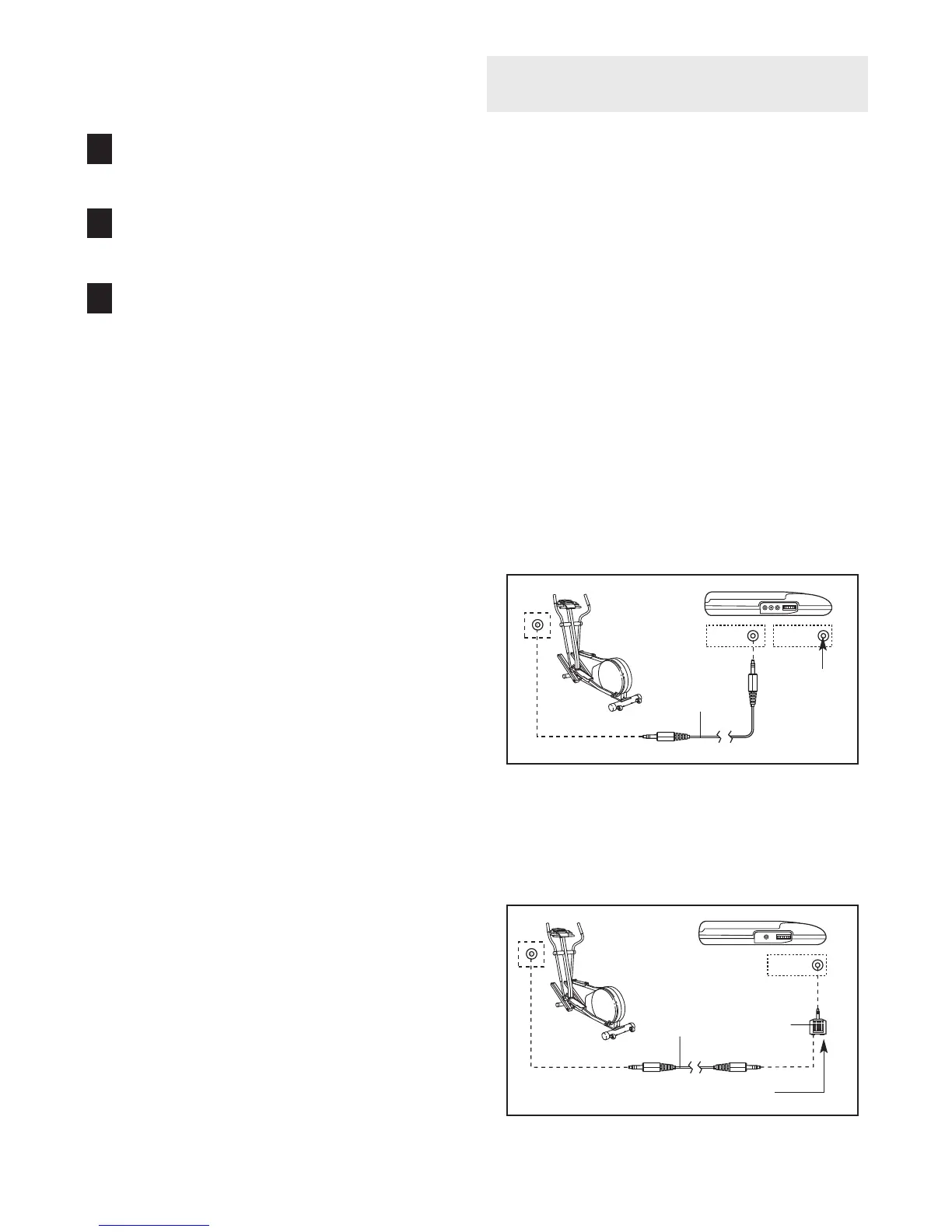
HOW TO CONNECT YOUR PORTABLE CD PLAYER
Note: If your CD player has separate LINE OUT and
PHONES jacks, see instruction A below. If your CD
player has only one jack, see instruction B.
A. Plug one end of the audio cable into the jack
beneath the console. Plug the other end of the
audio cable into the LINE OUT jack on your CD
player. Plug your headphones into the PHONES
jack.
B. Plug one end of the audio cable into the jack
beneath the console. Plug the other end of the
audio cable into the splitter. Plug the splitter into
the PHONES jack on your CD player. Plug your
headphones into the other side of the splitter.
8
7
6
LINE OUT
PHONES
LINE OUT
PHONES
Audio
Cable
Head-
phones
A
Audio
Cable
Splitter
Headphones
B
HOW T
O CONNECT YOUR CD PLAYER, VCR,
OR COMPUTER





 To Next Page