www.usaprocom.com
19200233-01B
INSPECTING HEATER
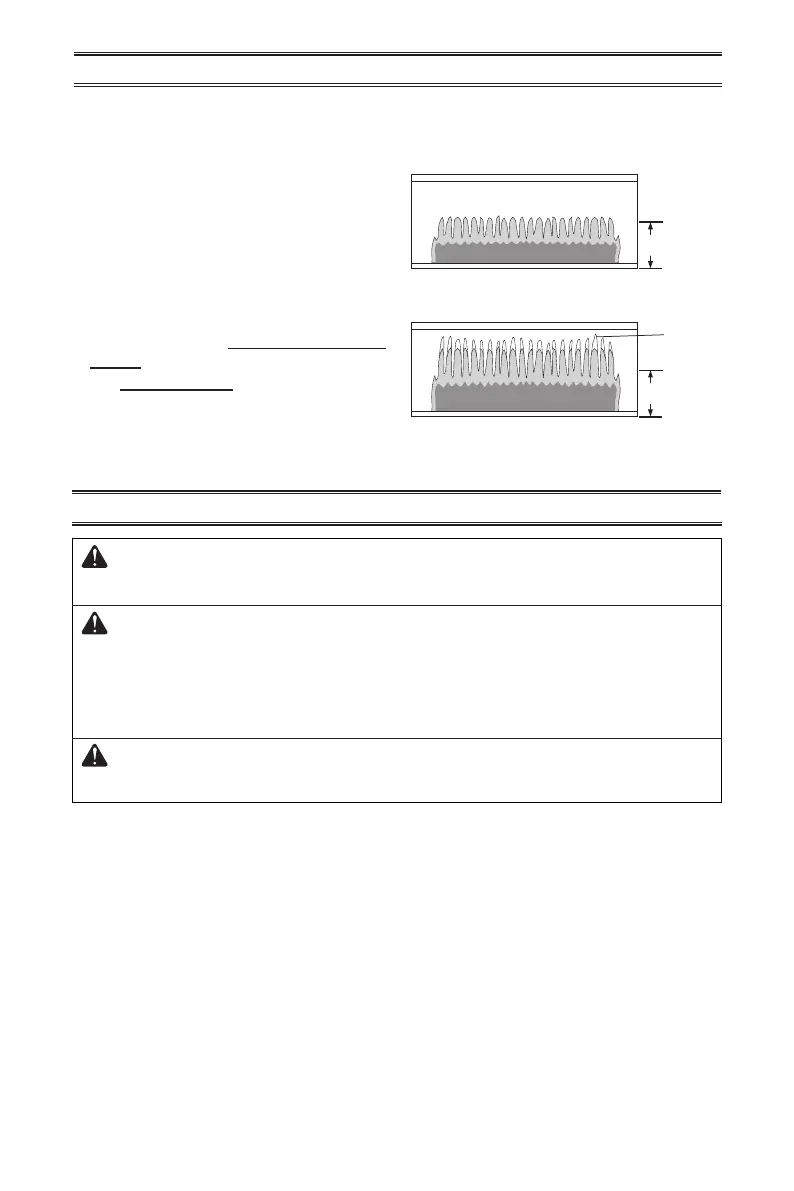
Height
Height
Yellow
Tipping
Figure 24 - Correct Burner Flame Pattern
Figure 25 - Incorrect Burner Flame
Pattern
Notice: Do not mistake orange ames with yellow tipping. Dirt or other ne particles enter the
heater and burn causing brief patches of orange ame.
BURNER FLAME PATTERN
Figure 24 shows a correct burner ame pat-
tern. Figure 25 shows an incorrect burner
ame pattern. The incorrect burner ame
pattern shows yellow tipping of the ame. It
also shows the ame higher than 1/2 the heat
shield height.
If burner ame pattern is incorrect, as shown
in Figure 25
• turn heater off (see To Turn Off Gas to Ap-
pliance, page 17 or 18)
• see Troubleshooting pages 20 through 24.
CARE AND MAINTENANCE
WARNING: Turn off heater and let cool before servicing. Only a
qualied service person should service and repair heater.
CAUTION: You must keep control areas, burner, and circulating
air passageways of heater clean. Inspect these areas of heater before
each use. Have heater inspected yearly by a qualied service techni-
cian. Heater may need more frequent cleaning due to excessive lint
from carpeting, bedding material, pet hair, etc.
CAUTION: Never use a wire, needle, or similar object to clean
ODS/pilot. This can damage ODS/pilot unit.
ODS/PILOT AND BURNER
Use a vacuum cleaner, pressurized air, or a small, soft bristled brush to clean.


 To Next Page