www.usaprocom.com
9200233-01B
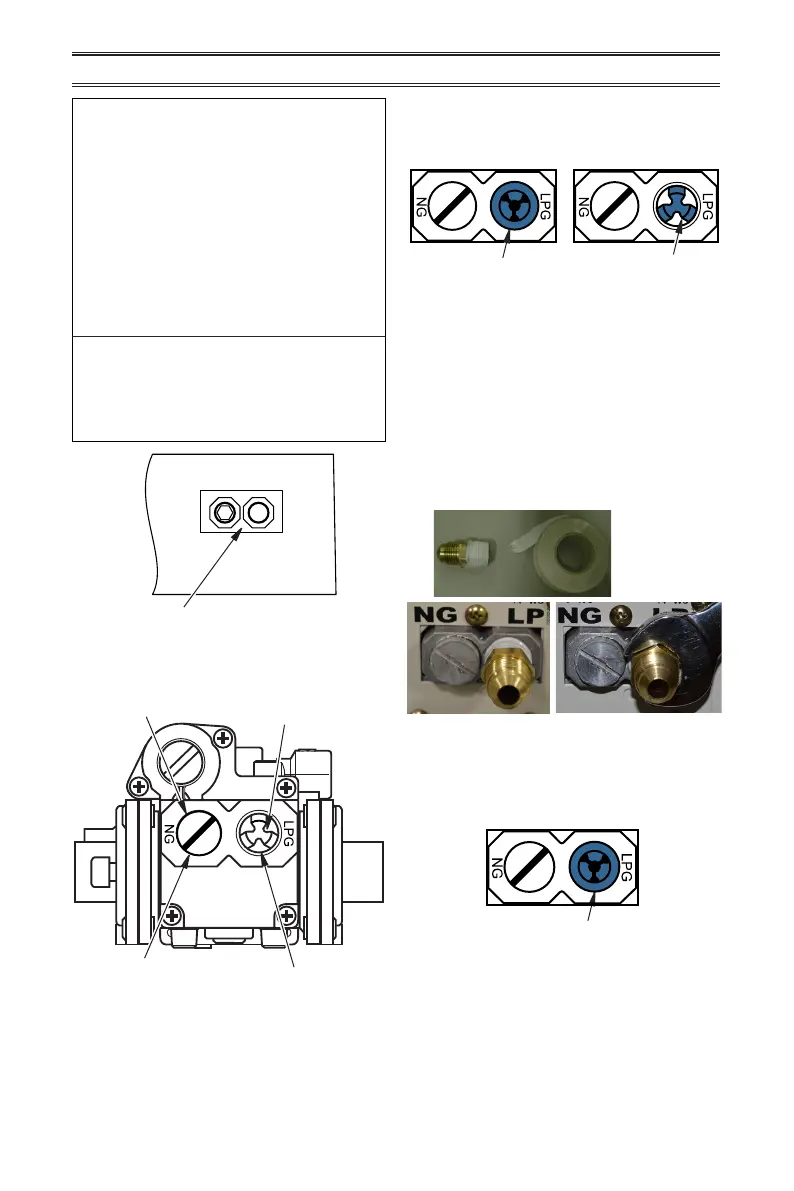
You will notice a color coded
plunger on the inside of the regu-
lator. This is normal. When the in-
let connection tting is inserted
and tightened, this plunger will
be pushed back by the tting
making all of the adjustments
for the gas being supplied. DO
NOT REMOVE THE PLUNGER.
The regulator will not work.
The inlet regulator is color coded
for identication of the correct
gas type. Blue is for propane (LP
gas) and yellow is for natural gas.
INSTALLATION
Figure 4 - Back of Heater
Yellow Natural Gas
Plunger Underneath
Metal Cap
Blue Propane/LP Gas
Plunger Underneath
Dust Cover
Figure 5 - Gas Regulator
Insert Gas Fitting
for Natural Gas
Insert Gas Fitting
for Propane/LP Gas
Blue Dust Cover
DO NOT REMOVE
Blue Propane/LP
Plunger
Install Gas Fitting Here
FOR PROPANE/LP GAS
INSTALLATION: BLUE
1. Remove blue dust cover.
NG
LPG
INLET GAS PRESSURE
MAX 1/2 PSIG (3.5 KPA)
Gas Connection
2. Apply thread sealant to the threads on a
3/8" NPT brass connection tting. While
pushing in, rotate the tting clockwise until
the threads engage the regulator. After
the tting has been hand tightened into
the regulator use a wrench to complete
tightening of the tting. Install additional
tting to connect to the house supply.
Fitting
supplied
by installer,
may vary.
Blue Dust Cover
FOR NATURAL GAS (NG)
INSTALLATION: YELLOW
1. Remove the blue dust cover from the
regulator.


 To Next Page