Configuring RADIUS Server Support for Switch Services
Configuring and Using RADIUS-Assigned Access Control Lists
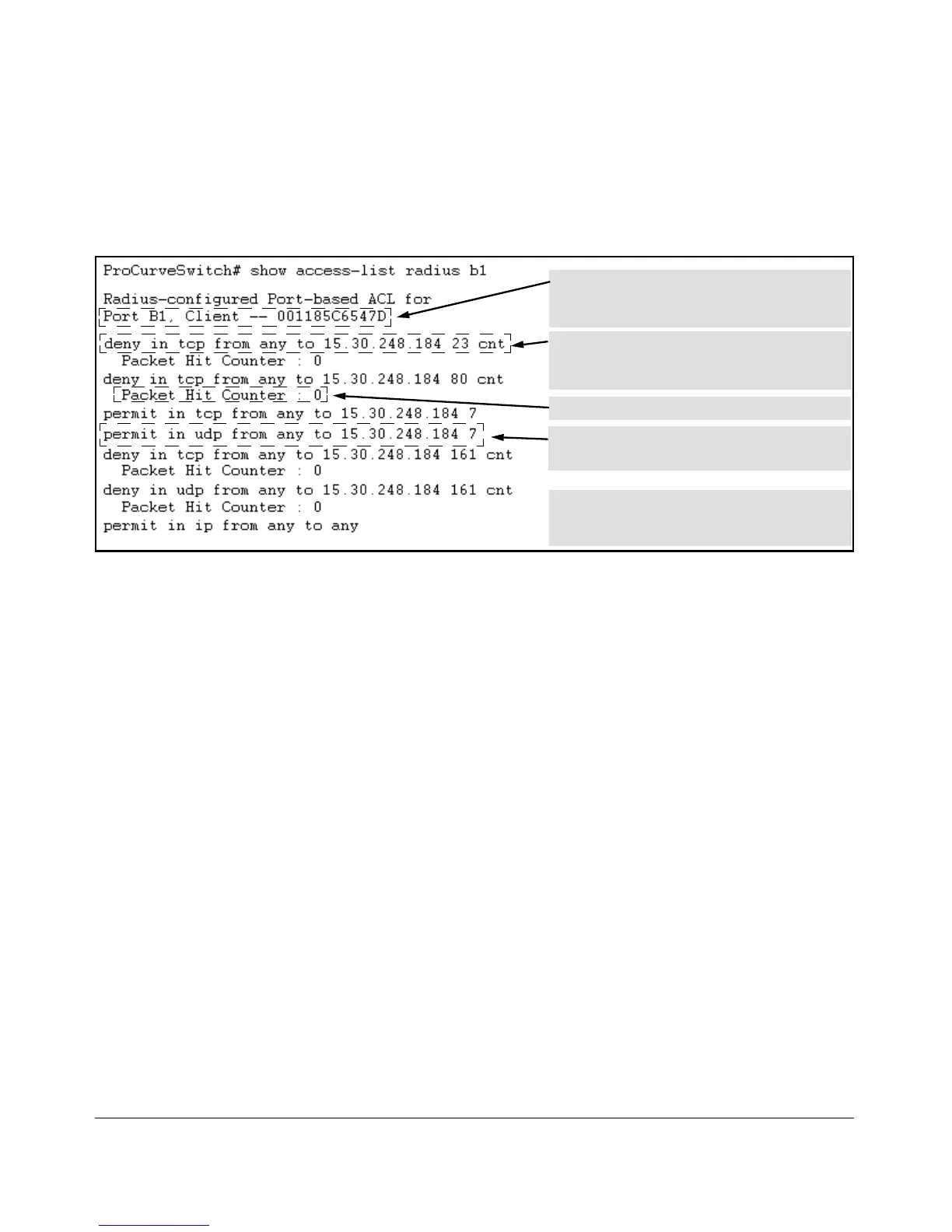
For example, the following output shows that a RADIUS server has assigned
an ACL to port B1 to filter inbound traffic from an authenticated client
identified by a MAC address of 00-11-85-C6-54-7D.
Indicates MAC address identity of the authenticated
client on the specified port. This data identifies the
client to which the ACL applies.
Lists “deny” ACE for Inbound Telnet (23 = TCP port
number) traffic, with counter configured to show the
number of matches detected.
Lists current counter for the preceding “Deny” ACE.
Lists “permit” ACEs for inbound TCP and UDP traffic,
with no counters configured.
Note that the implicit “deny any/any” included
automatically at the end of every ACL is not visible in
ACL listings generate by the switch.
Figure 6-6. Example Showing a Dynamic Port ACL Application to a Currently Active Client Session
Syntax: show port-access authenticator < port-list >
For ports, in < port-list > that are configured for authentication, this command indicates
whether there are any RADIUS-assigned features active on the port(s). (Any ports in
< port-list > that are not configured for authentication do not appear in this listing.)
Port: Port number of port configured for authentication.
Status: Port connection status:
Open = active connection with an external device
Closed = no active connection with an external device
Current VLAN ID: VLAN ID (VID) of the VLAN currently supporting the active connection.
Current Port CoS: Indicates the status of the current 802.1p priority setting for inbound traffic.
No-override: Indicates that no RADIUS-assigned 802.1p priority is currently active on
the indicated port. (For more on traffic prioritization for the switches covered in this
guide, refer to the chapter titled “Quality of Service (QoS): Managing Bandwidth More
Effectively”, in this guide.)
0 - 7: Indicates that the displayed 802.1p priority has been assigned by a RADIUS server
to inbound traffic on the indicated port for a currently active, authenticated client
session. This assignment remains active until the session ends.
RADIUS ACL Applied?: Indicates whether a dynamic port ACL is currently active on the port.
6-22



 To Next Page