Traffic/Security Filters
Overview
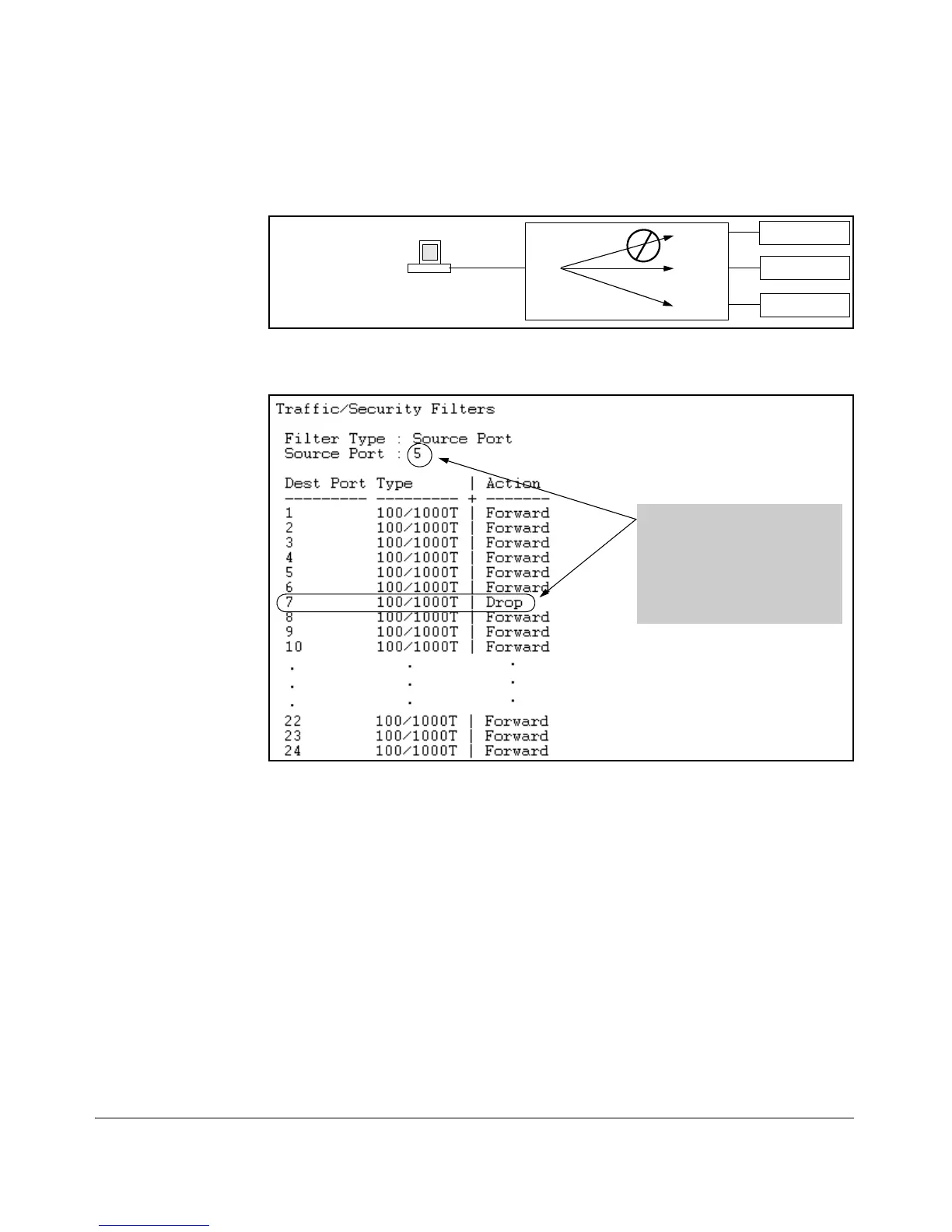
port 5 to port 7, but would forward all other traffic from any source port to
any destination port (refer to figures 10-1 and 10-2).
Server "A"
Port 7
Port 8
Server "B"
Port 9
Server "C"
Port 5
Workstation " X"
Figure 10-1. Example of a Filter Blocking Traffic only from Port 5 to Server "A"
This list shows the filter created
to block (drop) traffic from
source port 5 (workstation "X") to
destination port 7 (server "A").
Notice that the filter allows
traffic to move from source port
5 to all other destination ports.
Figure 10-2. The Filter for the Actions Shown in Figure 10-1
Applying a Source Port Filter in a Multinetted VLAN
If you have multiple IP addresses configured on the same VLAN (multinetting),
and routing is enabled on the switch, then a single port or trunk can be both
the source and destination of packets moving between subnets in that same
VLAN. In this case, you can prevent the traffic of one subnet from being routed
to another subnet on the same port by configuring the port or trunk as both
the source and destination for traffic to drop.
10-3



 To Next Page