Access Control Lists (ACLs)
Displaying ACL Data
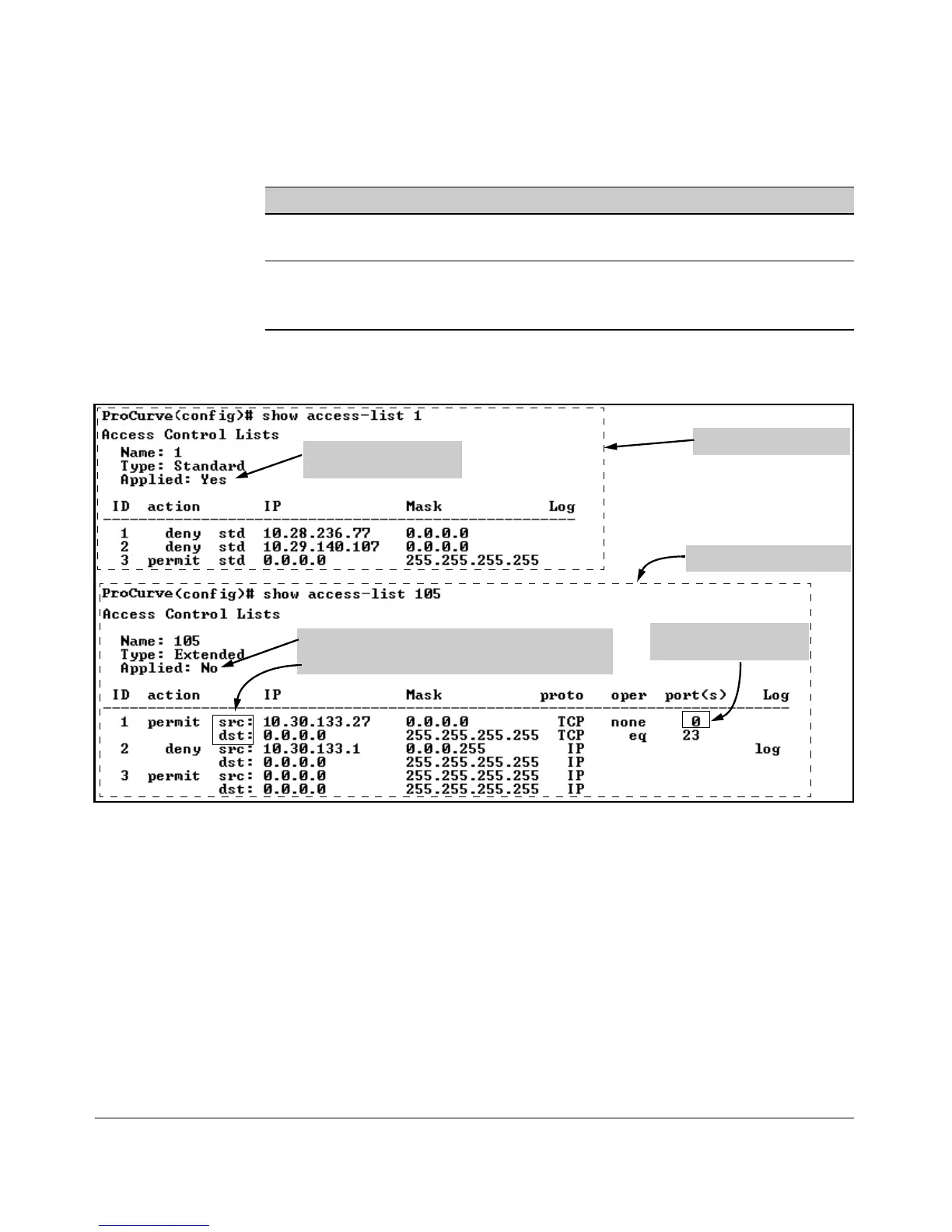
For example, suppose you configured the following two ACLs in the switch:
ACL ID ACL Type Desired Action
1 Standard • Deny IP traffic from 18.28.236.77 and 18.29.140.107.
• Permit IP traffic from all other sources.
105 Extended • Permit any TCP traffic from 18.30.133.27 to any destination.
• Deny any other IP traffic from 18.30.133.(1-255).
• Permit all other IP traffic from any source to any destination.
Inspect the ACLs as follows:
Listing for a Standard ACL
Listing for an Extended ACL
Indicates whether the ACL
is assigned to an interface.
Indicates whether the ACL is assigned to an interface.
Indicates source and destination entries in the ACL.
Indicates that the source
TCP port can be any value.
Figure 9-22. Examples of Listings Showing the Content of Standard and Extended ACLs
9-58



 To Next Page