Prodys S.L. Tel: +34 91 6896880 Fax: +34 91 6943777 Email: sales@prodys.net Web: www.prodys.com
Page 45
IV.2.1.10. Streaming RX parameters
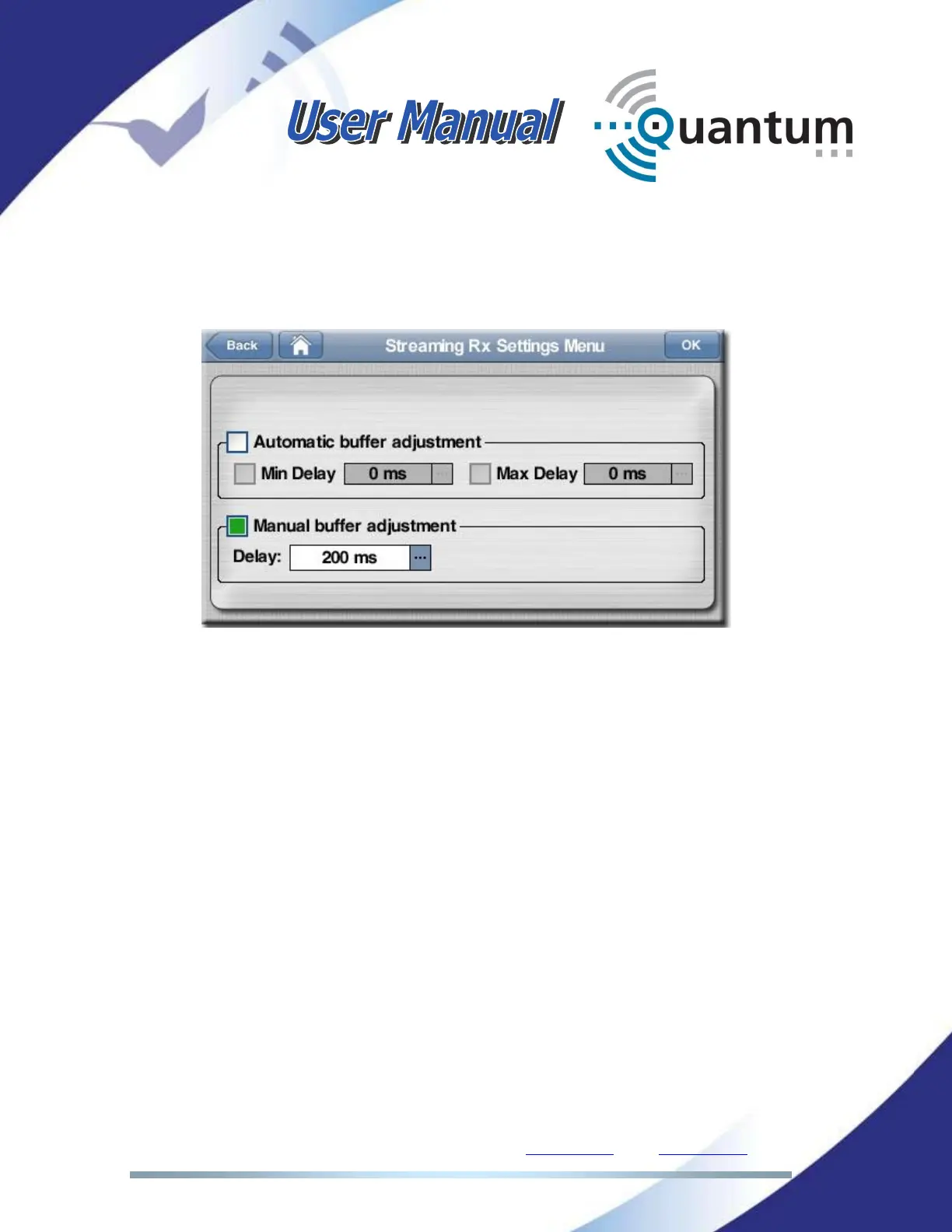
This menu configures the jitter buffer. This configuration affects the overall
communication delay. Independent configuration variables are available for
PROGRAM and TALKBACK channel.
The buffer size can be set manually or the automatic adjustment algorithm can
be chosen.
With automatic adjustment the jitter buffer adapt itself automatically to the jitter
of the network. The automatic jitter buffer is able not only to enlarge, but it is
also capable to shorten (decimation of samples) in order to recover the initial
delay when the jitter of the network decreases and the connection gets back to a
more stable and consistent status.
The user has the possibility to set the range of delay where the jitter buffer will
stay in. If a maximum delay is set, the buffer will never grow above that value. If
the minimum delay is set, the buffer will never be shorter than that value, and
that value will be the initial configuration.
The maximum buffer size is 20 seconds. The user has to take into consideration
that this size includes the encoding/decoding delay. This means that this would
be the total delay for the communication if the network adds no delay.
These parameters can be changed during the audio connection.



 To Next Page