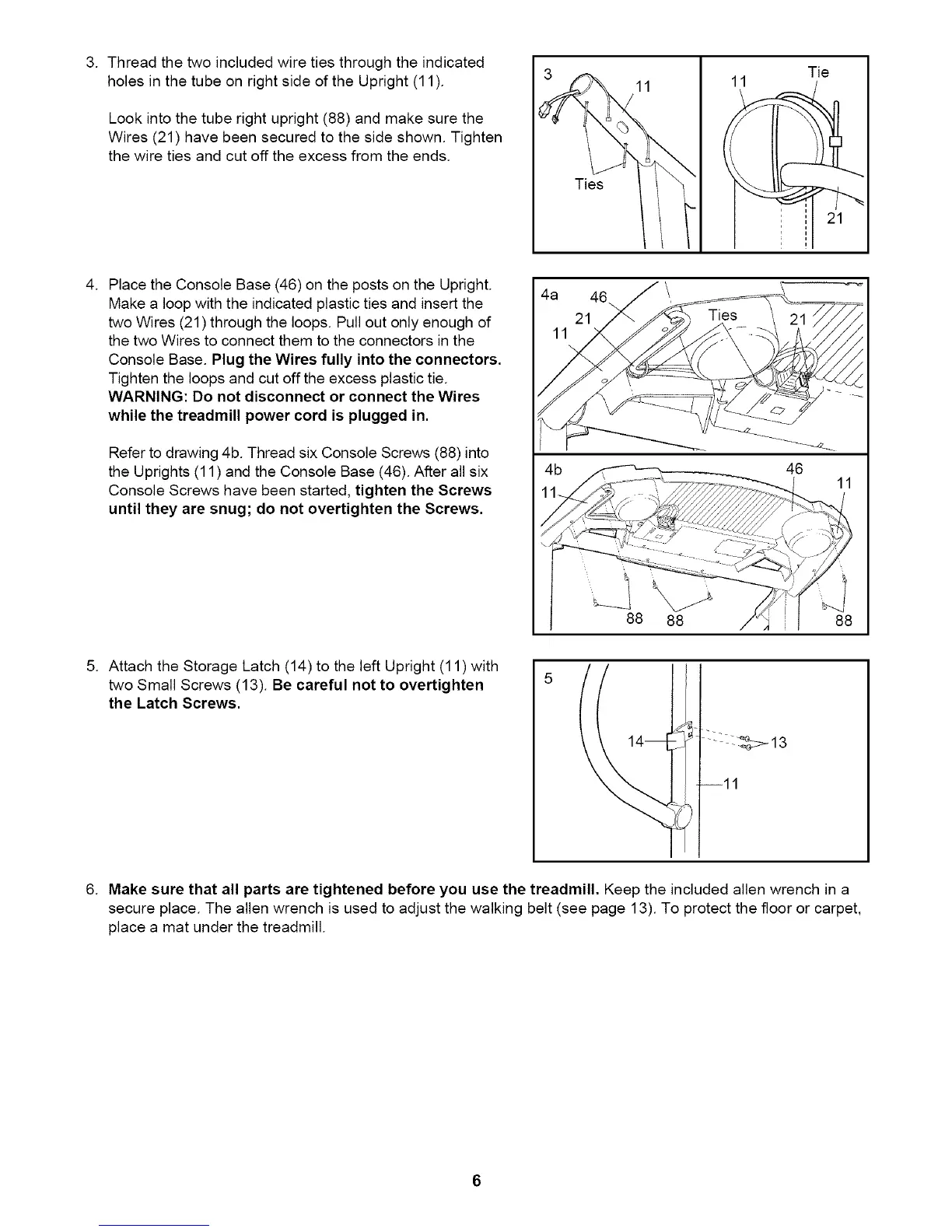
3. Threadthetwoincludedwiretiesthroughtheindicated
holesinthetubeonrightsideoftheUpright(11).
Lookintothetuberightupright(88)andmakesurethe
Wires(21)havebeensecuredtothesideshown.Tighten
thewiretiesandcutofftheexcessfromtheends.
Ties
11
Tie
4. PlacetheConsoleBase(46)onthepostsontheUpright.
Makealoopwiththeindicatedplastictiesandinsertthe
twoWires(21)throughtheloops.Pulloutonlyenoughof
thetwoWirestoconnectthemtotheconnectorsinthe
ConsoleBase.PlugtheWiresfullyintotheconnectors.
Tightentheloopsandcutofftheexcessplastictie.
WARNING:Donotdisconnector connecttheWires
whilethetreadmillpowercordis pluggedin.
Refertodrawing4b.ThreadsixConsoleScrews(88)into
theUprights(11)andtheConsoleBase(46).Afterallsix
ConsoleScrewshavebeenstarted,tightentheScrews
untiltheyaresnug;donotovertightentheScrews.
4a 46
21
88
46
11
88 88
5. AttachtheStorageLatch(14)totheleftUpright(11)with
twoSmallScrews(13).Becarefulnotto overtighten
the LatchScrews.
...._13
--11
6. Make sure that all parts are tightened before you use the treadmill. Keep the included allen wrench in a
secure place. The allen wrench is used to adjust the walking belt (see page 13). To protect the floor or carpet,
place a mat under the treadmill.





 To Next Page