EKG
GRiP PULSE
I
TIME
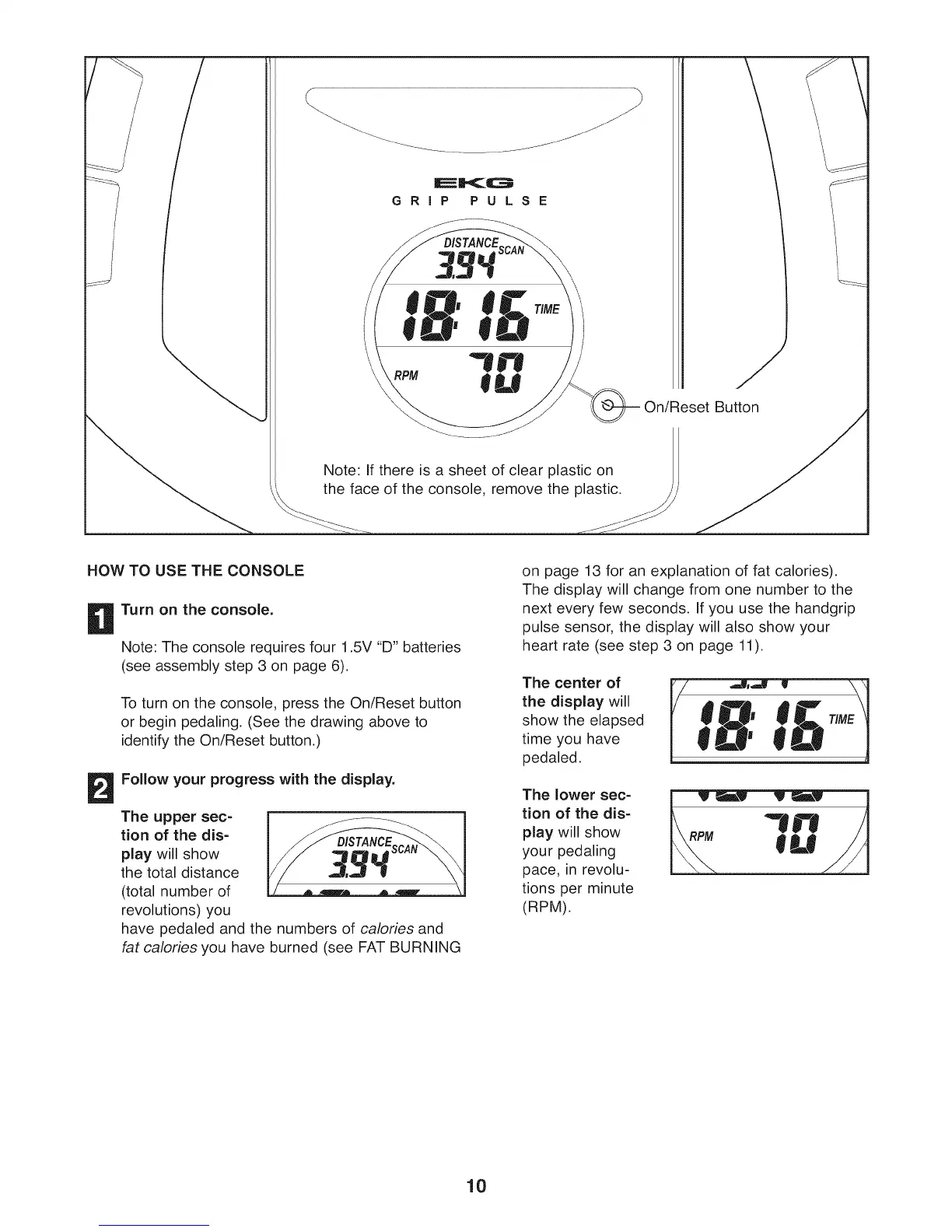
Note: If there is a sheet of clear plastic on
the face of the console, remove the plastic.
/
Button
HOW TO USE THE CONSOLE
D
Turn on the console.
Note: The console requires four 1.5V "D" batteries
(see assembly step 3 on page 6).
To turn on the console, press the On/Reset button
or begin pedaling. (See the drawing above to
identify the On/Reset button.)
Follow your progress with the display.
The upper sec-
tion of the dis-
play will show
the total distance
(total number of
revolutions) you
have pedaled and the numbers of calories and
fat calories you have burned (see FAT BURNING
on page 13 for an explanation of fat calories).
The display will change from one number to the
next every few seconds. If you use the handgrip
pulse sensor, the display will also show your
heart rate (see step 3 on page 11).
The center of
the display will
show the elapsed
time you have
pedaled.
The lower sec-
tion of the dis-
play will show
your pedaling
pace, in revolu-
tions per minute
(RPM).
RPM
10



 To Next Page