7
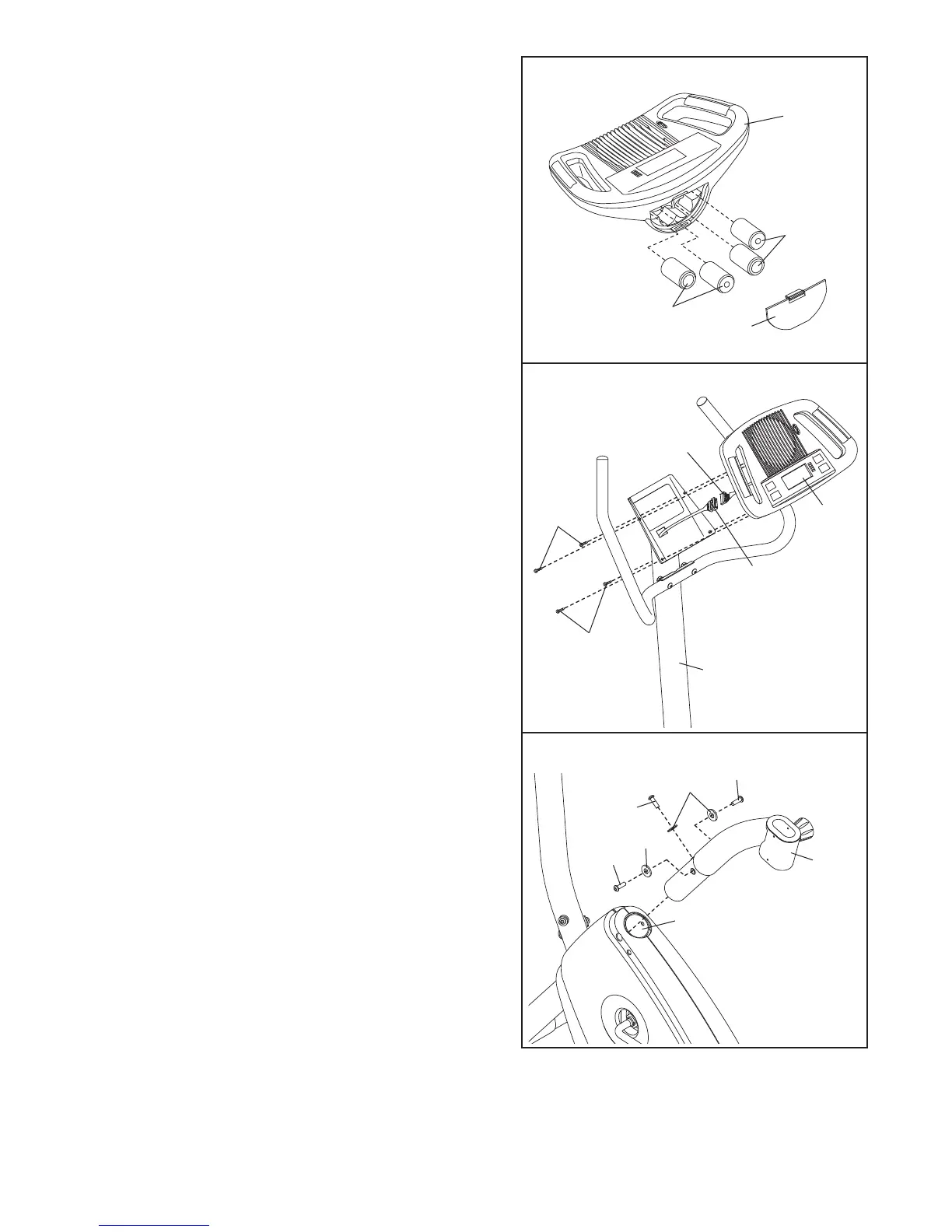
6. Hold the Console (16) near the Upright (13). Connect
the console wire to the Upper Wire Harness (36).
Insert the excess console wire and Upper Wire
Harness (36) down into the Upright (13). Next, attach
the Console (16) to the Upright with four M4 x 16mm
Screws (49).
Be careful to avoid pinching the wires.
16
6
Be careful to
avoid pinching
the wires.
13
49
49
36
Console
Wire
5
5. The Console (16) requires four “D” batteries (not
included); alkaline batteries are recommended. Press
t
he tab on the battery door and remove the battery
door. Insert four batteries into the Console as shown.
M
ake sure that the batteries are oriented as shown
by the markings on the battery door.
Then, reattach
the battery door.
7. Attach the Seat Frame (28) to the Frame (1) with three
M8 x 25mm Button Screws (45) and three M8 Split
W
ashers (41).
1
41
41
45
45
45
28
1
6
Batteries
Batteries
Door
7



 To Next Page