3. 3
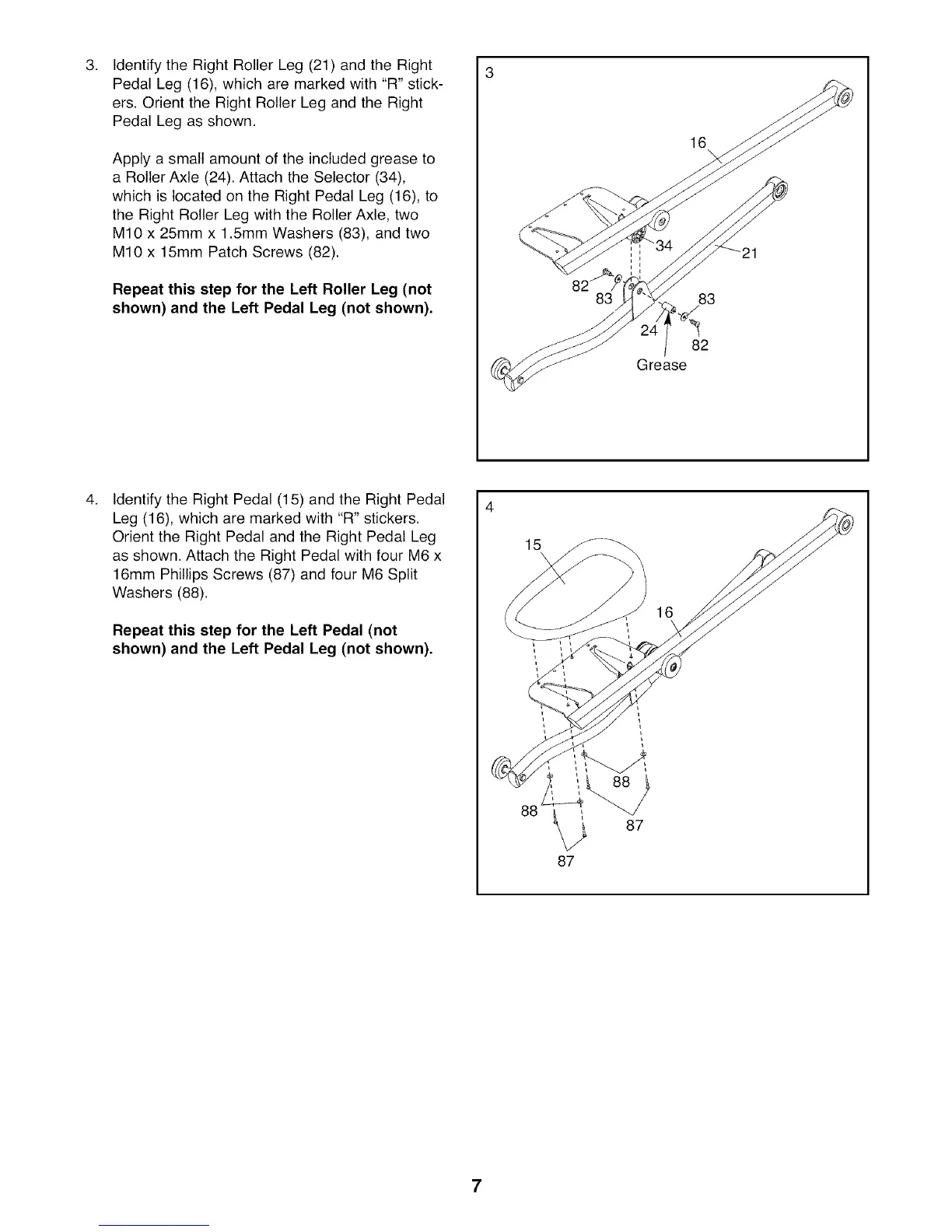
Identify the Right Roller Leg (21) and the Right
Pedal Leg (16), which are marked with "R" stick-
ers. Orient the Right Roller Leg and the Right
Pedal Leg as shown.
Apply a small amount of the included grease to
a Roller Axle (24). Attach the Selector (34),
which is located on the Right Pedal Leg (16), to
the Right Roller Leg with the Roller Axle, two
M10 x 25mm x 1.5mm Washers (83), and two
M10 x 15mm Patch Screws (82).
Repeat this step for the Left Roller Leg (not
shown) and the Left Pedal Leg (not shown),
16
83 83
82
Grease
4,
Identify the Right Pedal (15) and the Right Pedal
Leg (16), which are marked with "R" stickers.
Orient the Right Pedal and the Right Pedal Leg
as shown. Attach the Right Pedal with four M6 x
16mm Phillips Screws (87) and four M6 Split
Washers (88).
Repeat this step for the Left Pedal (not
shown) and the Left Pedal Leg (not shown),
88 _ 87
87
16
7





 To Next Page