MOBY40
26
3.19 CONTROLLER REMOTO AD INFRAROSSI
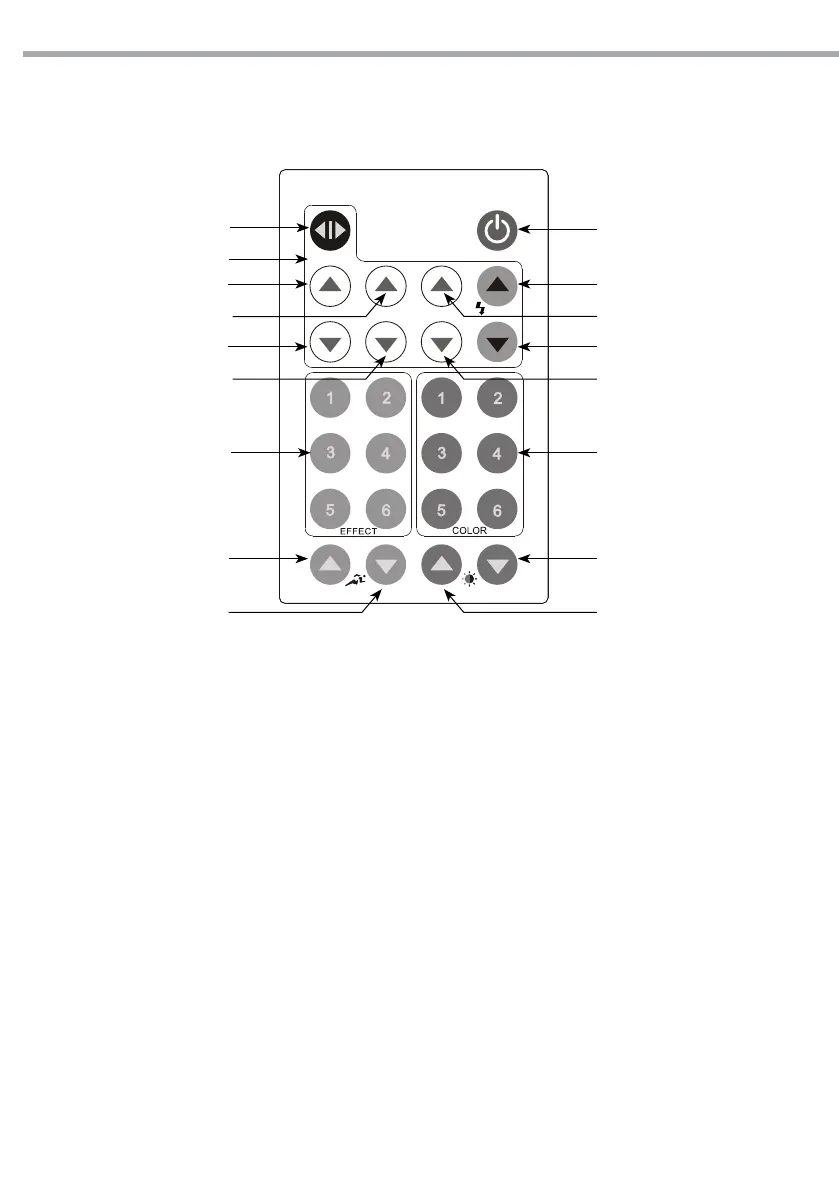
Con il controller remoto ad infrarossi (g.16) si possono gestire diverse funzioni, come riportato di seguito.
ON/OFF
A+
A-
COLORKEY CONTROLSEFFECTKEY CONTROLS
DIMMER (-)SPEED (+)
B+
DIMMER (+)SPEED (-)
G -
G+
R -
R+
STATIC CONTROLS
STATIC PLAY
B-
STATIC CONTROLS
• Premere il tasto [STATIC PLAY] per entrare nella riproduzione [STATIC].
• Eettuare le regolazioni usando i tasti [RED], [GREEN], [BLUE] e [STROBE].
• Regolare il livello di luminosità usando i tasti [DIMMER].
EFFECT CONTROLS
• Premere il tasto [EFFECT 01-06] per riprodurre il preset desiderato.
• Selezionare [SPEED+] o [SPEED-] per regolare la velocità di riproduzione.
• In questa modalità, non è possibile regolare il livello di luminosità degli eetti utilizzando i tasti
[DIMMER].
COLOR CONTROLS
• Premere il tasto [COLOR 01-06] per riprodurre il preset colore desiderato.
• Regolare il livello di luminosità usando i tasti [DIMMER].
• Modicare i colori tenendo premuto il tasto [COLOR 01-06] n quando le unità non lampeggiano,
quindi eettuare le regolazioni usando i tasti [RED], [GREEN], [BLUE], [STROBE] e [DIMMER].
Fig.16


 To Next Page