MOBY40
12
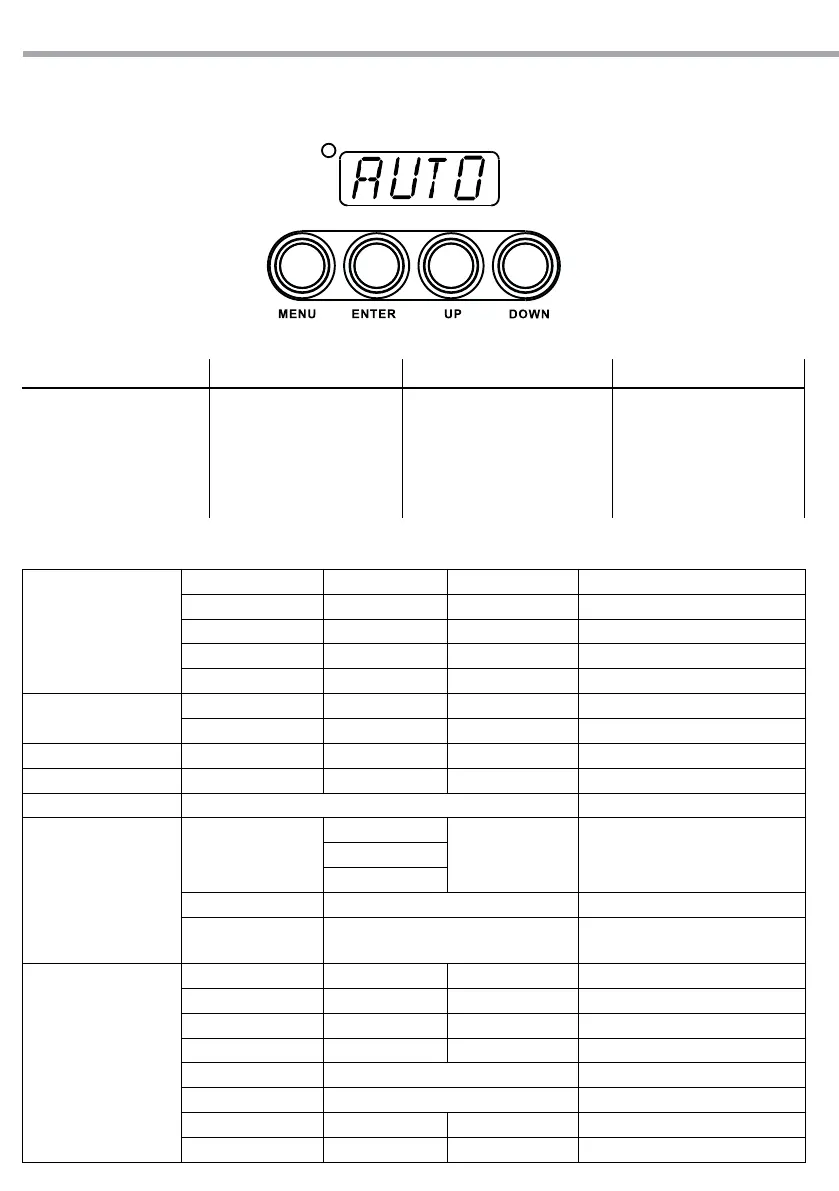
3.4 MENU STRUCTURE
STAT
RED R.(000-255)
GREN G.(000-255)
BLUE B.(000-255)
AMBR A.(000-255)
STRB S.(000-255)
AUTO
AT.01 ÷ AT.10 P.(000-255)
PR.01 ÷ PR.10
RUN DMX / SLAVE
ADDR D.(001-512)
PERS TOUR / TR16 / ARC.1 / AR1.D / ARC.2 / AR2.D / AR2.S / HSV
EDIT
PR.01 ÷ PR.10
SC.01
RED, GREN,
BLUE, AMBR, STRB,
TIME, FADE
R.(000-255), G.(000-255),
B.(000-255), A. (000-255),S.(000-255),
T.(000-255), F.(000-255)
...
SC.30
EKY1 ÷ EKY6 AT.01 ÷ AT.10, PR.01 ÷ PR.10
CKY1 ÷ CKY6 RED, GREN, BLUE, AMBR, STRB,
R.(000-255), G.(000-255),B.(000-255),
A. (000-255), S.(000-255),
SET
KEY ON/OFF
UPLD **** SEND OK
REST **** REST OK
COLR OFF/ RGBW / UC
DIMX DIM1 / DIM2 / DIM3 / DIM4 / OFF
CURV OFF / CV1 / CV2 / CV3
DERR SAVE/ BLAK
SLCK OFF/ON
Fig.10
3.3 BASIC
Access control panel functions using the four panel buttons located directly underneath the LED Display
(g.10).
MODE UP DOWN ENTER
Used to access the menu or
to return a previous menu
option
Navigates upwards through
the menu list and increases
the numeric value when in
a function
Navigates downwards through
the menu list and decreases
the numeric value when in a
function
Used to select and store the
current menu or conrm the
current function value or
option within a menu


 To Next Page