7
MOBY40
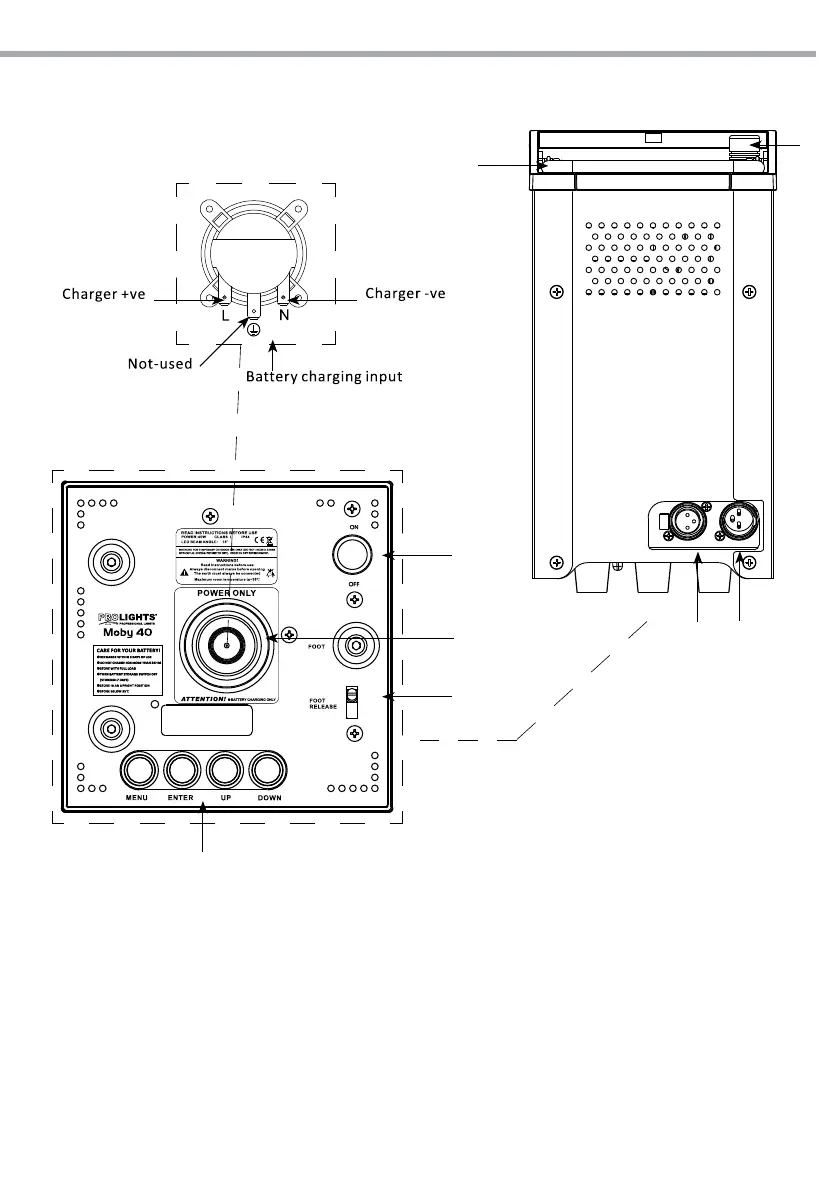
1.3 OPERATING ELEMENTS AND CONNECTIONS
Fig.5
3
4
8
1
7
6
5
2
1. WIRELESS RECEIVING ANTENNA
2. HANDLE
3. DMX OUT ( 3-pole XLR):
1 = ground, 2 = DMX -, 3 = DMX +
4. DMX IN (3-pole XLR):
1 = ground, 2 = DMX -, 3 = DMX +
5. BATTERY STORAGE SWITCH
6. BATTERY CHARGING INPUT
7. FOOT RELEASE
8. CONTROL PANEL
• Display LCD
• MENU button: used to access the menu or
to return a previous menu option
• ENTER button: used to select and store
the current menu or conrm the current
function value or option within a menu
• UP button: navigates upwards through the
menu list and increases the numeric value
when in a function.
• DOWN button: navigates downwards
through the menu list and decreases the
numeric value when in a function


 To Next Page