11
MOBY40
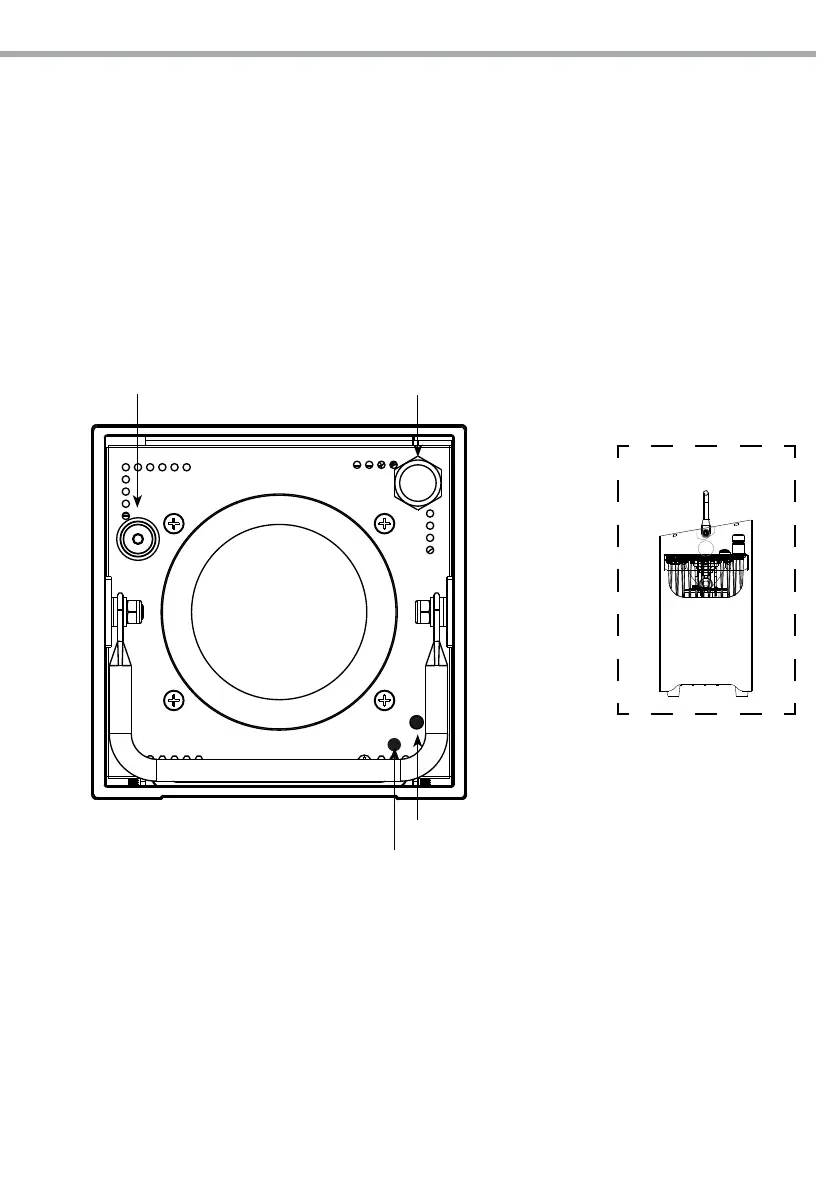
FRONT PANEL
Tilt adjustment
Fig.9
3.2 OPERATION
Press the ON/OFF button for 3 seconds to turn ON/O lighting xture (when battery storage switch is On).
Then the unit is ready for operation and can be operated via a DMX controller or it independently per-
forms its show program in succession. After operation, switch o the unit with the same switch.
(IMPORTANT - the battery discharges if the battery storage switch is On).
The LED control will show the amount of battery power that is remaining (g.9). The battery should be
recharged when RED is shown.
During charging the LED indicates GREEN to show that the battery is charging. Please note that GREEN
does not indicate that the battery is fully charged. When the battery is fully charged, the LED indicator will
turn o when the battery is fully charged.
ATTENTION - In the event that the battery storage switch is OFF, it is not possible to charge the battery. In
this case, when the mains power is connected to the xture, the LED indicator will show GREEN for 30 sec-
onds and then fade out. This shows that electrical contact has been made between the lighting xture and
the battery charging system. The BATTERY STORAGE SWITCH must be ON in order to charge the battery.
ON/OFF button
Wireless
• Green: power status >70%
• Yellow: power status >20%
• Red: power status = empty
Power status
Infrared receiver


 To Next Page