MOBY40
24
3.19 INFRARED REMOTE CONTROLLER
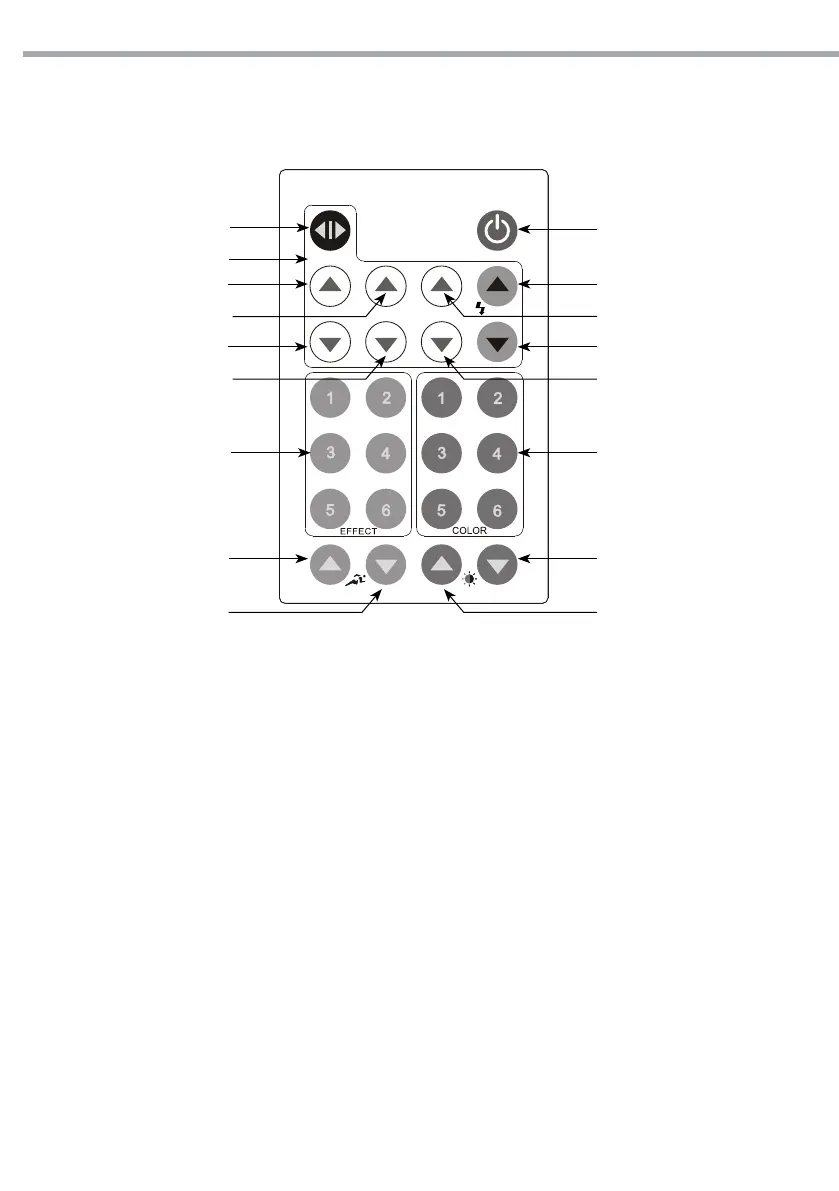
The infrared remote controller for MOBY40 allows to control dierent functions.
ON/OFF
A+
A-
COLORKEY CONTROLSEFFECTKEY CONTROLS
DIMMER (-)SPEED (+)
B+
DIMMER (+)SPEED (-)
G -
G+
R -
R+
STATIC CONTROLS
STATIC PLAY
B-
STATIC CONTROLS
• Select the [STATIC PLAY] key to enter the [STATIC] play mode
• Adjust [STATIC] play using [RED], [GREEN], [BLUE] and [STROBE].
• Adjust light level using the [DIMMER] keys.
EFFECT CONTROLS
• Select from [EFEECT key 01] to [EFEECT key 06] to play required pre-set color.
• Select [SPEED+] o [SPEED-] to adjust speed play function.
• It is not possible to adjust the light level of the EFFECT programs using the [DIMMER] keys.
COLOR CONTROLS
• Select from [COLOR key 01] to [COLOR key 06] to play required pre-set color.
• Adjust light level using the [DIMMER] keys
• Edit colors by press & holding a [COLOR KEY] until lighting xtures ash, then adjust using [RED], [GREEN],
[BLUE] and [STROBE] and [DIMMER] keys.
Fig.16


 To Next Page