20
Basic Feature
Timer Programming
This function is used for scheduled recording.
The recording from timer programme or direct
recording may have a little bit of delay when it
starts to record the broadcast programme.
Please make sure the USB device is inserted. If
not, a warning message will pop up.
1. Press the
EPG
button on the remote control.
The
EPG
menu will appear.
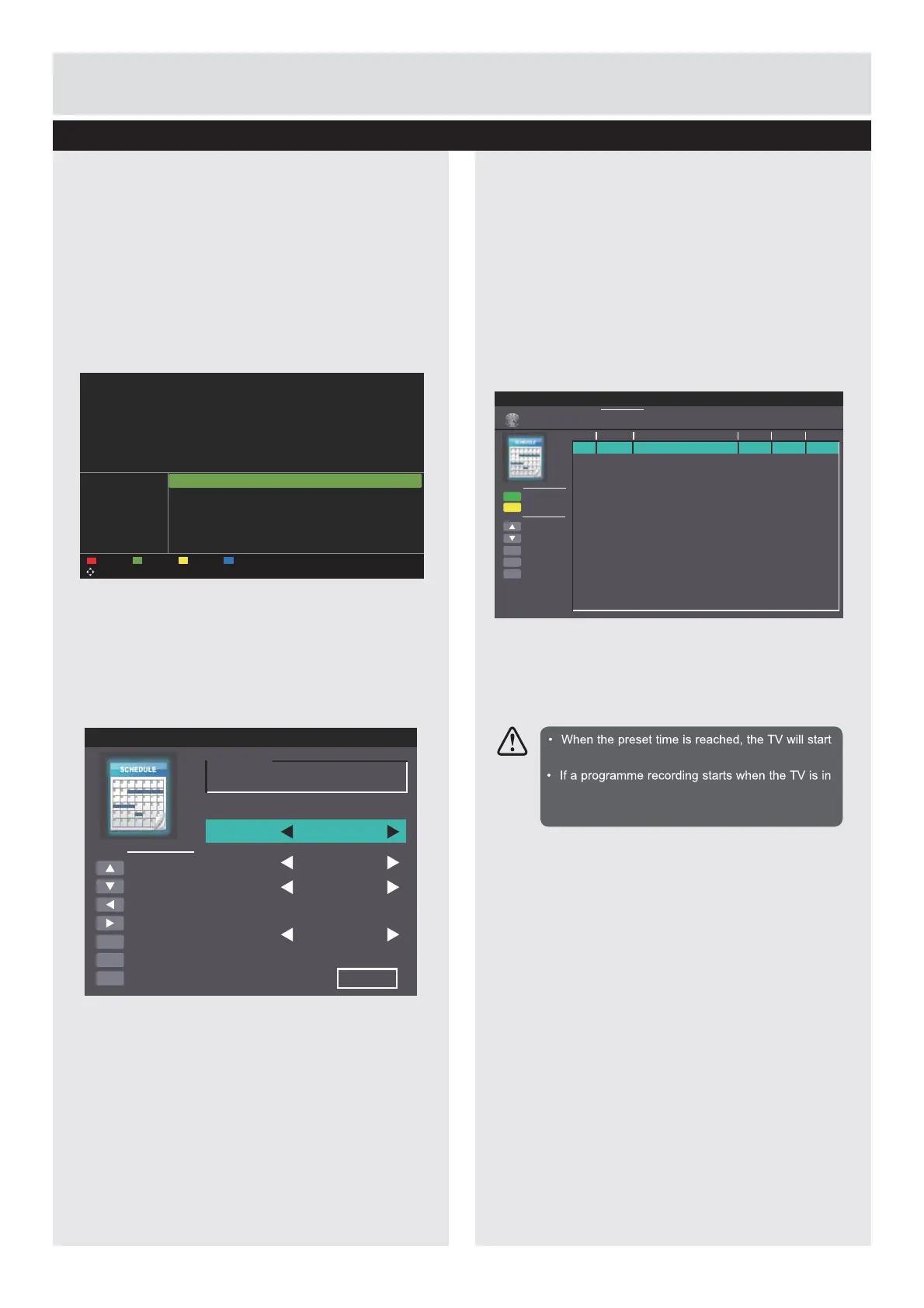
2. Press the
Ɣ
(REC) button on the remote
control while on the selected programme, the
Scheduled Record
menu will be displayed.
Press the
ŸźŻŹ
buttons to select the settings
in the
RECORD
PHQXIRUWKH)UHTXHQF\
Channel, Start time, and End time.
Frequency
Press the
ŻŹ
EXWWRQVWRVHOHFWWKHIUHTXHQF\
(Off/Once / Daily / Weekly).
Channel
Press the
ENTER
button and then press the
Ÿź
buttons to select the channel that you want
to record.
Start time
(for Mode Once, Daily, Weekly) Press
the
ŸźŻŹ
buttons to adjust the start time.
End time
(for Mode Once, Daily, Weekly) Press
the
ŸźŻŹ
buttons to adjust the end time.
3.
$IWHU¿QLVKLQJDOOWKHUHFRUGHUDGMXVWPHQWV
SUHVVWKH6DYHEXWWRQWRFRQ¿UP\RXUVHWWLQJV
4.
The
Scheduled Record Setting List
will then
be displayed with your preset reminders shown.
5. Press the
EXIT
button to exit EPG.
Move
PROGRAM GUIDE
26 Dec 2008 10:00 - 26 Dec 2008 10:25 Big Cook Little Cook
Penguin: Cookey series with Big Cook Ben and foot-high Little Cook Small. Ben comes in to the cate
wearing flippers and a mask he’s found in the fancy dress box. [AD,S]
PrevDate NextDate Schedule Reminder
Rec: Record ENTER: Display EXIT: Exit
009 BBC FOUR
071 CBeebies
081 BBC Parliament
087 Community
301 301
302 302
10:00 Big Cook Little Cook
10:25 Bob the Builder
10:40 Me Too!
11:00 Something Special
11:15 Doodle Do
11:35 Our Planet
26 Dec 2008 10:21:43
[Children’s]
Delete One
Move Up
Move Down
Select
Return
Exit
Function
OK
MENU
EXIT
Frequency
Off
Off
Off
Off
Off
Off
Off
Off
Off
Off
Off
Off
Off
Off
Off
Off
Hot Key
Date
Scheduled Record
Scheduled Record Setting List
Standby
Delete All
Group
1
2
3
4
5
6
7
8
9
10
11
12
13
14
15
16
Channel
Start Time
Duration
10:03
25 Dec 2008 Thu.
Scheduled Record - Group 1
Move Up
Move Down
Adjust
Adjust
Select
Return
Exit
Hot Key
OK
MENU
EXIT
Setting Status
Setting Is Not In Use
Frequency Off
1 BBC ONE
2008-12-25
1 0 : 0 5
2008-12-25
1 0 : 1 5
Channel
Start Time
End Time
Save
recording automatically.
standby mode, the LED indicator will alternatively
flash red and blue.
Downloaded from www.vandenborre.be



 To Next Page