14
Conexiones
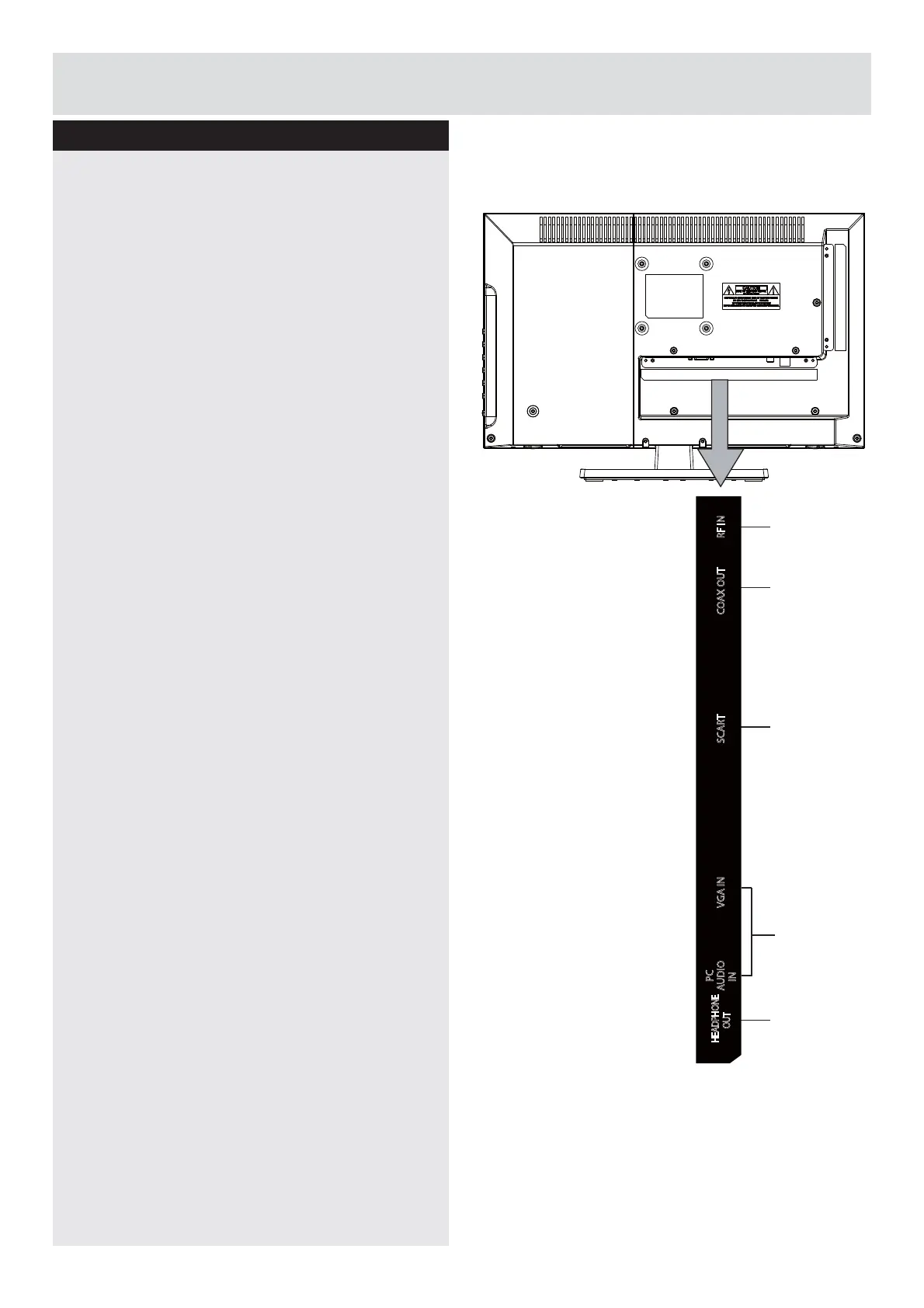
Descripción de las conexiones laterales
1.Toma de auriculares
&RQHFWDXQRVDXULFXODUHVDOWHOHYLVRU&RQHFWHD
la toma HEADPHONE para escuchar el televisor
FRQORVDXULFXODUHV
1RWD
El volumen de los auriculares puede
cambiarse usando los botones “VOL+” o “VOL-”.
(QWUDGDSDUD3&9*$3&$8',2
&RQHFWDXQRUGHQDGRUSHUVRQDODOWHOHYLVRU
Conecte el cable del PC a la entrada PC INPUT
GHOWHOHYLVRU\DODVDOLGDGHYtGHRGHO3&
1RWD
Si conecta un dispositivo al televisor con
el cable de vídeo, también deberá conectar el
dispositivo a la entrada
3&$8',2
mediante un
cable de audio para habilitar el sonido.
3.SCART (EUROCONECTOR)
(QWUDGDVRVDOLGDVSDUDGLVSRVLWLYRVH[WHUQRV
Conecte el cable Euroconector a la entrada del
SCART del televisor y a la del dispositivo externo
GHFRGL¿FDGRUUHSURGXFWRU9&5R'9'
1RWD6LVHFRQHFWDXQGLVSRVLWLYRH[WHUQR
a través de la entrada SCART, el televisor
cambiará automáticamente a la fuente del
(XURFRQHFWRU
4.COAX OUT
Conecte una barra de sonido, un sistema
de altavoces digital, o un sistema de sonido
envolvente a esta toma para escuchar el
sonido del televisor a través de unos altavoces
H[WHUQRV
5.RF IN (ANT.)
&RQHFWDODDQWHQDRODWHOHYLVLyQSRUFDEOH
6LXWLOL]DXQGHFRGL¿FDGRURXQJUDEDGRU
multimedia, debe conectar el cable de la antena
al televisor a través del dispositivo con el cable
GHDQWHQDDSURSLDGR
2
1
3
4
5
HEADPHONE
OUT
PC
AUDIO
IN
VGA IN SCART COAX OUT RF IN
Downloaded from www.vandenborre.be



 To Next Page