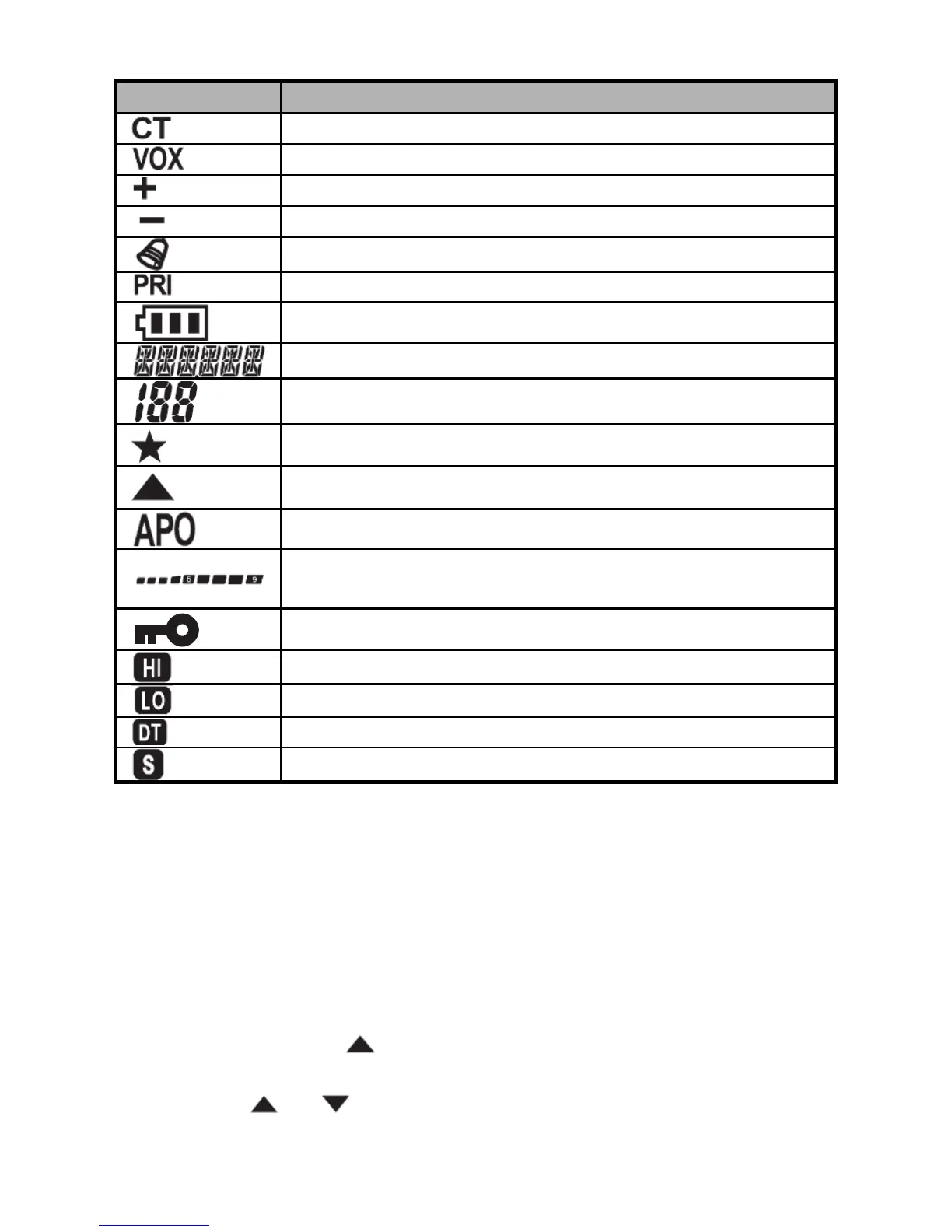
Means current channel sets CTCSS tone.
Means the VOX is activated.
Means positive offset frequency.
Means negative offset frequency.
Means the keypad tone is activated.
Means the priority scanning is activated.
Means battery power indicator.
Means channel frequency or menu item.
Means channel number or menu number.
Means current channel is enable scanning.
Means current channel is priority channel.
Means auto power off is activated.
Means real time display receiving signal
strength or power indicator.
Means current channel sets high power.
Means current channel sets low power.
Means current channel sets DCS code.
Means battery save is activated.
Save/Delete a Channel
1. Select the desired frequency, while operating in the VFO mode.
Be sure to set up any desired CTCSS tone or DCS code, as well
as any desired repeater offset. The power level may also be set
at this time, if you wish to store it.
2. Press and hold [
] button for 2 seconds, and then the left top of
the LCD displays ‘F’ icon.
3. Press [
] or [ ] button to select the channel number you desire
to store (from 1 to 199).


 To Next Page