9 – Side Button P2
Short press the button P2 is ‘Scan’ feature. Long press the button P2
is ‘FM Radio Receiver’ feature. (this feature maybe invalid in some
districts).
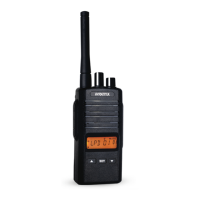
10 – LCD display screen
You will see the working channel frequency, name, number and
various icons which stand for the selected functions.
11 – SET Button
Short press this EXWWRQLVWRHQWHUPHQXPRGHRUFRQ¿UPWKHFXUUHQW
operation. Long press the button a few seconds is to lock the side and
front buttons operation. Press and hold this button and turn on the
radio is switch between VFO and Channel mode.
12 – UP/DOWN Navigation Buttons
Press the two buttons to select the desired channels under Channel
mode or menu items when operating in menu mode.
13 – Lithium-Ion Battery Pack
Radio comes equipped with a rechargeable Lithium-ion battery pack.
This battery should be fully charged before initial use to ensure
optimum capacity and performance. Batteries are
designed
specifically to be used with a supplied charger and vice versa.
14 – Battery Latch
Push down battery latch to release battery pack.


 To Next Page