EasyManua.ls Logo

promethean ActivPanel 9 - Page 27

promethean ActivPanel 9
62 pages
Print Icon
To Next Page IconTo Next Page
To Previous Page IconTo Previous Page
Loading...
27 ActivPanel 9 User Guide 06/22
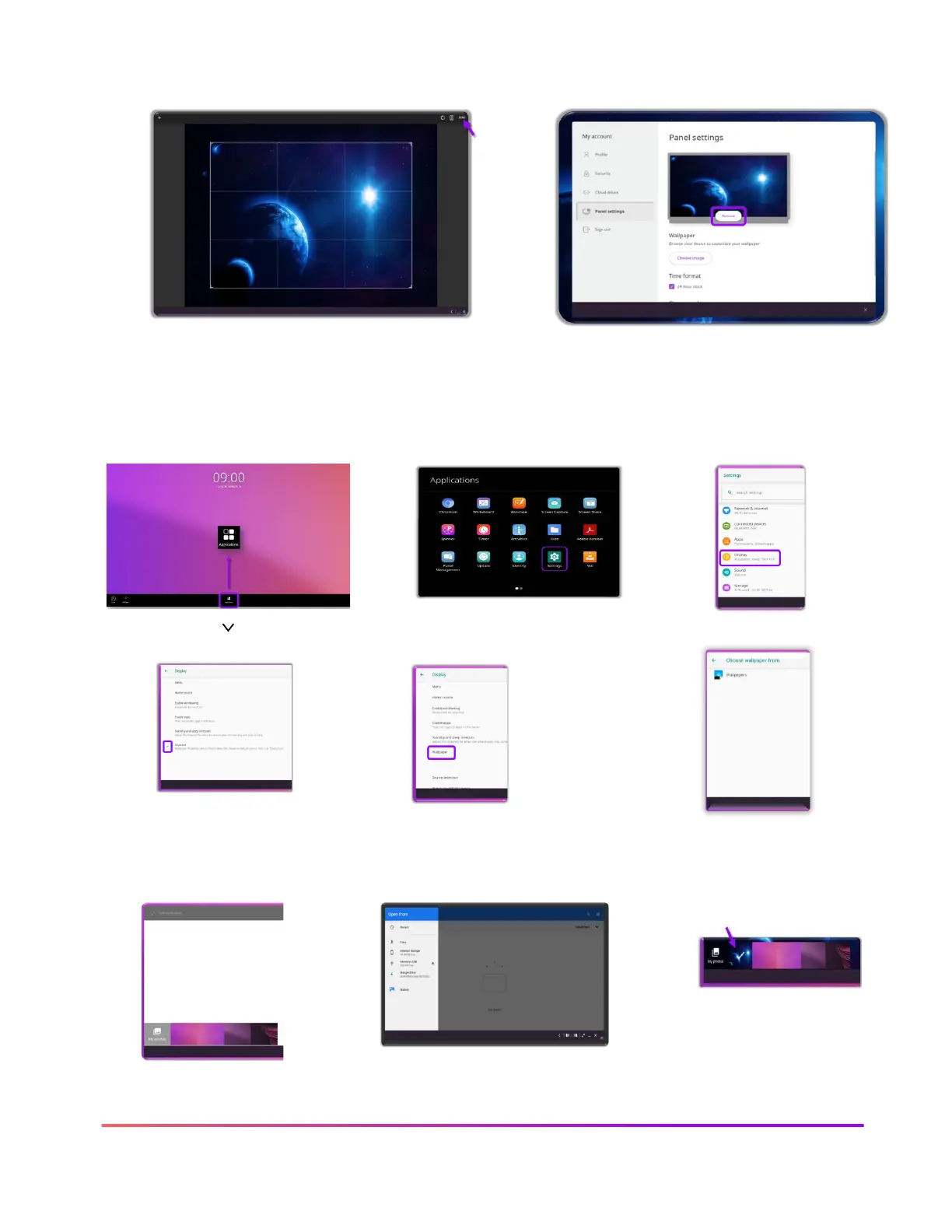
7. Select your image, crop if desired and
tap Done
8. To return your Wallpaper to original
settings, select Remove
Follow these steps to change your wallpaper on the ActivPanel 9 using the Applications icon from
the Menu
1. Tap the Applications icon
in the Menu
2. Select Settings
3. Select Display
4. Tap the caret ( ) next to
Advanced
5. Tap Wallpaper
6. Tap Wallpapers
7. Select a wallpaper displayed
or tap My photos to choose
from a different file
8. Select the file that has your
desired image in Open from
9. After selecting the
image, it appears in
the Wallpapers choices

Other manuals for promethean ActivPanel 9

Related product manuals