Dulcodes UV-Desinfektionsanlage
Page 43
ProMinent
®
7 Settings
NOTE
• Open out the fold-out page following the title page fully! There you will find the overviews
“control elements and key functions” and “operating settings diagram”.
• If no keys are pressed within a period of 1 minute, the S2Ca will return to a continuous
display.
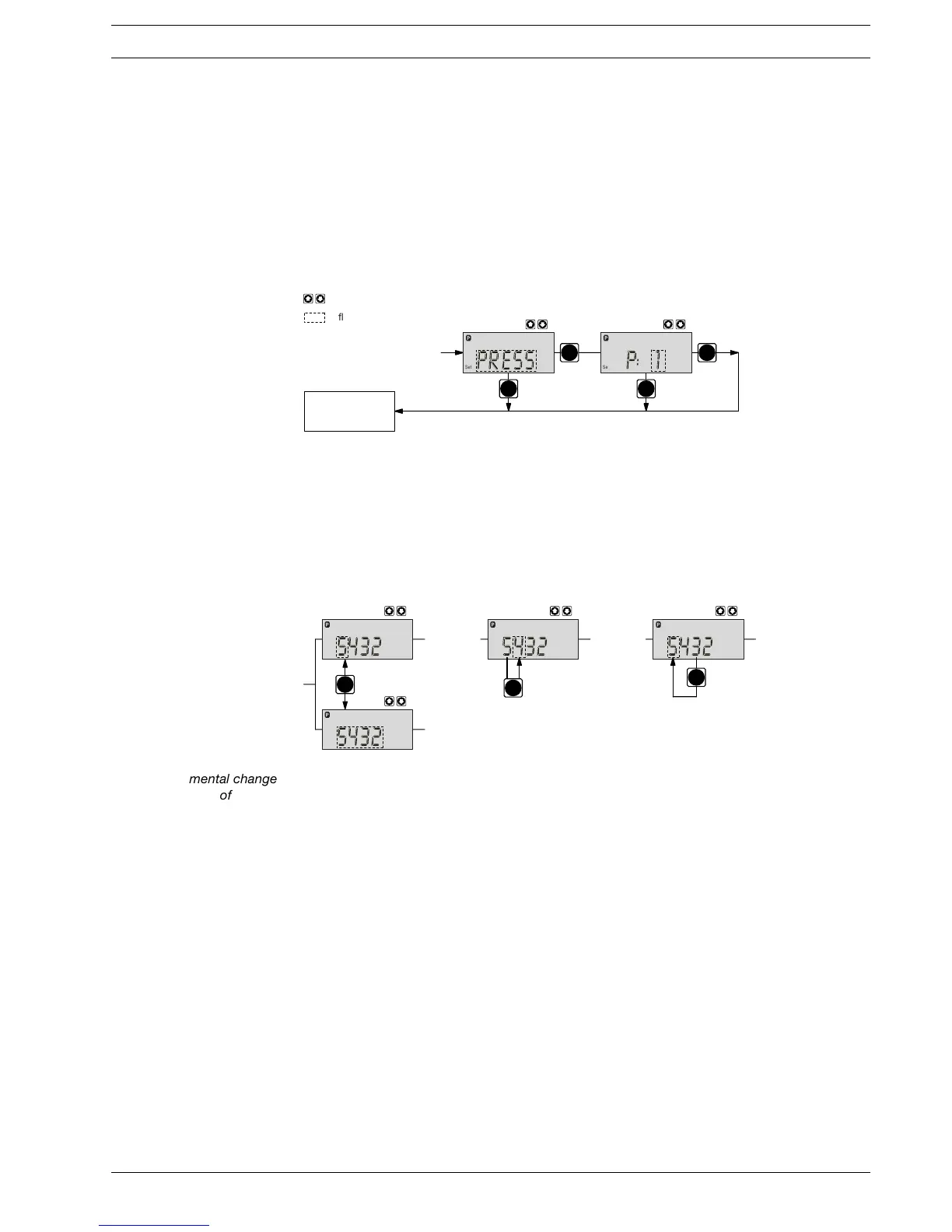
Basic information for setting up the S2Ca
Confirm entries Press the P key briefly;
you will automatically move to the next menu option or to a continuous display.
Exit menu option
without confirming Press the P key for 3 s:
The entry is cancelled and you will return to a continuous display.
i
1x
2x
!"#
!"#
!"# !"#
i
P
Incremental change
of a value Press the i key 1x;
you can toggle between altering the digits of a value (“change individual digits” = standard) or
incremental alteration of a value (“change a figure”).
Change adjustable values Press UP or DOWN arrow key;
The flashing digit or figure will start to increase or decrease incrementally.
Confirm adjustable values For “change individual digits”: confirm each digit using the P key. When the last digit has been
confirmed you will automatically move to the next menu option or to a continuous display.
For “change a figure”; press the P key 1x; you will simultaneously move to the next menu option
or to a continuous display.
Correct wrongly set digits Press the i key 2x;
you will go back to the first digit.
Settings






 To Next Page