When servicing your marker:
• Make sure a barrel sock is fi tted to the REFLEX RAIL™.
• Make sure your hopper is removed from the REFLEX RAIL™.
• Make sure there are no paintballs in the breech of the REFLEX RAIL™.
• Always remove the fi rst stage regulator and relieve all residual gas
pressure from the REFLEX RAIL™ before disassembly.
• The REFLEX RAIL™ can hold a small residual charge of gas, typically 2
shots, with the fi rst stage regulator removed. Always discharge the marker
in a safe direction to relieve this residual gas pressure.
RAIL
™
BOARD
SETTINGS AND FUNCTIONS
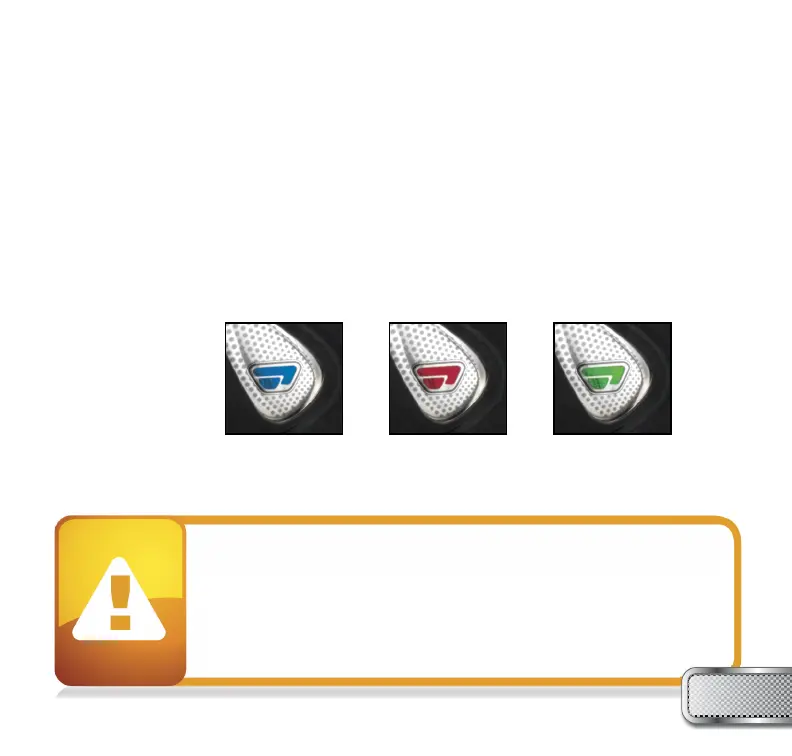
When you turn on the marker in normal operation mode with the power button, the light colors
mean the following:
Blue - Boot sequence
Red - Breech is clear, no ball detected inside the REFLEX RAIL™ (eye is on)
Green - Ball in breech, ready to fi re (eye on)
Blinking Red - Eye is turned off
Blinking Green - Eye failure, eye is blocked or dirty (see REFLEX RAIL™ Eye, page 26)
Blinking Blue - Indicates a low battery; battery should be changed as soon as possible
To turn off the eye feature press and hold the bottom button until the LED light starts blinking
Red indicating the eye feature is turned off.
W W W . P R O T O P A I N T B A L L . C O M
7
NOTE: The eye is always activated when you turn the marker on.



 To Next Page