BOARD SETTINGS AND CONFIGURATION MODE
There are fi ve settings you can alter on the RAIL™ board
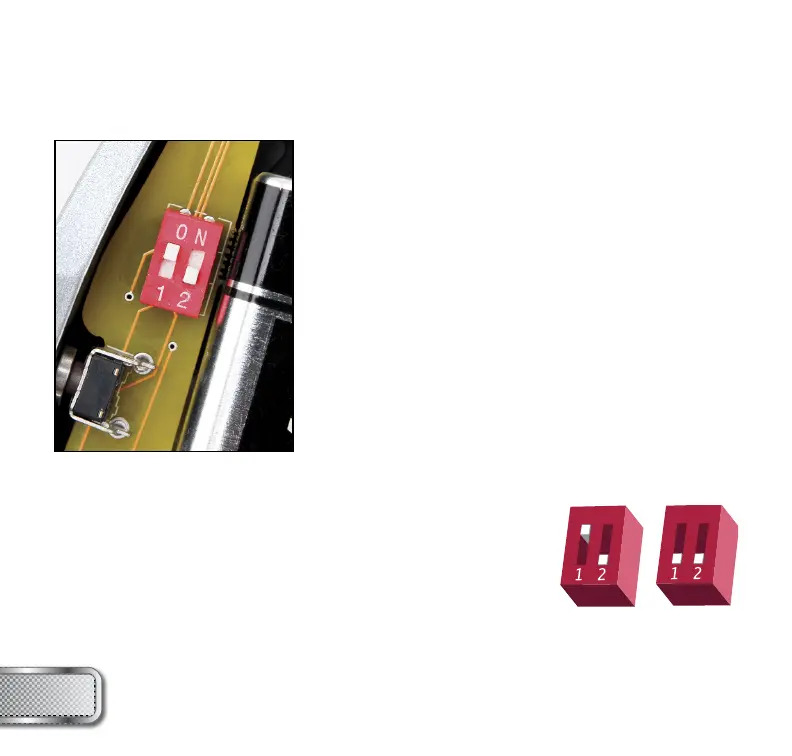
with the DIP switches inside the grip frame (see fi gure 1):
ABS Anti Bolt Stick.
Trigger Sensitivity This setting adjusts the delay
between two trigger pulls.
Dwell This is the time the solenoid is
activated for.
Rate Of Fire This setting is for adjusting the
maximum rate of fi re.
Firing Mode This is the fi ring mode the REFLEX
RAIL™ uses.
There are two DIP switches mounted on the board of the
REFLEX RAIL™ (See fi gure 1). The fi rst one is used for
the ABS setting and the second one is used to access a
confi guration mode, which changes the other four settings.
Anti Bolt Stick - When ABS is activated, the dwell is increased after
15 seconds of non-use for the next shot fi red. This helps to prevent
bolt-stick, but may result in higher velocity for the fi rst shot.
REFLEX RAIL™ BOARD
SETTINGS AND FUNCTIONS
W W W . P R O T O P A I N T B A L L . C O M
8
ABS ON
(DEFAULT)
ABS OFF
FIGURE 1



 To Next Page