SUPA8 User Manual
13
REVIEW
Key 4
Enter a user code followed by 4 or simply enter # 4 to enter review
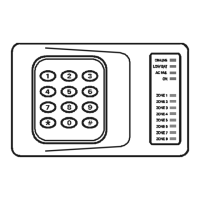
mode. The ON-LINE, LOW BATT, AC FAIL & ON lights will all be on to
indicate you are in review mode. Review mode displays a history of past
alarms and events stored in the SUPA8’s memory.
This alarm memory is permanently stored and can be cleared by pressing
the
0 key while in review mode.
(Please note that your Entry Delay Zone/s will always be stored in memory,
even if they have not alarmed.)
While in review mode, various events will be displayed by pressing the
following keys:
Key 1 Displays past Zone alarms since the last reset.
Key 2 Displays past alarms other than Zones.
Key 3 Display previous events (miscellaneous).
Key 0 Clear review memories.
Key 9 Displays the SUPA8’s software version. (in binary).
Key * Exit review mode.
When first entered, review shows past Zone alarms. The following tables
show how to interpret the various displays:
REVIEW
1
Previous Zone Alarms
While in REVIEW mode, pressing Key
1 displays:
Zone
Light Meaning
1 - 8 Previous alarm on Zones 1 - 8 since the SUPA8’s last
reset.
Note: The first Zone that was triggered will be flashing.


 To Next Page