SUPA8 User Manual
21
How to turn the system OFF
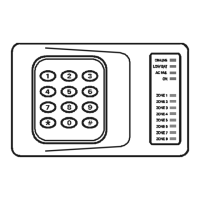
The ON light will be on or flashing.
1. Enter ____ ....Your User Code
(All Zone lights will flash - waiting for a command)
2. Enter 0 ....................Turns OFF the SUPA8
3. Check that the ON light turns off.
Isolating Zones
You are able to isolate (disable) selected Zones and turn the system ON. This
is useful in cases where, for example, a pet will be kept in a certain room or if
a detector has become faulty and must be isolated from the system.
1. Enter * ....................To clear the keypad
2. Enter ____ ....Your User Code
(All Zone lights will flash - waiting for a command)
3. Enter 6 ....................The ON-LINE, LOW BAT, AC FAIL & ON
lights will turn on to indicate isolation mode.
4. _ .............................Enter the Zone number/s you wish to
isolate. The corresponding lights will turn on. Pressing the Zone
number again will turn off the isolation for that Zone.
5. Enter * ....................To exit isolation mode
The system can now be turned ON as normal. Isolated Zones are
enabled again the next time you turn the SUPA8 OFF.


 To Next Page