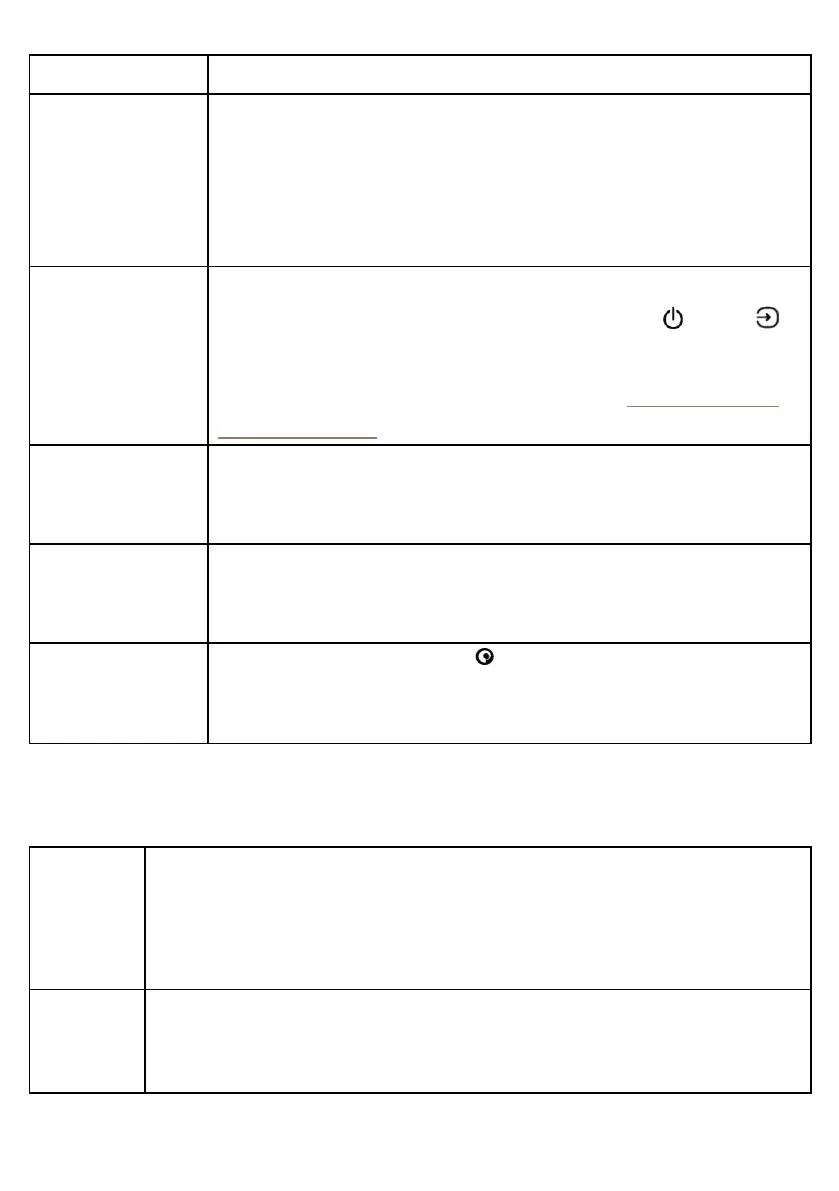
Problem Solution
There's no sound • Check the volume on your StreamR Splash.
• Check if your StreamR Splash is in the correct source mode.
• Check the volume on your mobile/controlling device.
• Make sure your StreamR Splash has sufficient power, or is properly
connected to a USB socket.
Speaker controls are
not responding
• Switch your StreamR Splash off and back on.
• Reboot your StreamR Splash (press and hold the Power / Source
button for 10 seconds).
• Restore your StreamR Splash to factory conditions. See "Restoring to
factory conditions".
The time is not
shown on the
display
• Change to a digital or FM radio station. Note: Your StreamR Splash uses
digital or FM radio signals to set the time.
Sound is distorted
after exposing the
speaker to water
• Your StreamR Splash is IP67-certified and can be submerged in water up
to 1m deep for no longer than 30 minutes. Allow your StreamR Splash to
dry completely before charging or using it.
notif. is shown on
the display
• Press and hold the Pure button and ask Alexa to read your
notifications.
Specifications
Bluetooth
• Bluetooth ® 4.2
• Bluetooth Low Energy
• Frequency range: 2402-2480MHz
• Maximum power: 4.28dBm
Profiles
• A2DP
• AVRCP
• HFP
StreamR Splash User Guide 19



 To Next Page