SELECT HP USER INSTRUCTIONS
Issue: A, part number L300954 15
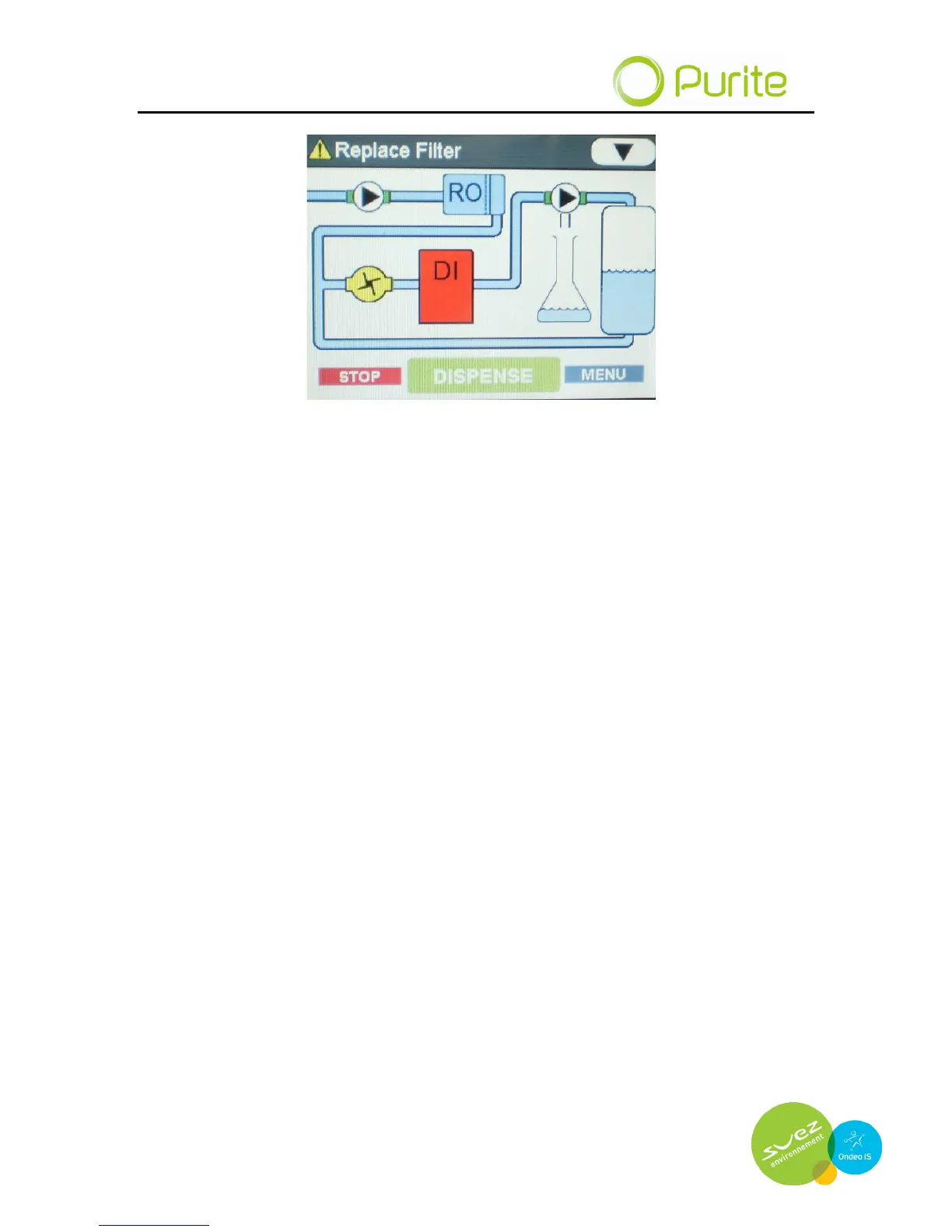
The mimic screen shown above features four buttons and displays the
process elements of the system. In normal operation they remain a fixed
colour. However, in the event an alarm is detected or a specific process
element goes into fault, the symbol on the display will flash red to indicate
maintenance or corrective action is necessary. In addition the text bar at the
top of the screen will alternate between showing an alarm is active and the
data normally displayed.
The mimic screen push buttons
STOP This stops the unit and returns you to the power on screen.
DISPENSE When pressed, water is dispensed from the dispense point. It
is not possible to dispense water from the unit until the tank is
filled to its mid level switch. This may take a few minutes
dependant upon model variant.
MENU This accesses a secondary menu to allow dispense settings to
be stored.
▼ Scrolls through the text bar display on the top of the screen to
show
Alarms active
Temperature
Outlet quality
Outlet Quality Uncompensated
These are features for display only and cannot be adjusted or reset from this
screen.
If an alarm is active the text bar display will alternate between the active alarm
and the last required display feature.


 To Next Page