Page 10 iGen
®
Man u al
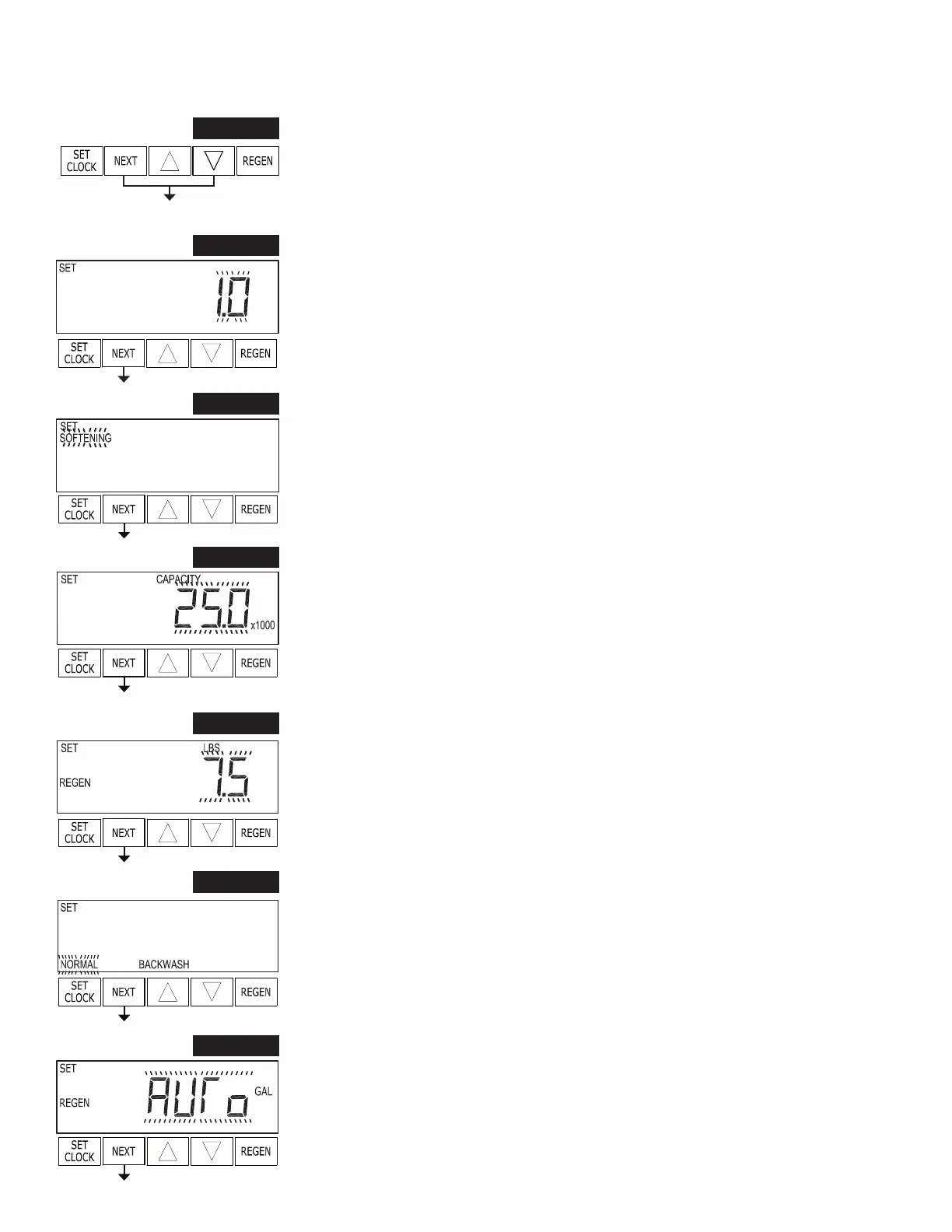
STEP 1S
OEM Softener System Setup
STEP 1S – Press NEXT and ▼ simultaneously for 3 seconds. If screen in step 2S does
not appear in 5 seconds the lock on the valve is activated. To unlock press ▼, NEXT,
▲, and SET CLOCK in se quence, then press NEXT and ▼ si mul ta neous ly for 3
seconds.
STEP 2S – Select Valve Type. Use ▲ or ▼ to select between 1.0 and 1.25. Press NEXT
to go to Step 3S. Press REGEN to exit OEM Softener System Setup.
STEP 2S
STEP 3S – Choose Softening using ▲ or ▼. Press NEXT to go to Step 4S. Press
REGEN to exit OEM Softener System Setup.
STEP 3S
STEP 4S – Enter the ion exchange capacity in grains of hardness as calcium carbonate
for the system based on test data using ▲ or ▼. Press NEXT to go to Step 5S. Press
REGEN to return to previous step.
STEP 5S – Enter the pounds of salt per regeneration using ▲ or ▼. Press NEXT to go
to Step 6S. Press REGEN to return to previous step.
STEP 4S
STEP 6S – Backwash: Select “NORMAL” or “LONGER” using ▲ or ▼. Press NEXT
to go to Step 7S. Press REGEN to return to previous step.
STEP 6S
STEP 7S – Set Gallons Capacity using ▲ or ▼:
• “AUTO” (reserve capacity automatically estimated and gallons capacity
au to mat i cal ly calculated from grains capacity and water hardness);
• “oFF” (regeneration based on day override); or
• number of gallons (20 to 50,000).
See Setting Options Table for more detail. Press NEXT to go to Step 8S. Press REGEN
to return to previous step.
STEP 7S
STEP 5S


 To Next Page