iGen
®
Man u al Page 19
Diagnostics
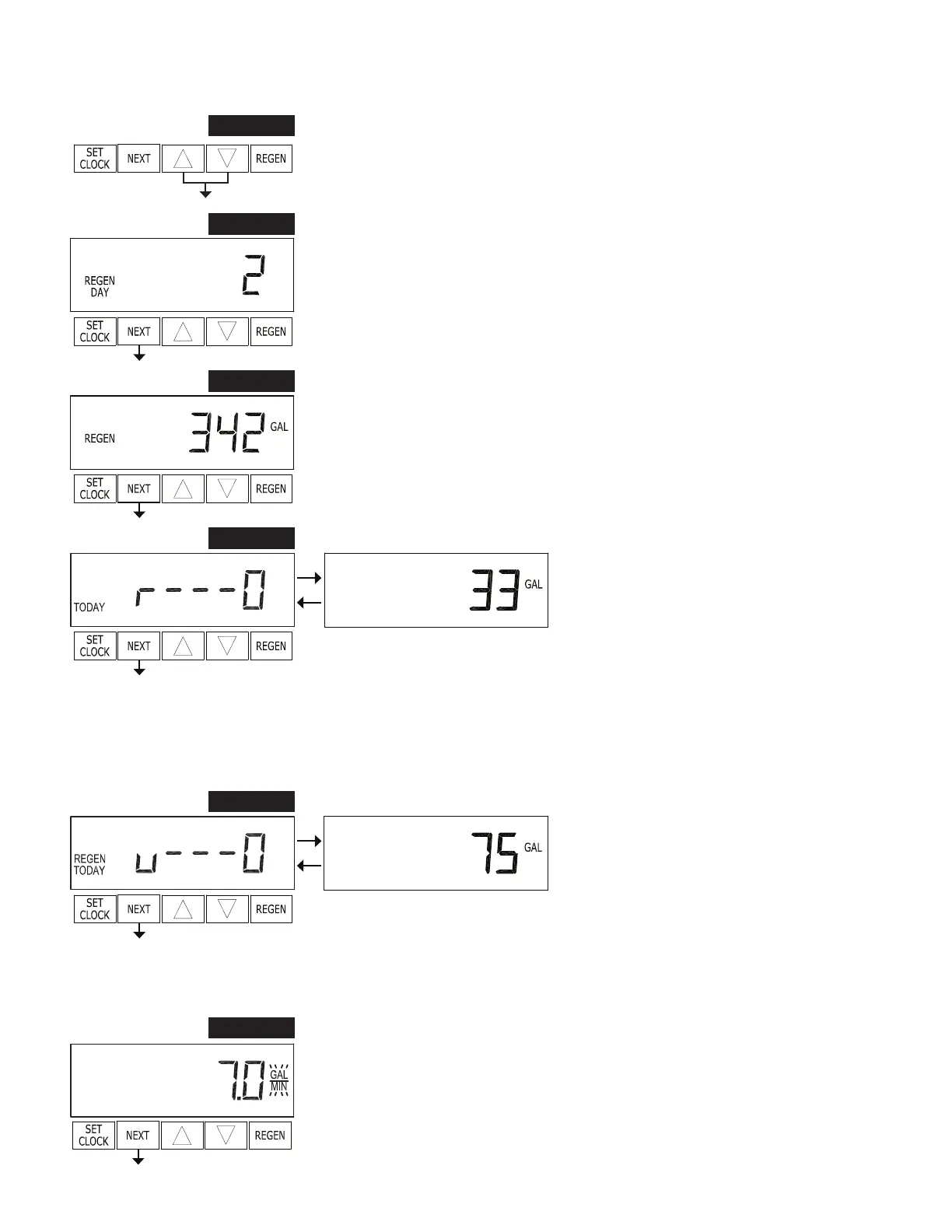
STEP 1D – Press ▼ or ▲ simultaneously for three seconds. If screen in step 2D does
not appear in 5 seconds the lock on the valve is activated. To unlock press ▼, NEXT,
▲, and SET CLOCK in sequence, then press NEXT and ▼ simultaneously for 3
seconds.
STEP 1D
STEP 2D
STEP 2D
– Days, since last regeneration: This display shows the days since the
last re gen er a tion occurred. Press NEXT to go to Step 3D. Press REGEN to exit
Diagnostics.
STEP 3D
STEP 3D – Gallons, since last regeneration: This display shows the number of gallons
that have been treated since the last re gen er a tion. This display will equal zero if a
water meter is not installed. Press NEXT to go to Step 4D. Press REGEN to return to
previous step.
STEP 4D
STEP 4D – Gallons, reserve capacity used for last 7
days
: If the valve is set up as a softener, a meter
is installed and Set Gallons Capacity is set to
“Auto,” this display shows 0 day (for today)
and ashes the reserve capacity. Press ing ▲ will
show day 1 (which would be yesterday) and
ashes the reserve capacity used. Press ing ▲
again will show day 2 (the day before yesterday)
and the reserve capacity. Keep pressing ▲ to
a the gallons for days 3, 4, 5 and 6. ▼ can be
pressed to move back wards in the day series.
Press NEXT at any time to go to Step 5D. Press
REGEN to return to previous step.
STEP 5D
STEP 5D - Gallons, 63 day usage history:
This display shows day 1 (for yesterday) and
ashes the number of gallons treated yesterday.
Pressing ▲ will show day 2 (which would be the
day before yesterday) and ashes the number of
gallons treated on that day. Con tin ue to press
▲ to show the max i mum number of gallons
treated for the last 63 days. This display will
show dashes if a water meter is not installed.
Press NEXT at any time to go to Step 6D. Press
REGEN to return to previous step.
STEP 6D
STEP 6D – Flow rate, current: The ow rate in gallons per minute will be displayed. If
ow stops the value will fall to zero in a few seconds. This display will equal zero if a
water meter is not installed. Press NEXT to go to Step 7D. Press REGEN to return to
previous step.


 To Next Page