Page 12 iGen
®
Man u al
OEM Filter System Setup
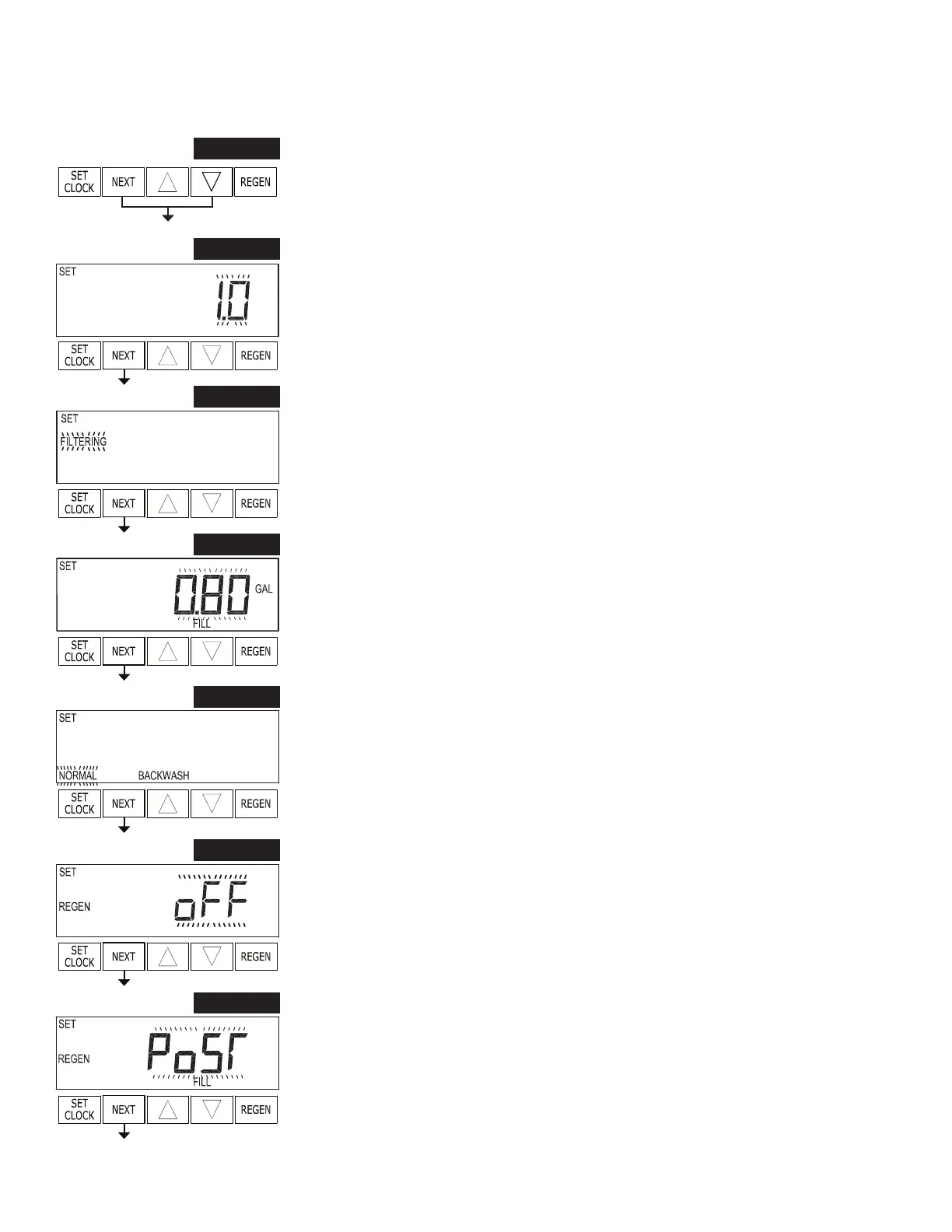
STEP 1F – Press NEXT and ▼ simultaneously for 3 seconds. If screen in step 2F does
not appear in 5 seconds the lock on the valve is activated. To unlock press ▼, NEXT,
▲, and SET CLOCK in sequence, then press NEXT and ▼ simultaneously for 3
seconds.
STEP 1F
This is a quick reference setup procedure. See OEM Filter System Setup Detail for more information on available settings.
STEP 2F
STEP 2F – Select Valve Type. Use ▲ or ▼ to select between 1.0 and 1.25. Press NEXT
to go to Step 3F. Press REGEN to exit OEM Filter System Setup.
STEP 3F
STEP 3F – Choose Filtering using ▲ or ▼. Press NEXT to go to step 4F. Press
REGEN to exit OEM Filter System Setup.
STEP 4F
STEP 4F – Enter “oFF” if regenerant is not used (i.e. backwash only) or enter the re ll
volume (in gallons) using ▲ or ▼. Prior to selecting oFF or regenerant volume, verify the
correct valve body, main piston, regenerant piston, and stack are being used, and that the
injector or injector plug(s) are in the correct locations. Press NEXT to go to step 5F. Press
REGEN to return to previous step.
STEP 5F
STEP 5F – Backwash: Select using ▲ or ▼:
• “NORMAL” for one “NORMAL” backwash (14 minutes);
• “NORMAL 2” for two “NORMAL” backwashes (8 minutes each);
• “LONGER” for one “LONGER” backwash (16 minutes); or
• “LONGER 2” for two “LONGER” backwashes (12 minutes each). Press NEXT
to go to step 6F. Press REGEN to return to previous step.
STEP 6F
STEP 6F – Set Gallons Capacity using ▲ or ▼:
• “oFF” (regeneration based on day override); or
• number of gallons (20 to 50,000).
See Setting Options Table for more detail. Press NEXT to go to step 7F. Press REGEN
to return to previous step.
STEP 7F
STEP 7F – Set Re ll option using ▲ or ▼:
• “PoST” to re ll the brine tank after the nal rinse; or
• “PrE” to re ll the brine tank two hours before the re gen er a tion time set.
Press NEXT to go to step 8F. Press REGEN to return to previous step.


 To Next Page