Page 16 iGen
®
Man u al
General Operation
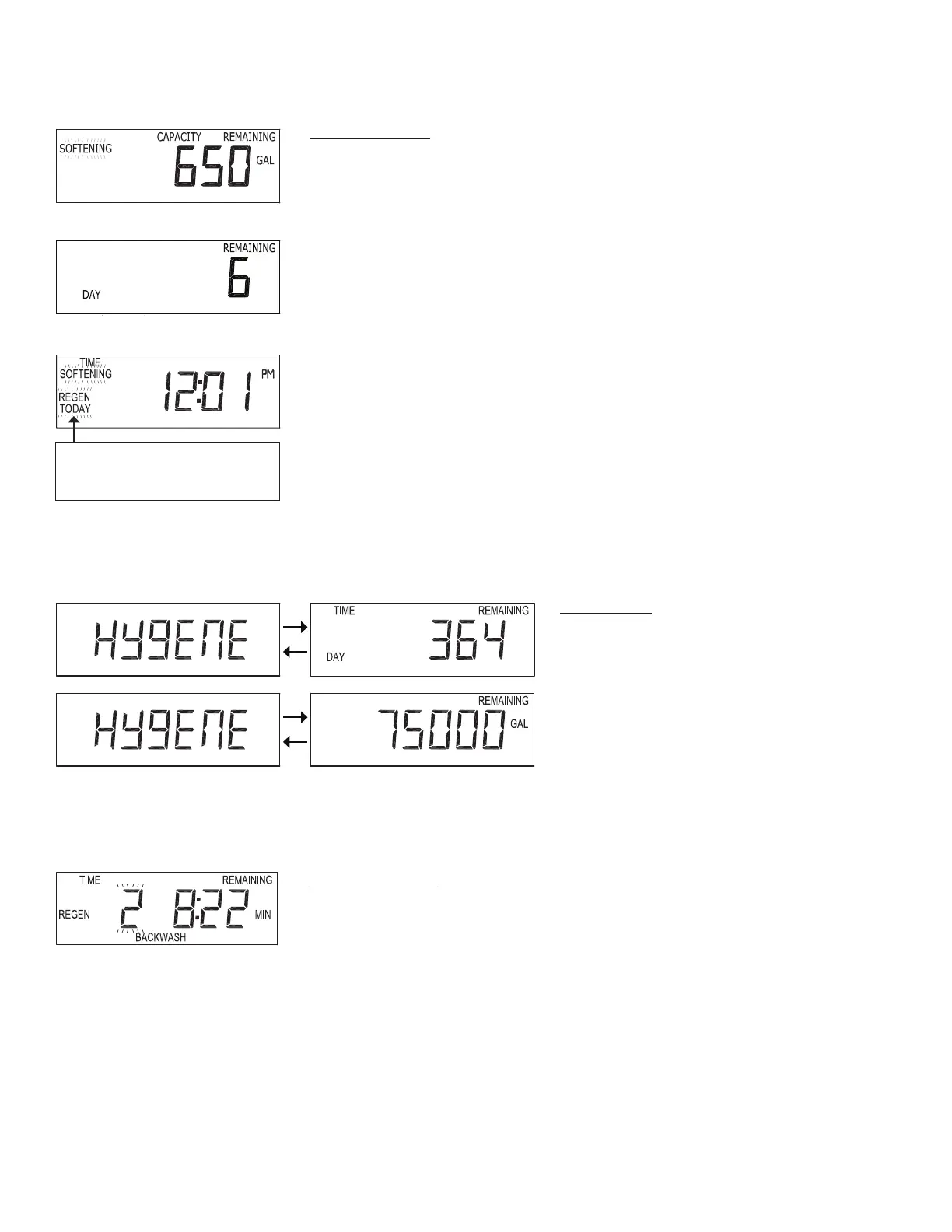
When the system is operating one of several displays will be shown. Press ing NEXT
will alternate between the dis plays. One of the displays is always the current time
of day. Days remaining is the number of days left before the system goes through a
regeneration cycle. Ca pac i ty remaining is the number of gallons that will be treated
before the system goes through a regeneration cycle. The user can scroll between the
displays as desired.
If the system has called for a regeneration that will occur at the preset time of
re gen er a tion, the words REGEN TODAY will appear on the display.
When water is being treated (i.e. water is owing through the system) the word
“Soft en ing” or “Fil ter ing” ashes on the display if a water meter is installed.
User Displays / Settings
REGEN TODAY will be
displayed if a regeneration is
expected “Tonight.”
Regeneration Mode
Typically a system is set to regenerate at a time of low water usage. An example of a
time with low water usage is when a household is asleep. If there is a demand for water
when the system is regenerating, untreated water will be used.
When the system begins to regenerate, the display will change to include information
about the step of the regeneration process and the time remaining for that step to be
completed. The system runs through the steps au to mat i cal ly and will reset itself to
provide treated water when the regeneration has been completed.
Service Alarm
If the Service Alarm is set in Steps 2SA or 3SA,
the time or volume remaining until service is
required will be displayed.


 To Next Page