iGen
®
Man u al Page 21
1
Values in steps 3VH through 7VH cannot be reset.
Valve History
STEP 1VH
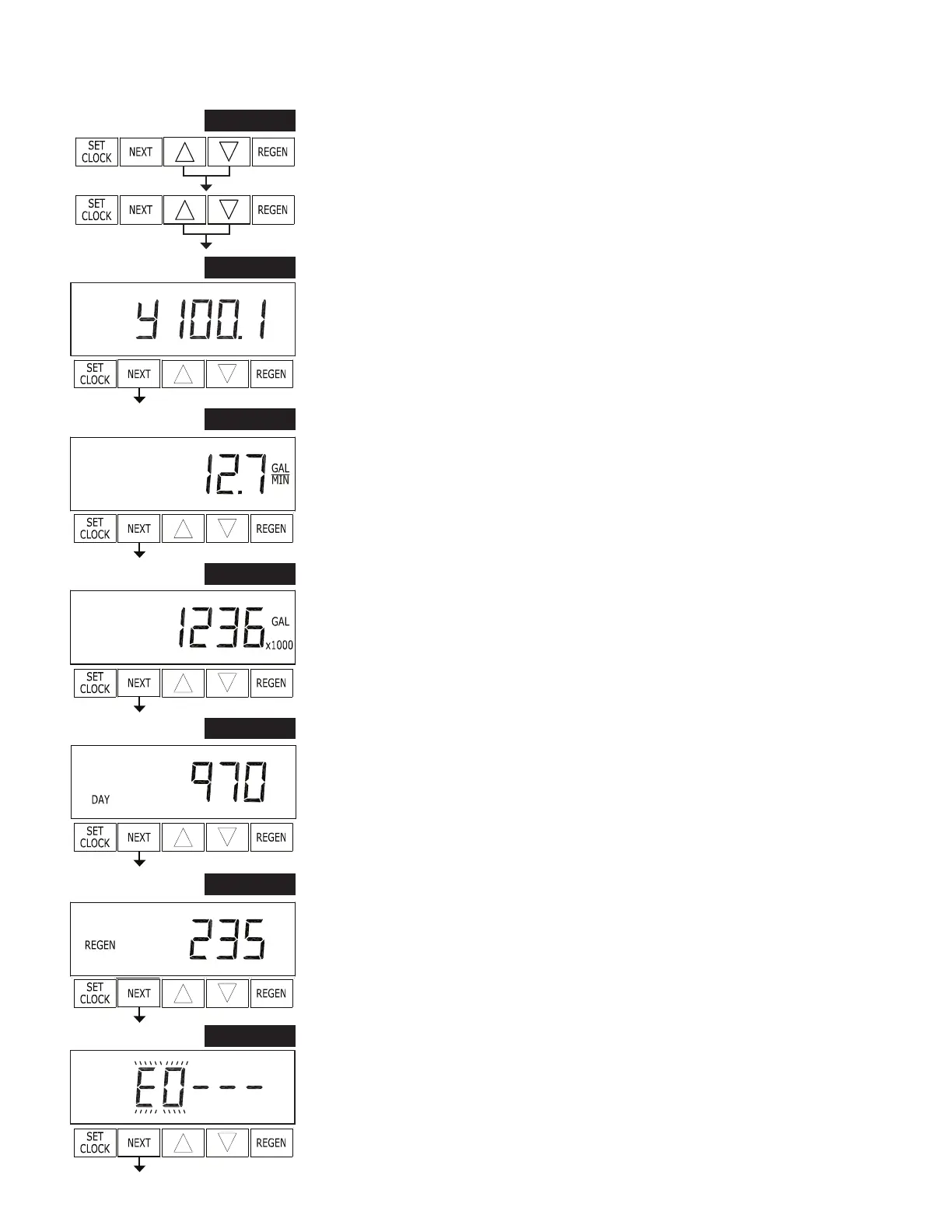
STEP 1VH – Press ▲ and ▼ simultaneously for three seconds and release. Then
press ▲ and ▼ si mul ta neous ly and release. If screen in step 2VH does not appear in
5 seconds the lock on the valve is activated. To unlock press ▼, NEXT, ▲, and SET
CLOCK in sequence, then press ▲ and ▼ si mul ta neous ly for 3 seconds and release.
Then press ▲ and ▼ simultaneously and release.
STEP 2VH
STEP 2VH – Software Version: This display shows the software version of the valve.
Press NEXT to go to Step 3VH. Press REGEN to exit Valve History.
STEP 3VH
STEP 3VH
1
– Flow rate, maximum since startup: This display shows the max i mum
ow rate in gallons per minute that has oc curred since startup. This display will equal
zero if a water meter is not installed. Press NEXT to go to Step 4VH. Press REGEN to
return to previous step.
STEP 4VH
STEP 4VH – Gallons, total used since start-up: This display shows the total gallons
treated since startup. This display will equal zero if a water meter is not in stalled. Press
NEXT to go to Step 5VH. Press REGEN to return to previous step.
STEP 5VH
STEP 5VH – Days, total since start-up: This display shows the total days since startup.
Press NEXT to go to Step 6VH. Press REGEN to return to previous step.
STEP 6VH
STEP 6VH – Regenerations, total number since start-up: This display shows the total
number of regenerations that have occurred since startup. Press NEXT to go to Step
7VH. Press REGEN to return to previous step.
STEP 7VH – Error Log: This display shows a history of the last 10 errors generated by
the control during operation. Press ▲ or ▼ to review each error recorded. Press NEXT
to exit Valve History. Press REGEN to return to previous step.
STEP 7VH
RETURN TO
NORMAL MODE


 To Next Page