Page 14 iGen
®
Man u al
Installer Display Settings
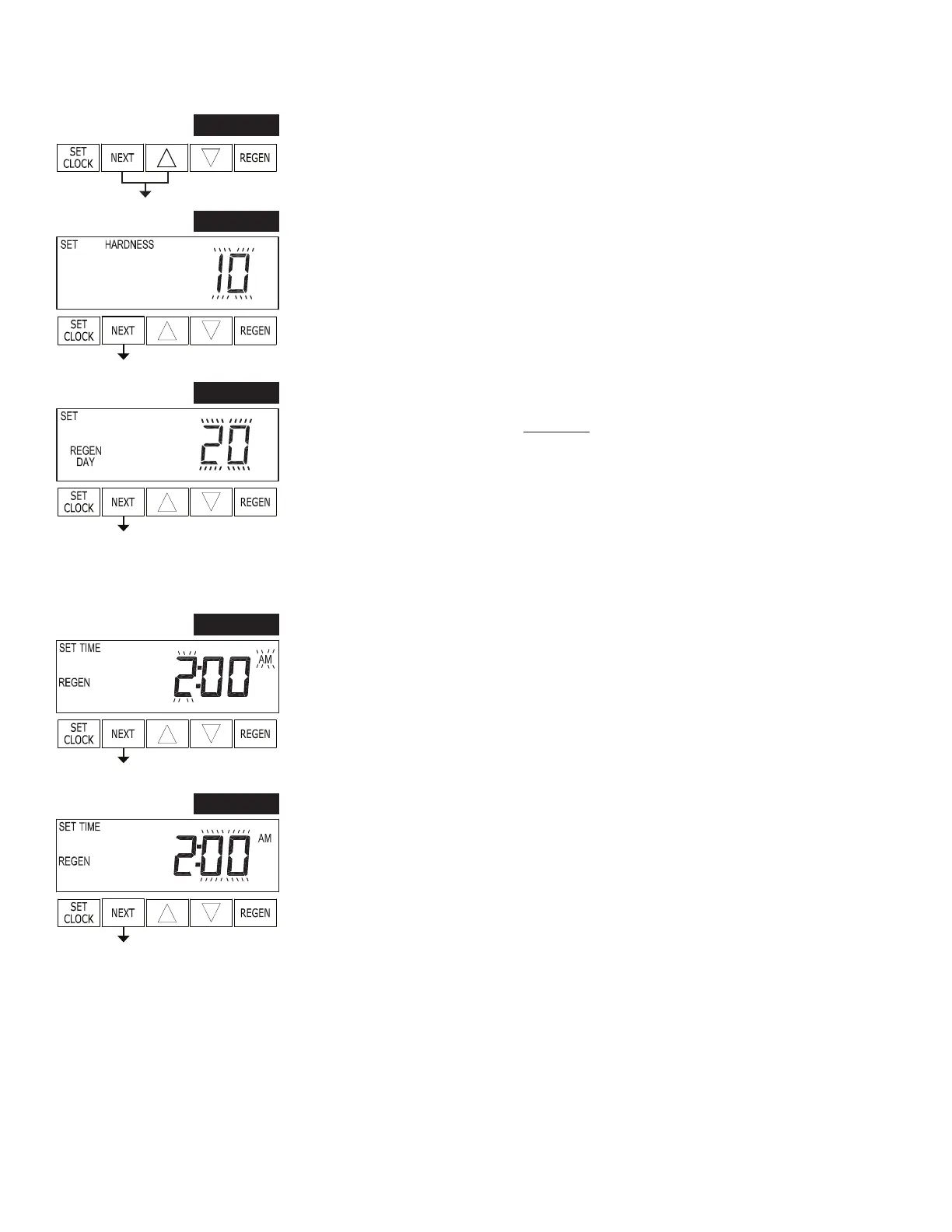
STEP 1F – Press NEXT and ▲ simultaneously for 3 seconds.
STEP 1I
STEP 2I
STEP 2I – Hardness: Set the amount of hardness in grains of hardness as calcium
car bon ate per gallon using ▲ or ▼. This display will not appear if Step 3F is set to
FILTERING or if OFF or a number is selected in Step 8S. Press NEXT to go to step
3I. Press REGEN to exit Installer Dis play Settings.
STEP 3I
STEP 3I – Day Override: When gallon capacity is set to off, Day Override sets the
number of days between re gen er a tions. When gallon capacity is set to AUTO or to
a number, Day Override sets the max i mum number of days between re gen er a tions.
If value set to “oFF” re gen er a tion initiation is based solely on gallons used. If value
is set as a number (allowable range from 1 to 28) a re gen er a tion initiation will be
called for on that day even if suf cient number of gallons were not used to call for a
regeneration. Set Day Override using ▲ or ▼:
• number of days between regeneration (1 to 28); or
• “oFF”.
See Setting Options Table for more detail on setup. Press NEXT to go to step 4I. Press
REGEN to return to previous step.
STEP 4I
STEP 4I – Next Regeneration Time (hour): Set the hour of day for regeneration using
▲ or ▼. AM/PM toggles after 12. The default time is 2:00 a.m. This display will show
“REGEN on 0 GAL” if “on 0” is selected in Step 10S or Step 8F. Press NEXT to go to
step 5I. Press REGEN to return to previous step.
STEP 5I
STEP 5I – Next Regeneration Time (minutes): Set the minutes of day for regeneration
using ▲ or ▼. This display will not be shown if “on 0” is selected in Step 10S or Step
8F. Press NEXT to exit Installer Display Settings. Press REGEN to return to previous
step.
RETURN TO
NORMAL MODE


 To Next Page