EasyManua.ls Logo

Pyronix PCX 78 - User Manual

Pyronix PCX 78
100 pages
Print Icon
To Next Page IconTo Next Page
Loading...
102017852 - V01 Software V12.0
PCX 78
Installation Guide

Table of Contents

Questions and Answers

  • B
    bhensonSep 16, 2025
    What does 'WLs Supervn Fault' mean on my Pyronix Security System?
    • V
      Vicki SantosSep 16, 2025
      The 'WLs Supervn Fault' message on your Pyronix Security System means that you should test the signal strength and the battery on each wireless device.
  • J
    juanwoodsSep 17, 2025
    What does 'WLs Input / Input Type Mismatch' mean on my Pyronix PCX 78?
    • D
      Donald SweeneySep 17, 2025
      The 'WLs Input / Input Type Mismatch' message on your Pyronix Security System means that you should program the input type for each wireless device learned in the PROGRAM INPUTS.
  • M
    Maria BlackSep 18, 2025
    What does 'Wireless Keypad x WLs Supervn Fault' mean on my Pyronix PCX 78 Security System?
    • D
      Debra GainesSep 18, 2025
      The 'Wireless Keypad x WLs Supervn Fault' message on your Pyronix Security System means that you should test the signal strength and the battery on each wireless keypad.
  • B
    Bobby TuckerSep 18, 2025
    What does 'Please leave via exit door' mean on my Pyronix PCX 78 Security System?
    • J
      James PhillipsSep 19, 2025
      The 'Please leave via exit door' message on your Pyronix Security System simply means that you should leave via the agreed exit route.
  • J
    Jeremy BakerSep 23, 2025
    What to do if my Pyronix Security System shows 'Unable To Arm'?
    • A
      Andrea SmithSep 23, 2025
      If your Pyronix Security System displays 'Unable To Arm', correct the problem if it is an input which is open, or call engineer.
  • V
    Victoria FisherSep 23, 2025
    What to do if there is an 'Alarm during the arming' on my Pyronix PCX 78?
    • R
      Ricky GeorgeSep 23, 2025
      If there is an 'Alarm during the arming' on your Pyronix Security System, leave the premises within the fail to arm time, increase the fail to arm time in timers, or disable this feature in system options.
  • J
    juan94Sep 23, 2025
    What to do if there is an 'Alarm during the arming procedure' on my Pyronix PCX 78 Security System?
    • J
      John StephensSep 23, 2025
      If there is an 'Alarm during the arming procedure' on your Pyronix Security System, do not activate instant Inputs during the arming procedure.
  • T
    Tanya SmithAug 31, 2025
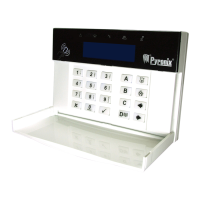
    How to fix a blank keypad display on my Pyronix PCX 78 Security System?
    • C
      Cheryl FergusonAug 31, 2025
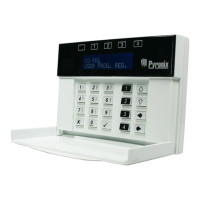
      If your Keypad display is blank: 1. Check the keypad address by pressing and holding 'd' until the security code is required. 2. Enter 2000 and set the keypad address. The primary keypad address MUST always be set to [00]. 3. Make sure in the Install Keypads and Readers menu in Engineer mode that the keypad address is set up correctly.
  • D
    David AdamsAug 25, 2025
    How to fix 'BATTERY FAULT xxx' on Pyronix PCX 78?
    • D
      Donald PowellAug 25, 2025
      The 'BATTERY FAULT xxx' indication on your Pyronix Security System is normal during recharge after a mains failure.
  • K
    Kelly MolinaAug 25, 2025
    What does 'LOW VOLTS xxx' mean on my Pyronix PCX 78 Security System?
    • E
      ehensleyAug 26, 2025
      The 'LOW VOLTS xxx' message on your Pyronix Security System indicates that the voltage coming out of the control panel PSU is not at the required ~12VDC. Ensure that the voltage is at this level.

Summary

System Description

Introduction

Overview of the PCX hybrid alarm system.

Installation

Important Installation Notes

Key considerations for safe and compliant wiring practices.

RS-485 Wiring

The Printed Circuit Board

Power and Battery Connections for the PCX S

Power and Battery Connections for the PCX L

Connecting Modems

Connecting to the Upload;Download Software

Serial Connection (RS232)

PyronixCloud Connection

Configuration

The Engineer Menu

Accessing and navigating the primary programming menu.

Entering the Engineer Menu

Learn Wireless Devices

Program Inputs

Program Outputs

Install Keypads;Readers

Change Codes

Engineer Tests

Communications (DIGI-GPRS)

Communications (DIGI-LAN)

Communications (DIGI-WIFI;XA)

Network Set-Up

ARC Signalling

User SMS Signalling

Options Up;Downloading

Download by Cloud (standard security)

Download by Serial Comm

Factory Default

Troubleshooting

Device Fail; Active Faults

Identifying and understanding device failure messages.

System Faults and Troubleshooting

Troubleshooting common system faults and communication issues.

SMS Commands

Pyronix PCX 78 Specifications

General IconGeneral
Wired zones8
Partitions4
Weight2.5kg
TypeHybrid Alarm Control Panel
Wireless zones70
Inputs8
Operating Temperature-10°C to +50°C

Related product manuals