8
2 Start the SP-800
Battery Installation
The SP-800 is powered by four AA-size alkaline batteries. Do not use rechargeable nickel cadmium (NiCad)
batteries or any AA-size lithium batteries. A set of batteries typically lasts for three months. When the
batteries capacity is low, the SP-800 will prompt a LOW BATTERY warning. Replace all four batteries to
resume operation of the SP-800 after the battery warning.
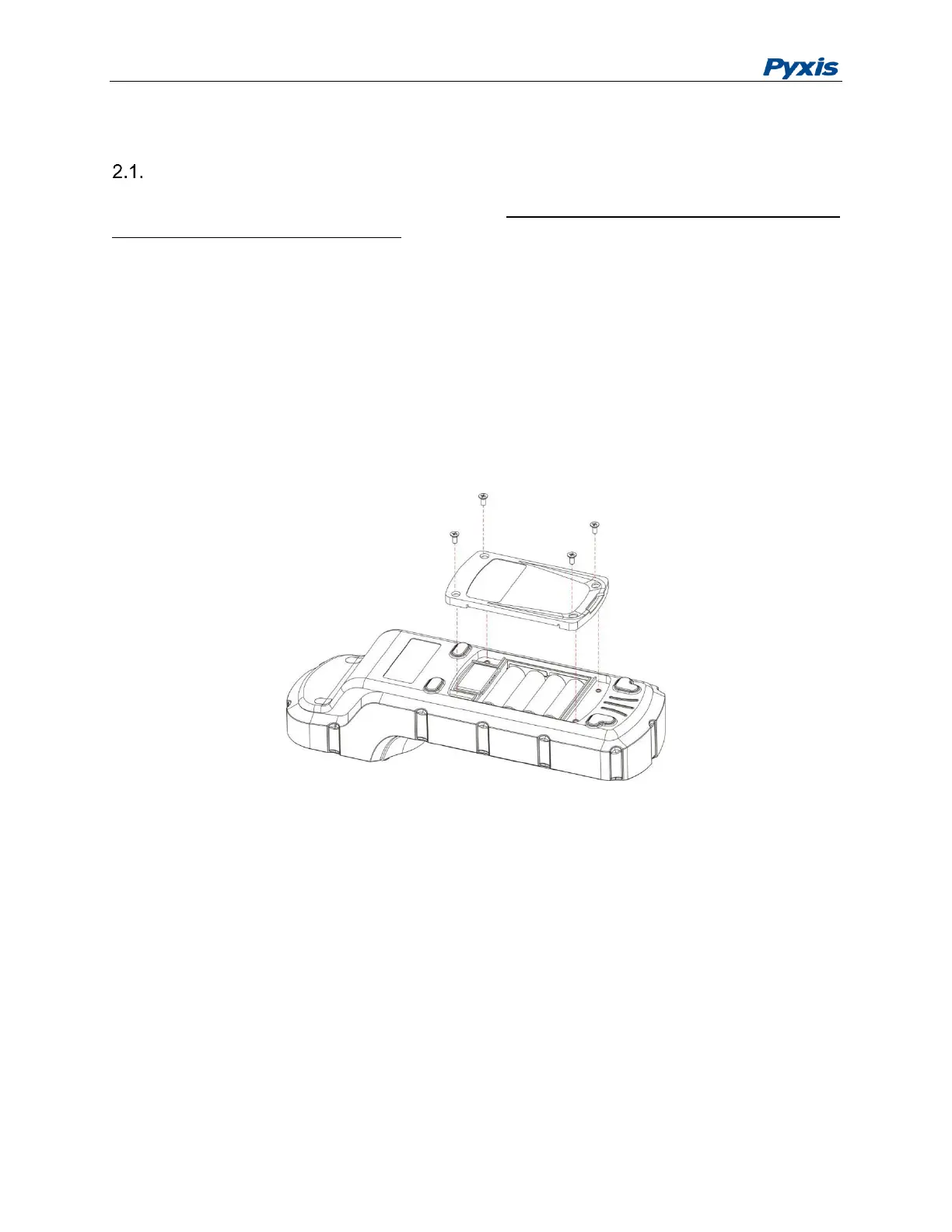
The SP-800 battery compartment, shown in Figure 3, is on the back side of the instrument. Insert a small
pad underneath the screen area to make the back-surface level when the instrument is turned upside down.
Install batteries as followings:
1. Remove the battery compartment cover by loosening four screws.
2. Insert four batteries into the battery holder as shown in Figure 3. Make sure the positive battery
polarity marker (+) is aligned with the positive marker (+) on the battery holder.
3. Replace the battery compartment cover, making sure that the sealing O-ring is lying flat on the
battery holder and tighten the four screws.
Figure 3 Replace Batteries
2.1 Description of the Navigational Control Pad
The SP-800 navigational control pad consists of five keys as shown in Figure 1. The left, right, up, and
down keys are navigational keys that are used to select an icon, a button, or other items in various pages.
The center key is the OK key. Press the OK key on a selected item to launch the action associated with the
selected item. The OK key is also used to accept the current selection, like the return key in a computer
keyboard.
2.2 Turning on the SP-800
After new batteries installation, the SP-800 will not be automatically turned on. To turn
on SP-800, press the OK key, and release the OK key when the LCD is lit.



 To Next Page