Power Up Sequence
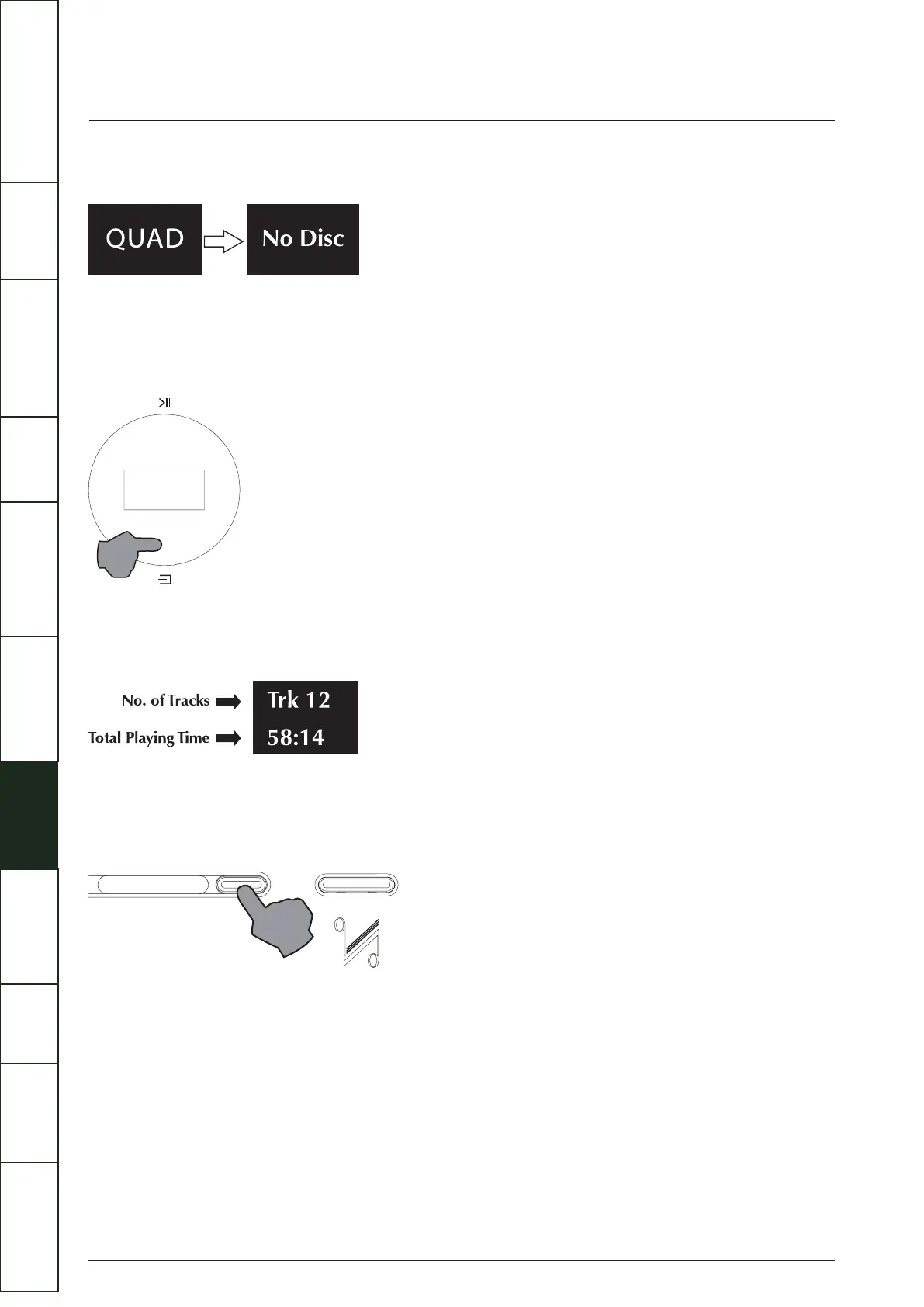
Switch on display: The welcome screen displays “QUAD” for 5 seconds, indicating that the Player has powered on successfully.
Selecting an Input
Besides CD, available playback connections include Bluetooth, USB, Play-Fi, two optical, two coaxial and two analogue inputs.
Short touch the SOURCE button on the front panel repeatedly to cycle the inputs CD, BT, Play-Fi, AUX1, AUX2, OPT1, OPT2,
DIG1, DIG2, USB. Or simply press the required button on the handset to select the desired input.
Loading a CD
Insert a CD into the slot, the Solus will automatically start to load the disc and display the Table of Contents then stop
Ejecting a CD
Press the Load/Eject key on the front panel or the handset, remove the disc and "No Disc” is displayed.
If the disc is not removed within ten minutes the Artera Solus Play will reload and read the disc.
13
IMPORTANT
SAFETY INFORMATION
REMOTE
HANDSET
CONTROLS AND
FUNCTIONS
CONNECTIONS
SYSTEM
OPERATIONS
DTS PLAY-FI
®
WIRELESS...
MENU
OPTIONS
SPECIFICATIONS CONTENTSINTRODUCTION
WARRANTY
COVERAGE



 To Next Page