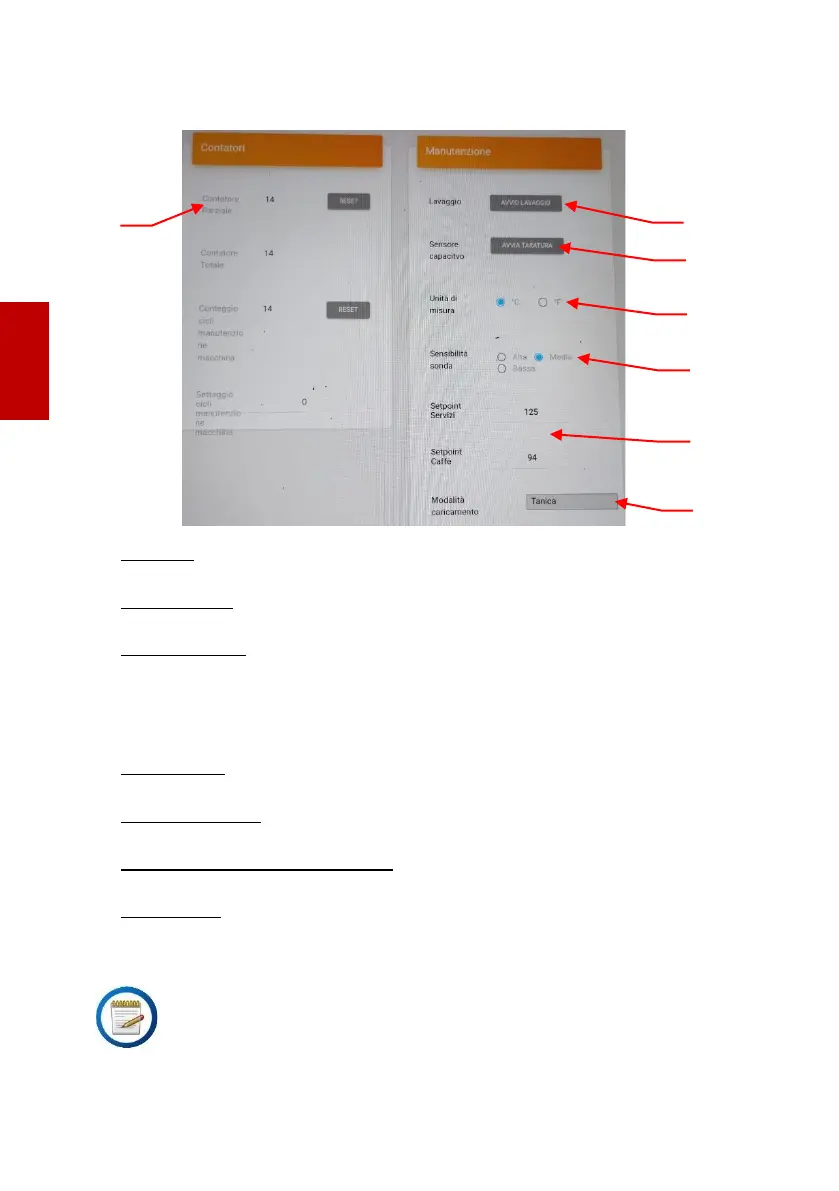
User/maintenance menu
1. Counters: This field shows the various counters regarding dosing and
maintenance.
2. Start cleaning: Pressing this button starts the cleaning of the coffee group.
To stop the cleaning, switch off then switch on the machine again.
3. Start calibration: Press this button to calibrate the level of the water reservoir
sensor, proceeding as follows:
-Insert the empty and completely dry water reservoir
-Press "Start calibration"; when the display shows the empty reservoir, the
calibration has terminated.
4. Measure unit: Pressing °C or °F it is possible to set the temperature measure
unit of the service boiler and the coffee boiler.
5. Sensor sensitivity: In this field the sensitivity of the water level sensors of the
boilers can be modified. If necessary, modify the setting.
6. Steam setpoint / Coffee setpoint: In these fields the temperature of the
boilers can be set.
7. Filling mode: In this field it is possible to set how the boiler is to be filled
choosing between reservoir and network water.





 To Next Page