True to the Music
Radial Engineering Ltd.
SW8-USB™ Owner’s Manual
5
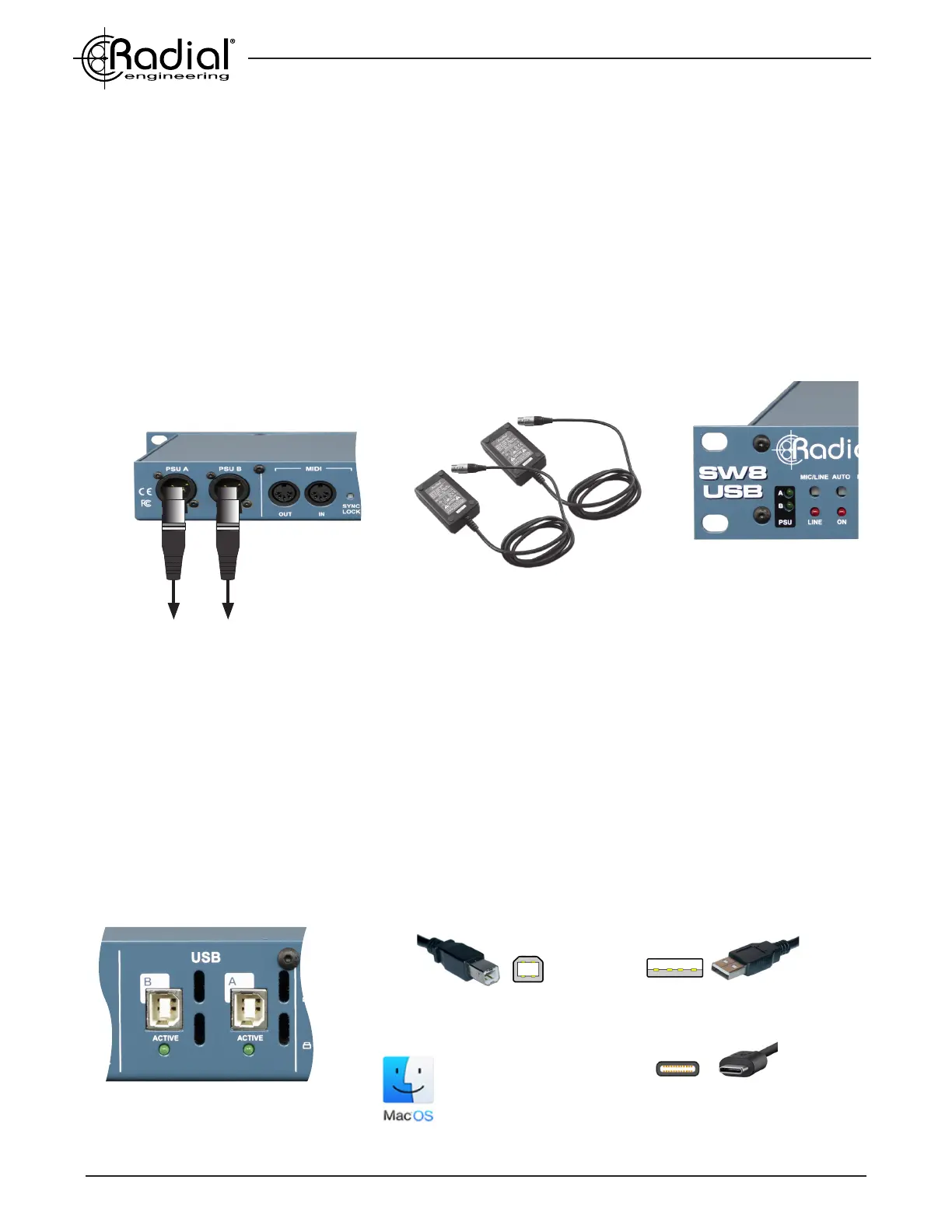
Dual locking XLR power supplies included.
TYPE-B USB
Used to connect to the SW8-USB
TYPE-A USB
Fits older laptops and computers
EXCLUSIVELY
FOR MAC OS
Front panel PSU A and B indicators
TYPE-C USB
Fits newer laptops and computers
ACTIVE LEDs indicate
connection to each computer
GETTING STARTED
Before connecting to the SW8-USB, it is always best to turn your audio system levels down in order to prevent plug-
in transients that could damage more sensitive components such as high frequency drivers.
POWERING THE SW8-USB
The SW8-USB features redundant power supply inputs to protect against loss of power during use. Two power
supplies are included with locking 4-pin connectors to prevent accidental disconnection. These are switching power
supplies to allow for easy international use: simply swap out the IEC cable for the appropriate power connector
when travelling to a region with a different power grid. There is no power switch on the SW8-USB, once it is
connected to a power source it will be active and ready for use. Two front panel LEDs will indicate which PSU inputs
are connected and providing power to the SW8-USB.
CONNECTING THE PRIMARY AND BACKUP COMPUTERS
The SW8-USB features two Type-B USB connections, and requires two USB 2.0 cables to connect both of your
computers. Use a USB 2.0 Type-B to Type-A cable for older computers that feature this connector type, and a
USB 2.0 Type-B to Type-C cable for newer computers that only feature Type-C connections. USB adaptors and
Thunderbolt hubs can be used to make the connection from the SW8-USB to your computer, but for the most stable
results we recommend using a direct cable connection from the SW8-USB to each of your playback computers.
Your primary playback computer should be connected to the rear panel USB A jack, and the backup computer
to USB B. The SW8-USB is exclusively compatible with Mac OS, and should be recognized by your computer
immediately upon connection. Upon rst use, if your audio software does not recognize the SW8-USB, restart your
Mac while leaving the SW8-USB connected.


 To Next Page