True to the Music
Radial Engineering Ltd. SW8-USB™ Owner’s Manual
6
SETTING THE DIGITAL AUDIO RESOLUTION AND SELECTING OUTPUTS
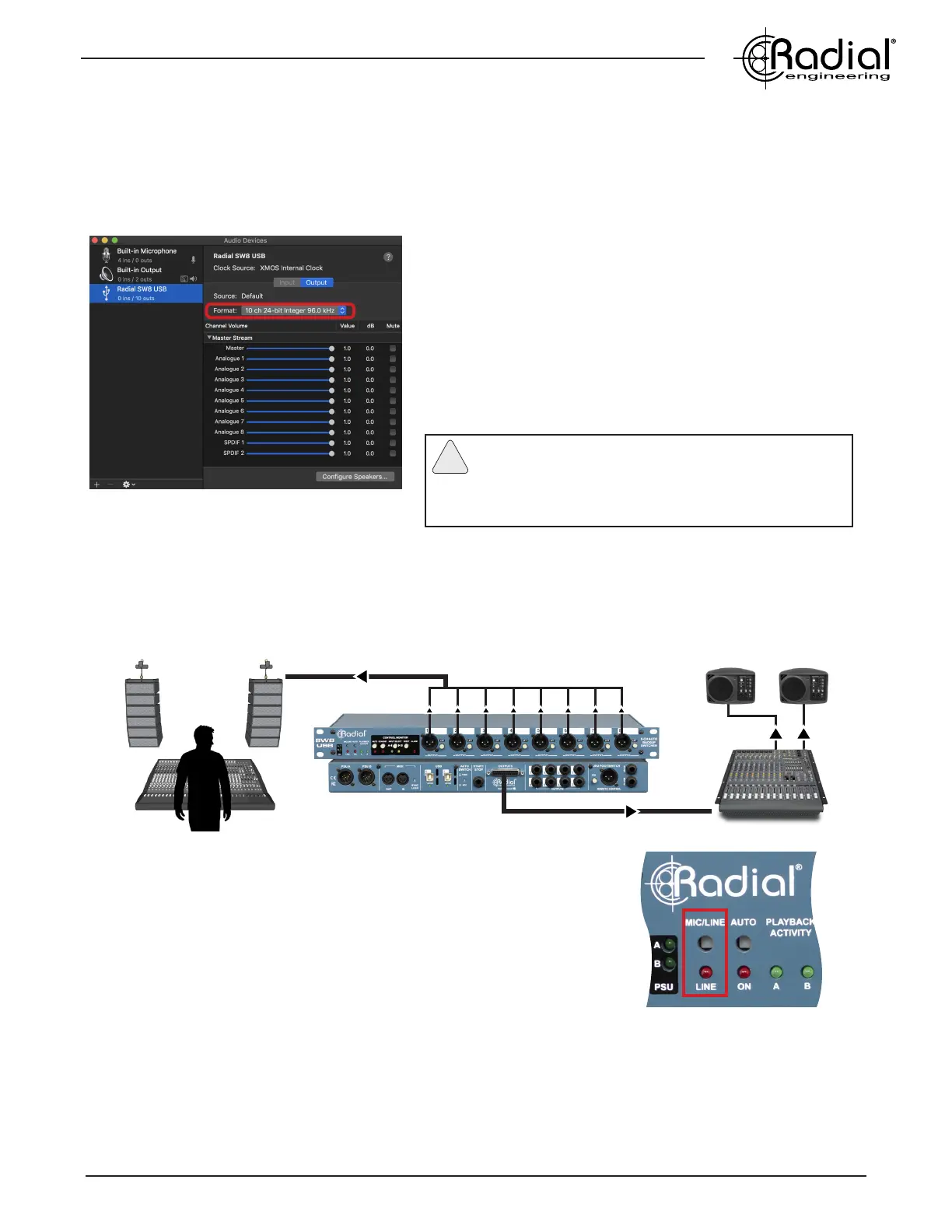
Once you’ve connected the SW8-USB to your primary and backup computers, use a Finder window to navigate
to Utilities > Audio MIDI Setup, and open the Audio Devices window. Set the bit depth and sample rate of the
SW8-USB to match the session settings of your Digital Audio Workstation (DAW). The SW8-USB can operate at
16 or 24bit resolution, with sample rates from 44.1kHz up to 192kHz.
CONNECTING THE ANALOG AUDIO OUTPUTS
The SW8-USB has two sets of analog audio outputs: the XLR connectors on the front panel to feed the main
PA system, and the rear panel DB25 and 1/4” TRS connectors for monitoring outputs at your playback control
station.
XLR OUTPUTS: The front panel XLR outputs feaure DI box transformers
that provide isolation to eliminate hum and buzz from ground loops when
connecting to distant PA systems. Individual ground lift switches are also
provided on each channel to further eliminate noise.
The XLR outputs provide balanced mic-level signals, allowing them to be fed
through stage snakes with other microphone outputs. You can bypass the
transformers on these channels if you wish to send line-level signals to the
PA system: this can be accomplished across all eight outputs using the global
XLR MIC/LINE switch.
You will notice that the SW8-USB is listed as a 10-output device, even
though there are only eight analog outputs. This is because outputs
9-10 are used to send Tone via SPDIF to activate the Auto-Switch
feature on the SW8-USB. See page 8 of this manual for more
details on using these outputs.
In your DAW, select the SW8-USB as your output device. You can
feed individual tracks to each of the eight mono outputs, or you
can send four stereo pairs of backing tracks to the audio outputs
of the SW8-USB as needed.
Changing audio settings in Audio MIDI Setup
Note: Up to three SW8-USBs can be simultaneously
connected to provide 24 channels of playback tracks
at a time. Please see the Synchronizing Multiple SW8-USB
Units section of the manual on page 12 for further details.
!
DB25 AND 1/4” TRS OUTPUTS: The rear panel outputs both operate at line-level, and are designed to be connected
to local monitoring systems to allow the operator to test the outputs and cue up tracks. These outputs will always be
active, so you can use the front panel MUTE switch to cut the XLR outputs to the PA system during testing, while
still hearing signal from the rear panel outputs. Use only one of the available connector types at any given time to
reduce the possiblity of encountering noise due to ground loops. The DB25 follows the Tascam pinout standard,
while the 1/4” outputs should be used with balanced TRS connectors.
Front of House (FOH)
Playback System Control
Front panel XLR MIC/LINE switch


 To Next Page