AP70 Instructions for Use - English
Date: 2020/03 Page 7/14
3. Operation Instruction
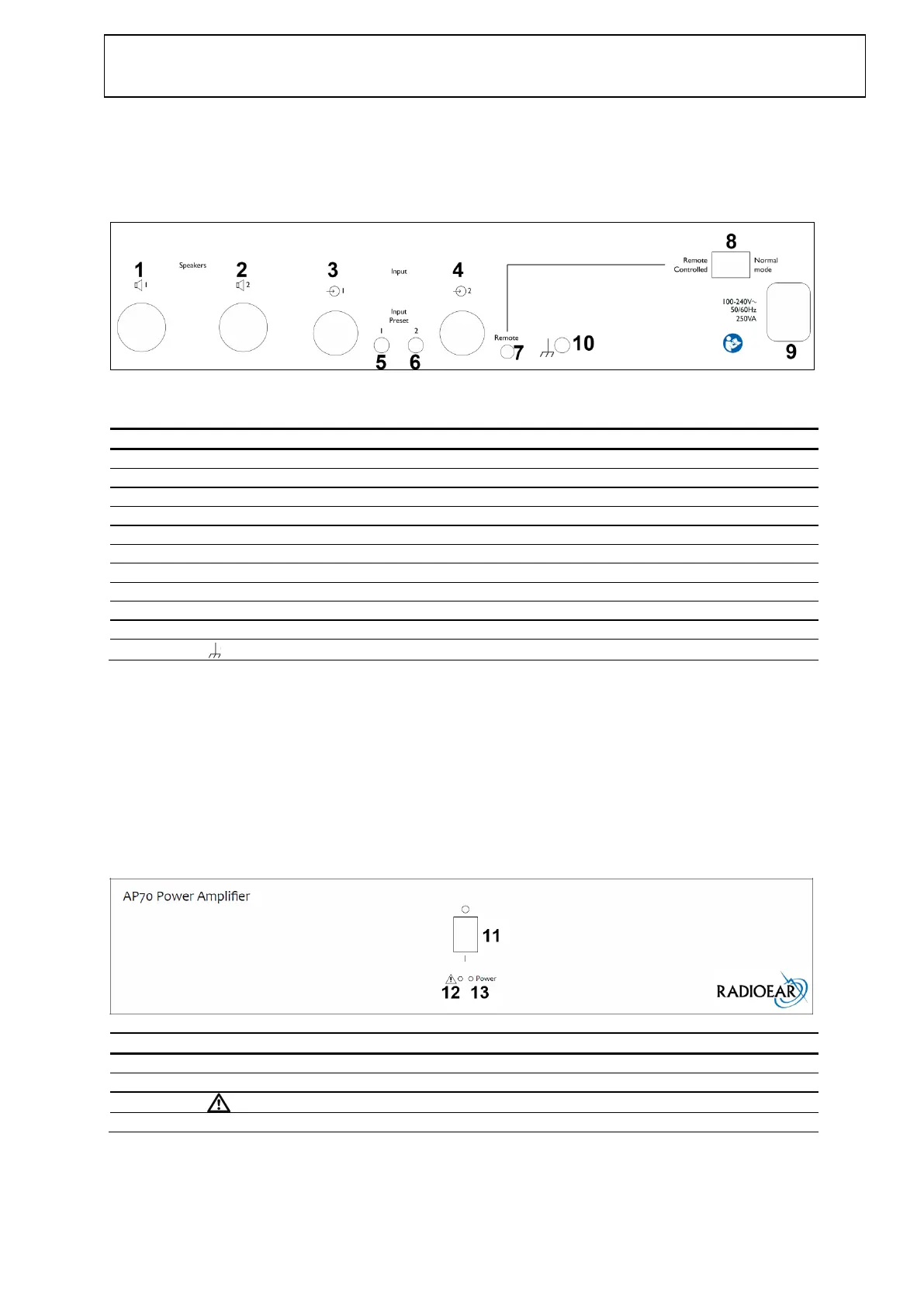
3.1 Connection Panel Directory
3.2 AP70 - Connection Panel Dictionary
Plug for input signal CH1
Plug for input signal CH 2
Input sensitivity adjustment for CH1
Input sensitivity adjustment for CH 2
Remote power on Controlled / Normal mode
Ground terminal for setup calibration
Input Level
The input sensitivity for CH1 and CH2 are controlled by the buttons (5) and (6) “Preset” on the connection panel. Do
not adjust the buttons (5) and (6) when the system is calibrated.
Remote power on
The amplifier can be switched on and off remotely. In the position “Normal mode” (8) can only be switched on and off
by the Main switch (10). In the position “Remote controlled” the amplifier can be turned on by applying 5VDC at the
Remote plug (9), 0VDC will turn of the amplifier.
3.3 AP70 - Operation Panel Dictionary
Overload / Over temperature indicator


 To Next Page