11
Connect Pump Start Relay
Connect an optional Pump Start Relay to the ESP-
RZXe controller.
Pumps are used in some places to draw water from a
well or other source. If you are activating a pump from
the controller, you must install a pump start relay.
A pump start relay connects to the controller in the
same way as a Master Valve, but connects dierently
at the water source.
NOTE: the ESP-RZXe controller DOES NOT
provide main power for a pump.
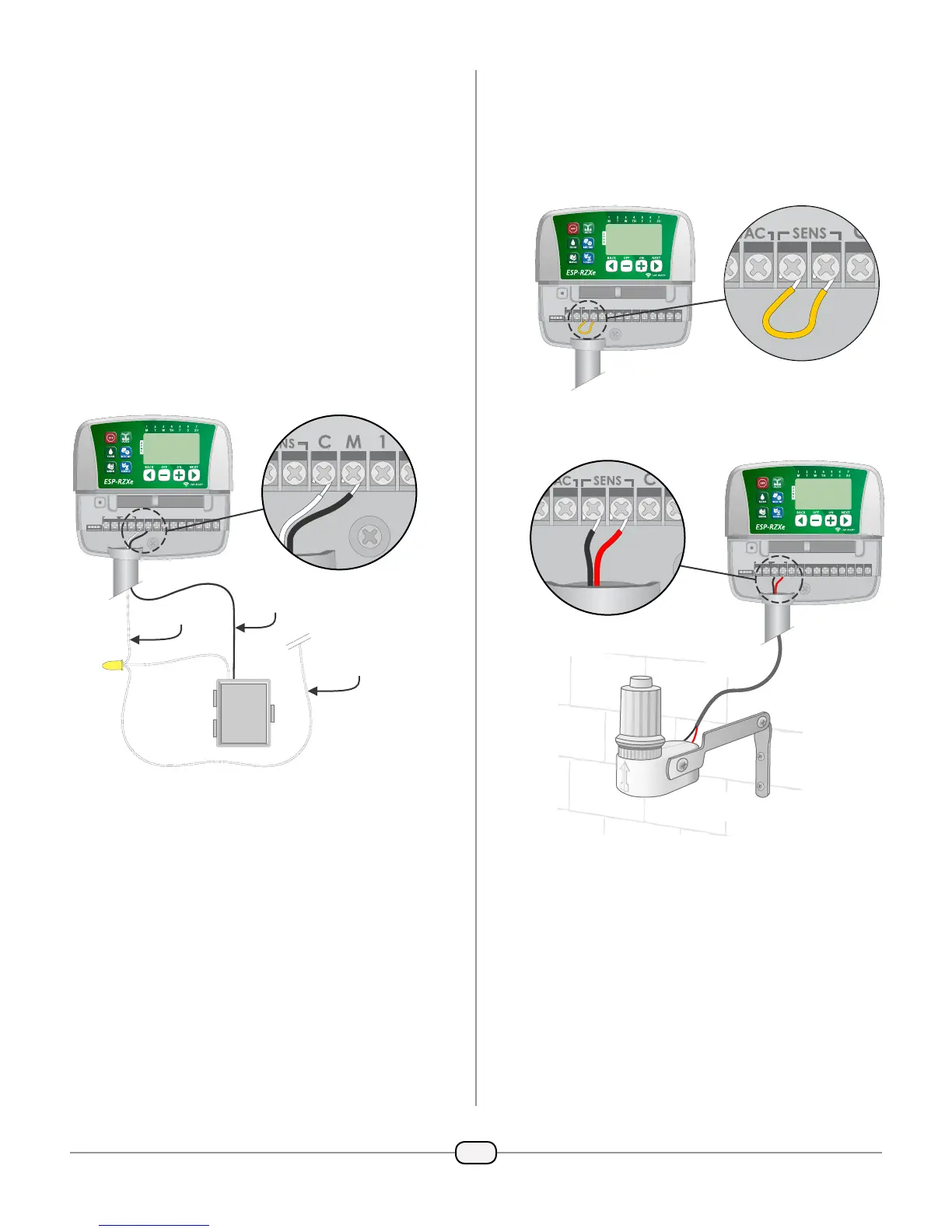
Connect the Relay Input wire from the pump
start relay to the master (M) terminal on the
controller terminal block.
REMOTE
24VAC
ACCESSORY
SENS
12345678CM
RESET
Connect the common wire from the pump start
relay to the COMMON (C) terminal.
NOTE: To avoid possible pump damage when
using a pump start relay, connect a short jumper
wire from any unused Zone terminal(s) to the
nearest Zone terminal in use.
For example, if a 4 Zone controller model is in
use with only two Zones connected, route the
terminals for Zones 3 and 4 to the nearest active
terminal (in this example, Zone 2)
Connect Rain Sensor
Connect an optional rain sensor to the ESP-RZXe
controller.
On the terminal board, remove the jumper wire
from the SENS terminals.
REMOTE
24VAC
ACCESSORY
SENS
12345678CM
RESET
Connect both Rain Sensor wires to the SENS
terminals.
REMOTE
24VAC
ACCESSORY
SENS
12345678CM
RESET
RELAY
INPUT
COMMON
FIELD
COMMON
PUMP
START
RELAY



 To Next Page
 Loading...