Need help?
Do you have a question about the RainPoint HWG004 and is the answer not in the manual?
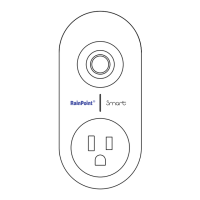
Provides a visual and descriptive introduction to the RainPoint Smart Socket Hub HWG004.
Explains the function of the control button and the status indicator light on the hub.
Details the technical specifications including range, operating temperature, WiFi band, and power input.
Guides users on downloading the HOMGAR application through app stores or QR code scanning.
Outlines the essential requirements and prerequisites for a successful Wi-Fi connection.
Provides general steps and guidance for connecting the smart socket hub to your network.
Step-by-step instructions for establishing a connection using the Smart WiFi mode.
Detailed guide for connecting the hub via the Access Point (AP) connection method.
An introduction to the overall structure and main features of the HOMGAR application.
Details the layout and functionalities available on the main home screen of the app.
Describes how to view, manage, and control irrigation plans within the app.
Information on reviewing past system events and activity logs for monitoring.
Instructions for managing user accounts, home profiles, and application settings.
Overview of the dedicated page for managing individual smart devices within the app.
Configuration options for basic settings of the smart socket hub, such as power-on state.
Guides users on creating and managing automated ON/OFF schedules for the smart socket.
Explains how to manually control the ON/OFF state of the smart socket via the app.
Details the two primary methods for connecting various sub-devices to the smart hub.
Step-by-step instructions for connecting the HTV113FRF 1-Zone Water Timer.
Step-by-step instructions for connecting the HTV213FRF 2-Zone Water Timer.
Instructions for connecting the HCS014ARF outdoor thermo-hygrometer sensor.
Provides a guide for connecting the HCS021FRF soil moisture sensor.
Instructions for connecting the HCS008FRF water flow meter.
 General
| Brand | RainPoint |
|---|---|
| Model | HWG004 |
| Category | Irrigation System |
| Language | English |

 To Next Page