EasyManua.ls Logo

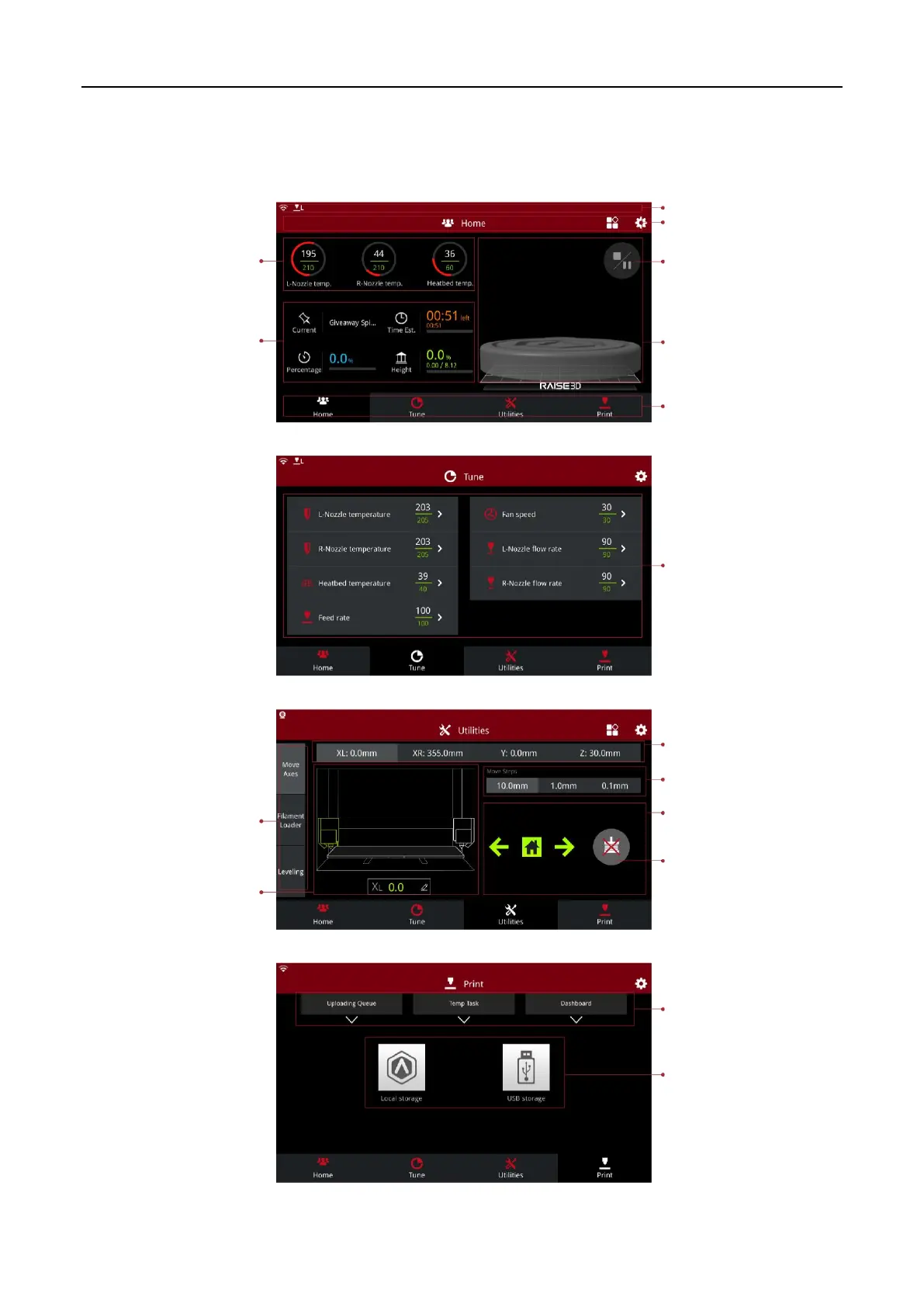
Raise3D E2 - E2 Printer User Interface Navigation; Home Screen and Taskbar; Tune Screen for Print Parameters; Utilities Screen for Axis Control

Raise3D E2
28 pages
Print Icon
To Next Page IconTo Next Page
To Previous Page IconTo Previous Page
Loading...
Raise3D E2_Quick Start Guide
www.raise3d.com
- 2
4 -
User Interface
Home
Tune
Extruder and heatbed
temperature
Current model name
Total print time
Current print status
Print height
Status
Pause, Resume and Stop
button
Menu and Settings button
Taskbar
Visual display of the
current model
Print parameters
Move the axis
Loading/Unloading
Leveling
Visual display of X/Y/Z axes
Coordinate value and
Custom edit function
Choose the X/Y/Z axes
Move distance "Unit Settings"
X/Y/Z axes move and return
button
Disable motor button
Upload, Resume Print
Task, and Print Statistics
The storage location of the
printed file
Utilities
Print
www.stomshop.pro

Other manuals for Raise3D E2

Related product manuals