NOTE:
Some SiriusXM® features are not supported by all
SiriusXM® channels or content, for example song and artist
favorites, sport game notifications, tune start, and others.
SiriusXM® Radio uses direct satellite-to-receiver broad-
casting technology to provide clear, coast-to-coast radio
content. SiriusXM® is a subscription-based service.
Visit https://www.siriusxm.com/trial-offer/stellantis or
review your SiriusXM® Radio pamphlet in your Owner’s
Manual kit for more information.
SiriusXM® services require subscriptions, sold sepa-
rately after the trial included with the new vehicle pur-
chase. If you decide to continue your service at the end
of your trial subscription, the plan you choose will auto-
matically renew and bill at then-current rates until you
call SiriusXM® at 866-635-2349 to cancel. See
SiriusXM® Customer Agreement for complete terms at
www.siriusxm.com (US) or www.siriusxm.ca (Canada).
All fees and programming subject to change. SiriusXM®
service is available only to those at least 18 and older
in the 48 contiguous US and D.C. Our SiriusXM® ser-
vice is also available in Canada and Puerto Rico (with
coverage limitations). SiriusXM® Internet radio service
is available throughout their satellite service area and
in AK. © 2023 SiriusXM® Radio Inc. SiriusXM® and all
related marks and logos are trademarks of SiriusXM®
Radio Inc.
This functionality is only available for radios equipped
with a Satellite receiver. In order to receive satellite
radio, the vehicle needs to be outside with a clear view
to the sky.
If the screen shows “Acquiring Signal”, you might have
to change the vehicle’s position in order to receive a
signal. In most cases, the satellite radio does not
receive a signal in underground parking garages or
tunnels.
No Subscription
Radios equipped with a Satellite receiver require a sub-
scription to the SiriusXM® Service. When the radio
does not have the necessary subscription, the radio is
able to receive the Preview channel only.
Acquiring SiriusXM® Subscription
To activate the SiriusXM® Radio subscription, US resi-
dents visit
https://www.siriusxm.com/trial-offer/stellantis or call:
1-800-643-2112
Canadian residents visit https://www.siriusxm.ca/ or
call: 1-888-539-7474.
NOTE:
You will need to provide the SiriusXM® ID (RID) located
at the bottom of the Channel 0 screen.
The SiriusXM® Radio Mode is activated by a press of
the SXM button on the touchscreen.
When in SiriusXM® Radio Mode:
•
The SXM button on the touchscreen is highlighted.
•
The SiriusXM® Presets are displayed at the top of
the screen.
•
The SiriusXM® Channel Number is displayed in the
center.
•
The Program Information is displayed at the bottom
of the Channel Number.
•
The SiriusXM® function buttons are displayed below
the Program Information.
Tuning is done by operating the Tune Knob or by Direct
Tune, similar to other Radio Bands.
In addition to the tuning operation functions common to
all radio modes, the Replay, Traffic/Weather button,
and Favorite button functions are available in
SiriusXM® Mode.
REPLAY
Replay provides a means to store and replay up to
22 minutes of music audio and 48 minutes of talk
radio. Once the channel is switched, content in replay
memory is lost.
Press the Replay button on the touchscreen. The Play/
Pause, Rewind/Forward and Live buttons will display at
the top of the screen, along with the replay time.
You can exit by pressing the Replay button on the touch-
screen any time during the Replay Mode.
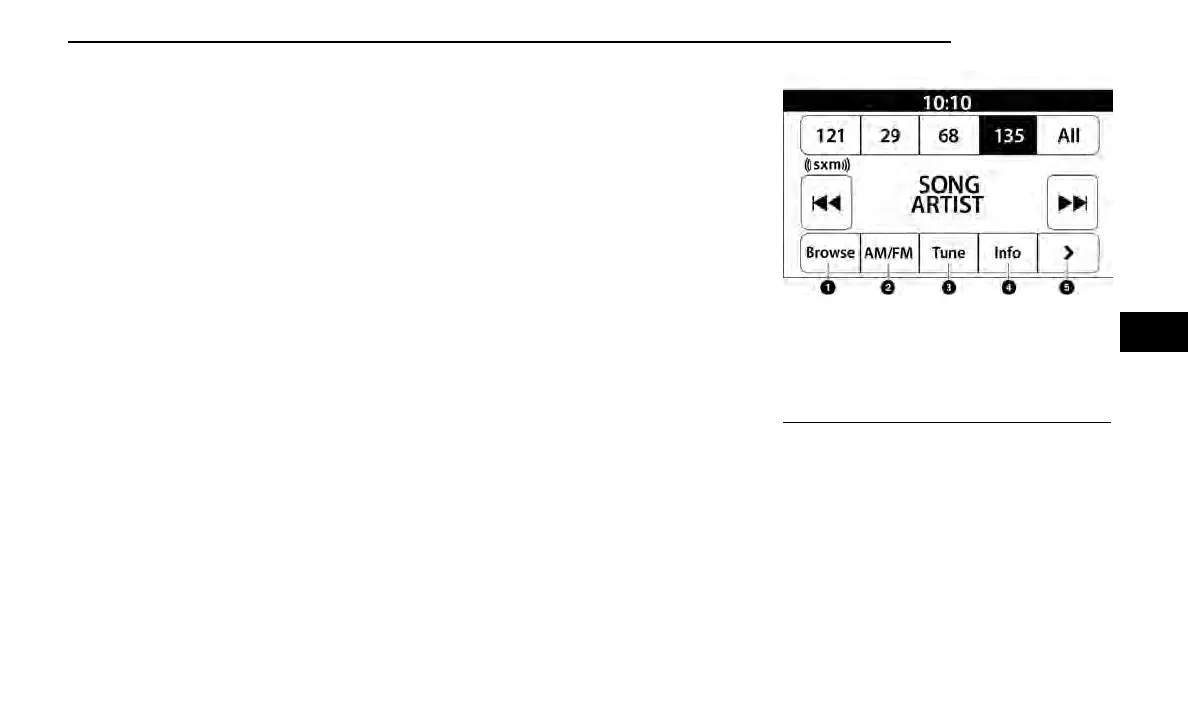
Uconnect 3 With 5-inch Display SiriusXM® Radio
1—Browse
2 — Radio Bands
3 — Direct Tune
4 — Info Button
5 — Next Button
MULTIMEDIA 187
5



 To Next Page